This topic has been closed for replies.
Correct answer _maria_

Hi,

Please try the following:

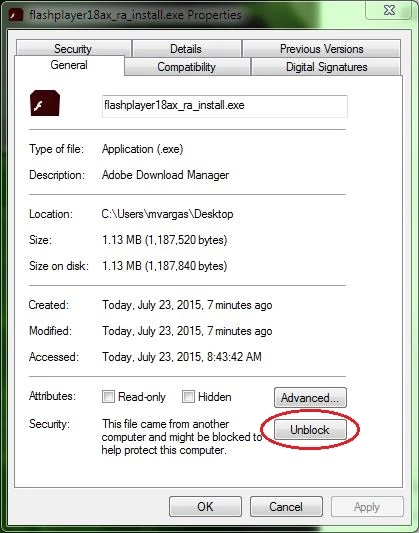
  1. Right-click on the installer file and select Properties
  2. In the General tab click the Unblock button
  3. Click Apply
  4. Click OK to close the window
  5. Double-click on the installer file to launch the installer

2 replies

Benjamin_Lopez22
Participant
May 14, 2018

but there's another problem. when i started to run the app it says "failed to load the adobe flash player" i even restarted my computer.

_maria_
Community Manager
Community Manager
May 14, 2018

I'm not familiar with SWFKit Player.  Please provide more information on this app, including a link to their site.

Also, Flash Player is only supported on the platforms listed at Tech specs | Adobe Flash Player​.  Anything not listed may or may not work with Flash Player.

Benjamin_Lopez22
Participant
May 15, 2018

The name of the game is Adventure Quest. ---> http://www.aq.com/play-now/

and im using some kind of bot that needs the flash player. But it always

say failed to load the flash player even i installed it twice.

_maria_
Community Manager
_maria_Community ManagerCorrect answer
Community Manager
May 14, 2018

Hi,

Please try the following:

  1. Right-click on the installer file and select Properties
  2. In the General tab click the Unblock button
  3. Click Apply
  4. Click OK to close the window
  5. Double-click on the installer file to launch the installer

Benjamin_Lopez22
Participant
May 14, 2018

Thanks! it worked!

_maria_
Community Manager
Community Manager
May 14, 2018

You're welcome.