Participant
January 16, 2021
Answered

Adobe Flash Player mms.cfg settings for Programs Apps and Software

  • January 16, 2021
  • 2 replies
  • 6297 views

Hello,

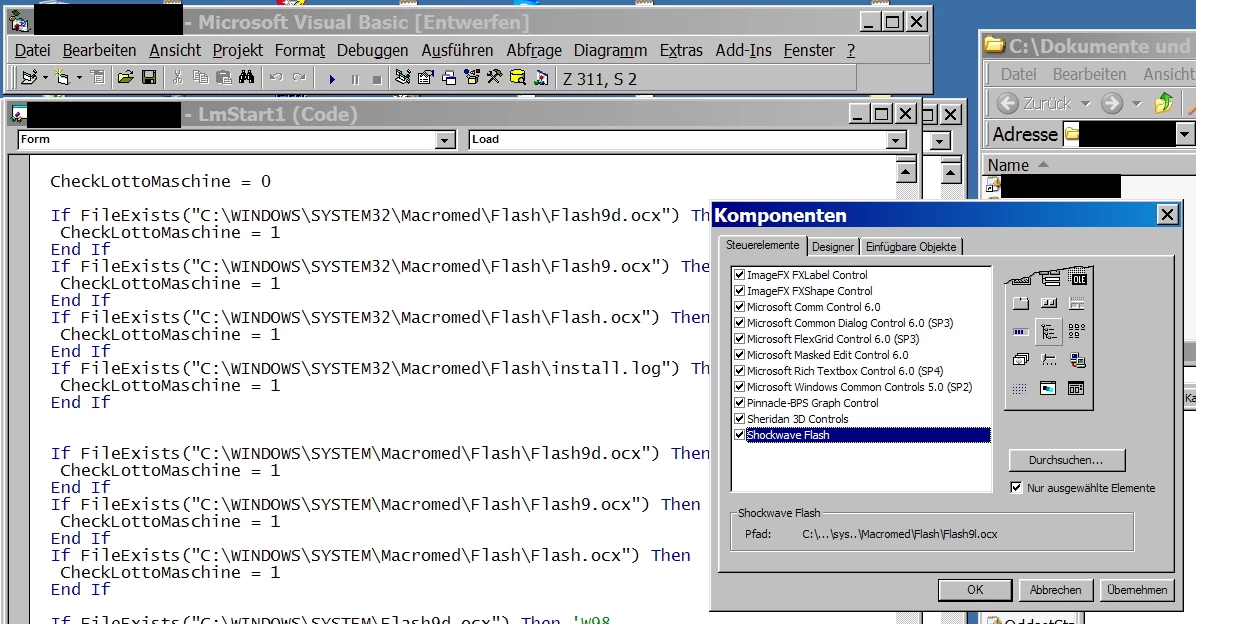
I run an older Visaul Basic software that uses the flash.ocx to run a flash file. Windows blocked this file. I tried to allow the folder the .swf is loaded from but still it didn't work. Does flash.ocx ignore the mms.cfg ?


I put it in both folders:


C:\Windows\SysWOW64\Macromed\Flash\mms.cfg
C:\Windows\System32\Macromed\Flash\mms.cfg


This is the mms.cfg I use:


EOLUninstallDisable=1

EnableAllowList=1

ErrorReportingEnable=1

SilentAutoUpdateEnable=0

EnableInsecureLocalWithFileSystem=1

EnableInsecureAllowListLocalPathMatching=1

EnableInsecureActiveXNavigateToURL=1

AllowListUrlPattern=file:///c:/Users/Logo%20Tipp/AppData/Roaming/Logo/Legacy/swf/lottogross/

AllowListUrlPattern=file:///c:/Users/Tipp-Terminal/AppData/Roaming/Logo/Legacy/swf/lottogross/

AllowListUrlPattern=blob:*


Also the software like JPEX is not working anymore. Can't you allow a software like in AllowListUrlPattern to work with .swf files that are in that directory. I don't understand why it's not working as it should.

This topic has been closed for replies.
Correct answer Marcel5C83

So just to clafiry the next steps: 

  • Get a configuration that logs
  • Examine the logs and take a look at what's getting sent
  • Patch your app to send confirming URIs
  • Recommend that your enteprise customers license the ActiveX Flash Player from HARMAN if they need the ActiveX Flash Player for more than the next couple months.


I'm super curious about the URIs that are getting sent.  There's no possibility of pushing out an update at this point that would change the behavior, but at that point, we can have an informed look at what's happening.  If there's an edge case that we didn't think of, I can at least debug it and see if there are any useful recommendations.


In terms of addressing this, you probably just want to update your application to normalize those paths to RFC 3986 compliant URIs.

This is what Caspar (the software from the case study above) did. You might be able to just crib the normalization code from their Github repo. This is optimal (at least IMO), because your customers on Win8+ probably aren't on a version of Flash Player that supports EnableInsecureAllowListLocalPathMatching, and their only option to get it is to license a maintained Flash Player from HARMAN moving forward. It's much more cost-effective to just patch the application to pass in a valid URI in the first place. 


At that point, you should be able to look at the logs and write matching AllowListUrlPattern directives that work.

It's also worth pointing out that MSFT will be removing the ActiveX Flash Player that they distributed to Windows 8 and higher via a future mandatory Windows Update.  That package is currently optional, but the next big roll-up update (scheduled around summer) will require it. 


Licensing the ActiveX Flash Player from HARMAN is ultimately going to be necessary for enterprises on Windows 8 and higher.  Adobe was never able to distribute an installer for the ActiveX Flash Player on that platform, so you can't just reach back and get and old version.  HARMAN built an installer that works on Win8+ systems, AFTER the Microsoft Update that removes their Flash distribution has been applied.


Deploying a licened version from HARMAN confers some meaningful benefits -- those builds continue to get functional and security updates.  For enterprises that need to keep Flash deployed, this is the best approach from both a security and operational perspective (they can/should still leverage the AllowList to limit their attack surface).


Without requiring users to license the HARMAN player, using confirming URIs buys you a few months to replace those Flash dependencies with something else before that mandatory MSFT patch gets deployed.


 I basically gave up on this case. It's a cold case for me now. I see that getting to the ground of it would require to log the pathes and setup a vm and track everything but that's not in my area. I'm not the coder of the program tbh I'm more a middleman trying to find a soultion for 2 parties.


All I can say is that my "path" worked for Google Chrome. I could tun the local file in the browser with using my mms.cfg setup but could not let it run with the software. I thought AllowListUrlPattern=file:* will allow all softwares to play anything on my local drive. It does not. Maybe because of the EnableInsecureAllowListLocalPathMatching which is not working on Windows 10 unless you get the HARMAN Flash Player. Or maybe it's not reading the mms.cfg. But I can sent you how it was integrated. Maybe it helps some other people when looking for this thread. I guess there are many people having problems and looking for a good solution.


    ShockwaveFlash1.Height = 9000  '15 * 400

    ShockwaveFlash1.Width = 12000    '15 * 480

    ShockwaveFlash1.Top = 0

    ShockwaveFlash1.Left = 0


   ShockwaveFlash1.Movie = svp & "swf\lottogross\lottogross.swf"

   ShockwaveFlash1.Playing = True

   ShockwaveFlash1.Visible = True


2 replies

jeromiec83223024
Inspiring
January 19, 2021

It's possible that Flash Player can't read mms.cfg from the context of your application.  It really depends on how you embedded Flash Player, and since it's not a use-case that we really support or test, it's not something that I have good recommendations about.  I know that people are doing it successfully, but we're outside my wheelhouse. 


Since you're not running in a browser, you can't look in the JavaScript console to see any of the logging output.  This makes it hard to validate whether or not you're getting any output about what's getting blocked.  If you're lucky, it's just that your pattern doesn't match the URI that's ultimately being sent to Flash.


There's a lot of platform/browser-specific normalization and pre-processing that can happen before a request for a given URL gets passed to us (and a lot of that doesn't necessarily happen when you embed Flash like this).  The point of all the logging is to help you get at those actual values as they're presented to Flash.


If you're lucky, just specifying "AllowListUrlPattern=file:*" gets things working.  This might not be optimal, but at that point, you know that mms.cfg is being read.  If not, you're going to have to solve that first, and while I'd be curious about the solution that you arrive at (I'd love to be able to point to an analysis for other folks that run into this), it's easily been a decade since I've played with Visual C#, and I wasn't doing Flash-centric stuff.


Since you can't use TraceOutputEcho in this scenario because you're not in a browser with a JavaScript console, the only way that you'd be able to see any of the debug output necessarily to configure good AllowListUrlPattern rules would be to log trace output to a file. 


File logging is only supported by the Flash Player Debugger variants (intended for use by Flash content developers to debug content), with the TraceFileOutputEnable directive specified in mm.cfg.  Because Microsoft controls the ActiveX installation path on Windows 8 and higher (and they declined to make ActiveX debuggers available for those platforms), you'll only be able to do this on a Windows 7 machine. 


See: https://helpx.adobe.com/flash-player/kb/configure-debugger-version-flash-player.html for details on how to install and configure the debugger.  The debugger is still available as of today, but those downloads will be taken down eventually, so sooner is better on that front.


At that point, you should be able to follow the instructions in the Enterprise Enablement section of the Admin Guide to log the URIs that are getting blocked.  Ideally, you'd construct a set of matching patterns that constrains access to a limited set of locations sufficient to prevent local Flash content from leaking any sensitive information to the web in the event that you ran malicious content by accident.


https://www.adobe.com/devnet/flashplayer/articles/flash_player_admin_guide.html

Participant
January 20, 2021

Hello,

thanks for reaching out and trying to help. I already tried the file:* pattern but it didn't change anything so I didn't post it here. I thought it may be too wide because there are some restrictions with those patterns.

There are several programs that do not work. I thoguht they should work when i allow the specific folders in which the .swf are located and I allow the program folders. Basically the FFdec.exe which is a Flash Decompiler is not working in that way and my Visual Basic program which uses the flash.ocx to implement a flash file into the software and let it run.

So I really miss a legit way to let it run from softwares which I haven't seen so far.
With my list above I could get it to run in Chrome if I copy the mms.cfg in the correct folder and open an index.html with embed tag. But there is no way so far I saw to get "Software" which runs flash in it, to allow playing flash anymore. "Only if you have an standalone .exe made out of an .swf, but not software who tries to run real .swf files. So I'm still stuck on this one!

Of course there are solutions to uninstall those updates with killswitch or set the timer back. But these are no real solutions for 1000's of pc's where software runs.

So my question remains the same: 

How to allow software to run real flash via the flash.ocx or other to still play flash files?

For my view it seems that it's not possible using the mms.cfg, I even don't know if any Application takes care of the mms.cfg like FFdec.exe or my Visual Basic Software which uses the Flash.ocx. Seems not.

So it seems we are stuck on this one unless there is an automated un-update.exe for those files killing .swf

Because a manual way is too complicated for most users.

FGsysadmin
Participating Frequently
January 20, 2021

I have the same problem as Marcel5C83, about which I'd posted in another thread (but this thread seems to be more apt) with an HP printer application (HP Solution Center) which HP will not update.

I have determined that the application exe does access mms.cfg (twice, for some reason) when launched; it looks for it in C:\Windows\SysWOW64\Macromed\Flash, it accesses it in read mode, it parses its contents and it closes it; all these operations are marked as "successful". But of course I have no way to tell what the exe does with the information it finds in mms.cfg, and I don't know it it's a standalone Flash application or if it reads .swf files (but from what I gather it should be a standalone Flash application). The "file:*" pattern also does not work in my case.

Participant
January 16, 2021

I have the same issue here, trying to unblock content which is expected to be loaded by a Flash player instance inside Articulate Storyline 2. The mms.cfg files placed in Windows folder are only unblocking content inside Internet Explorer. Please let us know if you figure this out...


