
Participating Frequently
July 22, 2018
Question

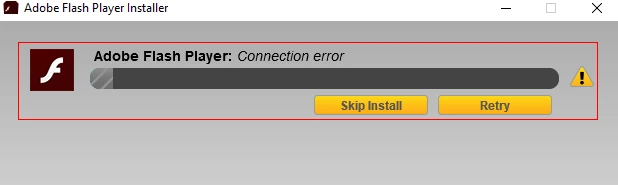
Adobe Flash Update v30.0.0.134 Will Not Install

  • July 22, 2018
  • 3 replies
  • 3810 views

Windows 10 Home version 1803

Firefox 61.0.1 (64 bit)

Adobe Flash Player 30.0.0.113 installed

The executable file for Adobe Flash Player 30.0.0.134 (flashplayer30au_ha_install.exe) downloads. When trying to "Run" the installation an error cannot connect to server pops up.

This has been going on for a few weeks now and have not found a way to update the player. Any help would be appreciated. Thanks.
    This topic has been closed for replies.

    3 replies

    jeromiec83223024
    Community Manager
    Community Manager
    August 13, 2018

    Is the date and time on your computer correct?  That's a simple problem that could cause certificate validation to fail.

    If that doesn't help and you have a commodity wireless router, you might power-cycle it.  If the problem goes away, it's probably because the router was infected.  Those infections don't typically persist through a reboot of the router, but they'll come back as soon as the router is discovered and reinfected.  Update the firmware from a trusted, known-good machine to prevent the problem from recurring (and think about setting up a scheduled reminder to keep updating it, or consider upgrading to a modern router that keeps itself updated).

    Also, a wipe and reinstall probably isn't a bad idea.  Something weird is happening.  It's not really passing the sniff-test for me.

    I'd definitely bounce the router and apply any pending firmware updates before re-imaging, just to be doubly sure that you're getting legitimate payloads.  It's pretty unlikely as there are multiple redundant defenses against getting impostor binaries or patches (nobody writing installers or updaters trusts the Internet to just deliver the bits to you untouched), but you might as well reduce the risk that your router is hostile to zero.

    _maria_
    Community Manager
    Community Manager
    July 23, 2018

    We'll need to review the installation log files to review further.  Please provide the following files for the same installation attempt:

    • FlashInstal32.log saved at C:\Windows\SysWow64\Macromed\Flash
    • FlashInstall64.log saved at C:\Windows\System32\Macromed\Flash
    • Adobe_ADM.log saved at C:\Users\<YourUserID>\AppData\Local\Temp\Adobe_ADMLogs
    • Adobe_GDE.log saved at C:\Users\<YourUserID>\AppData\Local\Temp\Adobe_ADMLogs

    Upload the files to cloud.acrobat.com/send using the instructions at How to share a file using Adobe Document Cloud or some other file sharing service of your choice that doesn't require user account login.  Post the link to the uploaded files in your reply.

    Thank you

    --

    Maria

    Participating Frequently
    July 24, 2018

    I loaded the files you requested to my gmail drive but have never tried to create a shareable link before. Please let me know you can view. Thanks for your help.

    Adobe Flash Install - Google Drive

    Participating Frequently
    July 28, 2018

    Hi,

    It sounds like there's an issue with your system.  Do you get the same error using a different browser?

    Does your Windows 10 system have the latest updates installed?  If not, please install the latest updates

    Is proxy server enabled on this system?

    • Using Control Panel
      • Navigate to Control Panel\All Control Panel Items
      • Select Internet Options
      • Navigate to Connections tab
      • Click on LAN settings
      • post a screenshot of the LAN settings tab
    • In Firefox
      • Navigate to about:preferences#general
      • Scroll down to Network Proxy
      • Click Settings
      • Post a screenshot of the Connection Settings modal dialog window

    Note:  If there is a network proxy enabled, I would recommend uploading the screenshots to cloud.acrobat.com/send (see How to share a file using Adobe Document Cloud ) and then private messaging me the link to the uploaded files instead of posting them here.

    --

    Maria


    I don't use another browser and am concerned that if I download one there will be a conflict between the two browsers.

    Windows 10 updates are good.

    Robert Mc Dowell
    Legend
    July 22, 2018

    did you try with another computer/network? are you using any anti-malware or anti-virus?