
artdude67
Participant
December 5, 2018
Answered

After downloading the latest Flash update on my Mac, the installer keeps quitting

  • December 5, 2018
  • 1 reply
  • 651 views

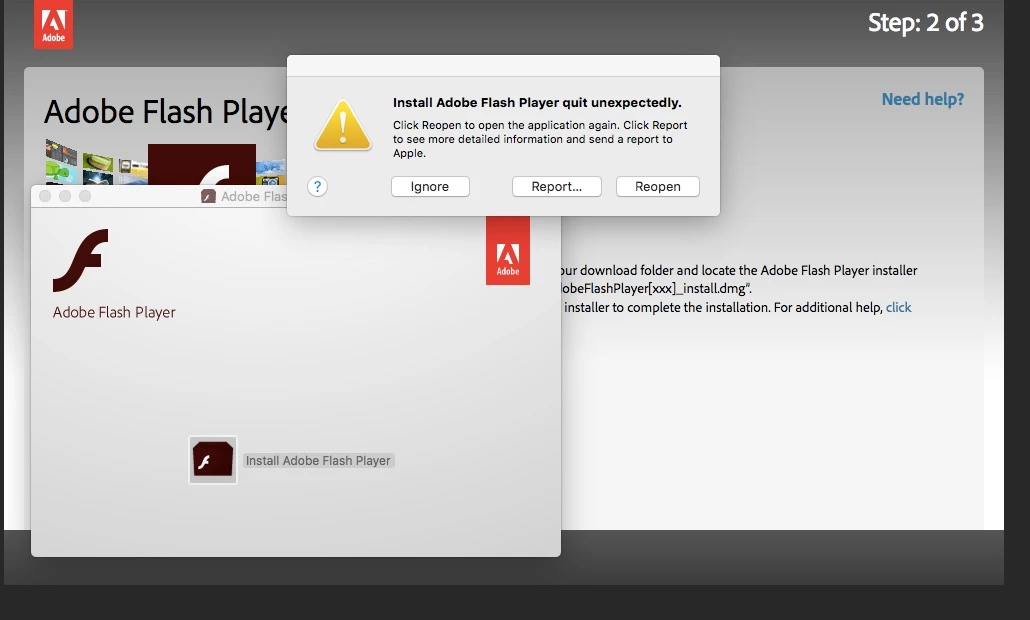
I have been trying to download and install the latest Flash update for my MacBook Air, but after I click on the .dmg file to update Flash Player quits everytime (and Adobe Flash keeps sending popups to my computer trying to get me to upload several times a day.)

I am using a MacBook Air running OS X El Capitan, Version 10.11.6 and I'm  trying to update Adobe Flash version 2.0.0.318s (the latest one listed on the Adobe website.) I've attached a screenshot of the error message it keeps giving me below.

Any suggestions?
    This topic has been closed for replies.
    Correct answer _maria_

    The most recent version of Flash Player is 32.0.0.101, not 2.0.0.318s.  2.0.0.318s is the version of the shim installer (which then installs Flash Player silently in the background).

    I'm not able to reproduce the behaviour your experiencing on my OS X 10.11.6 VM test machine, however, I'll forward your post to the team responsible for the shim installer.


    In the mean time, try the offline installer posted at the bottom of the Installation problems | Flash Player | Mac page, in the 'Still having problems' section.

    1 reply

    _maria_
    Community Manager
    _maria_Community ManagerCorrect answer
    Community Manager
    December 5, 2018

    The most recent version of Flash Player is 32.0.0.101, not 2.0.0.318s.  2.0.0.318s is the version of the shim installer (which then installs Flash Player silently in the background).

    I'm not able to reproduce the behaviour your experiencing on my OS X 10.11.6 VM test machine, however, I'll forward your post to the team responsible for the shim installer.


    In the mean time, try the offline installer posted at the bottom of the Installation problems | Flash Player | Mac page, in the 'Still having problems' section.

    artdude67
    artdude67Author
    Participant
    December 5, 2018

    Thank you!

    _maria_
    Community Manager
    Community Manager
    December 5, 2018

    you're welcome.