


'Application initialization error' attempting to install flashplayer29pp_xa_install - Windows 10

Copy link to clipboard
Copied
Hi .. I have a problem with the inability to install .flashplayer29pp_xa_install. I hope help waiting for reply and thank you.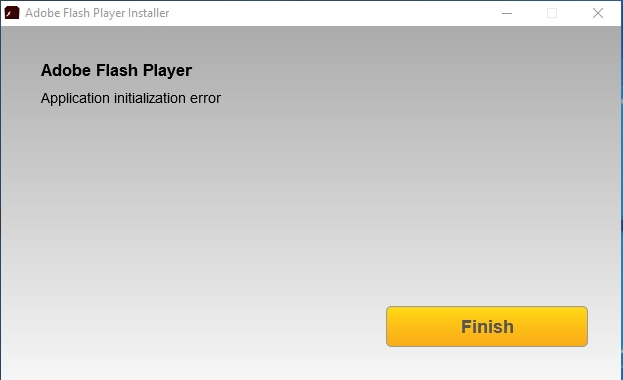
[moderator: edited title to accurately reflect issue being reported]
Message was edited by: Maria Vargas


 12
Replies
12
12
Replies
12


Copy link to clipboard
Copied
Hello, Please Help As Soon As Possible .. And Thank You. 


Copy link to clipboard
Copied
Hi,
Could you please provide the following details:
- OS you are using.
- Browser you are using.
- How you are trying to install Flash Player.
You should download the uninstaller from Uninstall Flash Player for Mac OS page, uninstall Flash Player and then try to install it.
Thanks!
Copy link to clipboard
Copied
- Thanks For The Help .. This Information is Required And Please Put A Direct Link To Download The Program Uninstall Flash Player
- I expect that the problem will be solved because I tried to get into C:\Windows\System32\Macromed\Flash
- I could not remove it
- windows 10 Pro
- Google Chrome 64 .. 65.0.3325.162
- Adobe Flash Player Install for all versions
Thank You So Much
Copy link to clipboard
Copied
Hi,
You should download the uninstaller for Windows from Uninstall Flash Player for Windows page.
Thanks!
Copy link to clipboard
Copied
I have implemented this method a little while ago and will not solve the problem yet
Copy link to clipboard
Copied
Hi,
Google embeds Flash Player in Chrome. There is no need to install Flash Player PPAPI plugin for Chrome. However, Google does disable Flash by default and users must enable it. See Use or fix Flash audio & video - Computer - Google Chrome Help for assistance.
To troubleshoot the Application Initialization error, I'll need to review the installation log files. There are several, located in the following directories:
- C:\Windows\System32\Macromed\Flash\FlashInstall64.log
- C:\Windows\SysWOW64\Macromed\Flash\FlashIntall32.log
- C:\Users\<YourUserID>\AppData\Local\Temp\Adobe_ADMLogs > Adobe_ADM.log and Adobe_GDE.log
- AppData is a hidden directory, if it's not visible, see https://support.microsoft.com/en-us/help/14201/windows-show-hidden-files for instrutions on enabling the viewing of hidden files.
After gathering the files, upload them to cloud.acrobat.com/send using the instructions at How to share a file using Adobe Document Cloud and post the link to the uploaded files.
Thank you.
--
Maria
Copy link to clipboard
Copied
Thank you before all this. The problem has been resolved after all this time and the long experience and frankly I was desperate to solve this problem and there was no way to solve my problem to one way only and after following many of the explanations and is to stop the program of protection and cutting the Internet and Rely on a tool to delete everything from the program, but the problem remains the Convention to solve such problems and is expected from the protection program Kaspersky Total Security And windows Defender .. Please communicate with me from the technical support specialist to support me to solve this problem once and I thank you very much with my greetings .. Thank you. SyrSun
Copy link to clipboard
Copied
I'm sorry, you're reply is not difficult to understand. As mentioned previously. Google embeds Flash Player in Chrome and there is no need to install Flash Player separately.

Copy link to clipboard
Copied
Can you Please explain what you did step by step as if you are talking to a beginner?
Thank you, Layla
Copy link to clipboard
Copied
Hi laylabas1967
To confirm, are you getting the application initialization error on macOS or Windows?
--
Maria
Copy link to clipboard
Copied
I fixed the problem. Thank you for your concern.Take Care, Layla
On Wednesday, April 25, 2018, 10:09:18 AM CDT, maria__ <forums_noreply@adobe.com> wrote:
'Application initialization error' attempting to install flashplayer29pp_xa_install - Windows 10 created by maria__ in Installing Flash Player - View the full discussion Hi laylabas1967
To confirm, are you getting the application initialization error on macOS or Windows?
-- Maria
If the reply above answers your question, please take a moment to mark this answer as correct by visiting: https://forums.adobe.com/message/10341759#10341759 and clicking ‘Correct’ below the answer
Replies to this message go to everyone subscribed to this thread, not directly to the person who posted the message. To post a reply, either reply to this email or visit the message page: Please note that the Adobe Forums do not accept email attachments. If you want to embed an image in your message please visit the thread in the forum and click the camera icon: https://forums.adobe.com/message/10341759#10341759
To unsubscribe from this thread, please visit the message page at , click "Following" at the top right, & "Stop Following"
Start a new discussion in Installing Flash Player by email or at Adobe Community
For more information about maintaining your forum email notifications please go to https://forums.adobe.com/thread/1516624.
This email was sent by Adobe Community because you are a registered user. You may unsubscribe instantly from Adobe Community, or adjust email frequency in your email preferences |
Copy link to clipboard
Copied
Can you please post what you did to fix the issue?

Get ready! An upgraded Adobe Community experience is coming in January.
Learn more
 AdChoices