Sorry, I wasn’t clear. My original image that I posted was a photo, taken with my cell phone, of the mac dashboard where the problematic “Adobe Flash Player Download” appears. That’s why it is blurry. The Flash Player screen does not appear in any browser window, only when I go to the dashboard. (I agree it’s very odd.) You want me to take a screen shot of this screen. When I take the screen shot, I get the camera click. But the resultant image does not appear on my desktop. But if I open a MS Word doc, I can paste it onto that page. I presume at some point a DIFFERENT preference has been set. And I don't know how to change it. So sorry. Very grateful for your continuing help. But I am not very skilled in all this.
Yes, I understood the original post. When taking a screenshot in the method I posted the file is automatically saved to the Desktop (see https://support.apple.com/en-us/HT201361) . If you don't see it on the Desktop, it should be accessible, using Finder at ~/Users/YourUserID/Desktop.
Is it possible that you accidentally created the Dashboard widget from the browser page that happens to be the Flash Player Download page? The widget on the bottom left of the screen is most likely hiding the +- buttons enabling the creation/deletion of widgets. Move this widget elsewhere on the screen. Are the +- signs visible? If so, click the - button, an 'x' will display in the upper left of each widget. Click on the 'x' to delete the widget. For information on creating, and deleting, widgets see Mac Basics: Dashboard gives you quick access to frequently used info - Apple Support

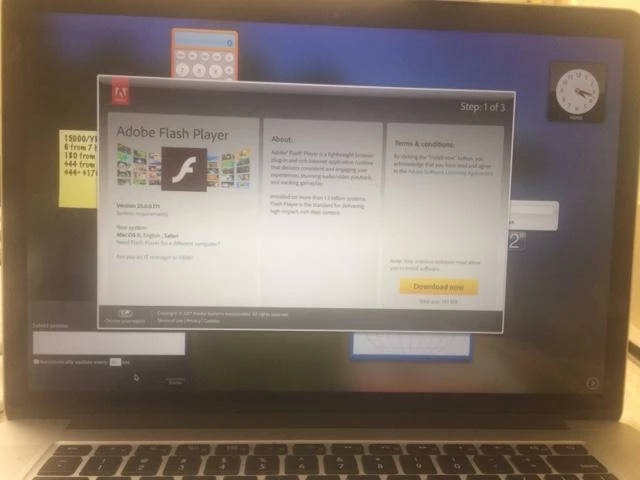 I upgraded to Flash player 25.0.0.171 on my Mac Book Pro (Version 10.12.4) using Safari. Download apparently successful. But I am left with an Adobe download screen on top of my dashboard - blocking functions on dashboard. Can't get rid of it. Clicking "close" and "shrink" icons doesn't work. And why is it happening? And can anyone help me get it off my screen?
 AdChoices