
bernd dr34391629
Participating Frequently
March 28, 2018
Answered

Diese App kann auf diesem PC nicht ausgeführt werden.

  • March 28, 2018
  • 1 reply
  • 1934 views

Beim Updaten von Adobe Flash Player auf 29.0.0.113 erfolgte folgende _

_

Fehlermeldung:

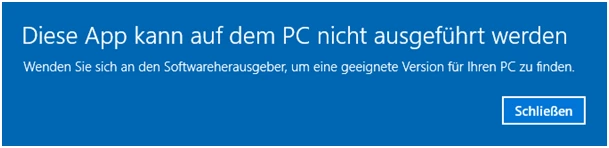
Diese App kann auf diesem PC nicht ausgeführt werden. Wenden Sie sich an

den Softwarehersteller, um eine geeignete Version für Ihren PC zu finden.

Hardware Info:

Laptop Medion Akoya MD 96970 DE S

Operating System: Windows 10 Upgegrated

Graphics Info: NVIDIA GeForce 9300M G

Software Info:

Windows 10 Home (upgegrated)

Version: 1709 (Build 16299)

Browser:

Mozilla Firefox Quantum, Version: 59.0.2 (32-Bit)

Was ist zu tun??!! Ich bitte um eine Schritt-für-Schritt-Anleitung -

danke !!!

MfG Bernd D. Rumpel
This topic has been closed for replies.
Correct answer _maria_

Hallo Maria,

nach vielen Versuchen jetzt die gewünschte Fehlermeldung als Screenshot:

Um bei Adobe eine einfache eMail abzusetzen, ist das Prozedere recht kompliziert.

Mit freundlichen Grüßen

Bernd D. Rumpel


Thank you.

Since this is a Windows error, being returned prior to the installer launching, and the Flash Player installer won't have generated its log file at this time.

Installerdateiname: "install_flash_player" mit

"install_flash_player.exe.part" herunter geladen von Adobe

Flash Player is supported on 32-bit operating systems.  Based on this comment it appears the file wasn't completely downloaded when you attempted to launch it, as ".part" indicates a partial file.  Can you try downloading the file again, ensuring it completes downloading (there should be no file with .part in the file name once download is complete) and then try again?

If that doesn't work, please try the offline installer posted at the bottom of the Installation problems | Flash Player | Windows 7 and earlier page in the 'Still having problems' section.

1 reply

_maria_
Community Manager
Community Manager
March 28, 2018

Hi,

I am not familiar with the error message being reported.  Please provide the following information:

Thank you.

--

Maria

bernd dr34391629
Participating Frequently
March 30, 2018

Hallo Maria,

leider weiss ich nicht, wie ich über den Adobe-Forums-Account ein

Screenshot/Datei einfügen kann, deshalb sende ich Ihnen den Screenshot

in diese eMail eingefügt (s.u.).

Mit freundlichen Ostergrüßen

Bernd D. Rumpel

_maria_
Community Manager
_maria_Community ManagerCorrect answer
Community Manager
March 30, 2018

Hallo Maria,

nach vielen Versuchen jetzt die gewünschte Fehlermeldung als Screenshot:

Um bei Adobe eine einfache eMail abzusetzen, ist das Prozedere recht kompliziert.

Mit freundlichen Grüßen

Bernd D. Rumpel


Thank you.

Since this is a Windows error, being returned prior to the installer launching, and the Flash Player installer won't have generated its log file at this time.

Installerdateiname: "install_flash_player" mit

"install_flash_player.exe.part" herunter geladen von Adobe

Flash Player is supported on 32-bit operating systems.  Based on this comment it appears the file wasn't completely downloaded when you attempted to launch it, as ".part" indicates a partial file.  Can you try downloading the file again, ensuring it completes downloading (there should be no file with .part in the file name once download is complete) and then try again?

If that doesn't work, please try the offline installer posted at the bottom of the Installation problems | Flash Player | Windows 7 and earlier page in the 'Still having problems' section.