


- Home
- Flash Player (read-only)
- Discussions
- Re: Flash Player buffering problem
- Re: Flash Player buffering problem
Flash Player buffering problem

Copy link to clipboard
Copied
When I play videos from sites like YouTube, the Flash player buffers almost no content.
On YouTube for example, the slider should gradually change color to show that the video I'm watching is buffering. It does not.
If I refresh and watch the Website Storage Settings panel on the Settings Manager page, the "Used" column for YouTube never shows more than 1K used, even if I set the storage limit to "Unlimited", and even if I leave a video paused for 20 minutes.
If I leave a video paused for a long time, then unplug the network/internet cable from the computer, the video only plays for a few seconds before giving me an error message. I take that to mean that the buffer is emptying right away.
Even though I have a 10Mb/s connection, this is causing problems with HD video such as provided by MLB.com
I can provide a detailed set of steps I followed to test for this problem if requested. I can also provide screenshots of the Website Storage Settings panel and the final state of the YouTube video after I did the testing.
Computer: Dell Latitude 6520, i7 processor, 6GB memory, 128GB SSD system disk, Windows 7 Professional
Flash Version 11.2.202.235
Browser: Firefox 12.0
Thanks for any help!


 68
Replies
68
68
Replies
68


Copy link to clipboard
Copied
Although nobody from Adobe deigns to reply to this thread any more, can anybody tell me whether the new version of Flash player fixes anything related to MLB.com, and if so what? Is there another thread I could/should be monitoring?

Copy link to clipboard
Copied
I have sort of the same issue where videos or streams using flash player will just stop buffering all of a sudden requiring me to refresh.
Copy link to clipboard
Copied
Note this screenshot: http://i59.photobucket.com/albums/g314/BruceMangosteen/misc/NetworkTraffic6.jpg
I think what's happening is that the player stops requesting the stream.. It certainly wasn't network speed, my line tested near 8Mb/s with MLB's own speed tester immediately after that happened. Note that the MLB tester was simultaneously testing 300Kb/s on Firefox but 8Mb/s on IE, which is why I believe the player is changing some browser-related behavior.
Sure do wish I could get some attention to this testing from either Adobe or MLB. It takes me a hell of a lot of time and patience.


Copy link to clipboard
Copied
Sorry Wilbur, I didn't mean to ignore this thread. I thought I had communicated that we found the MLB problem wasn't due to Flash Player, but instead attributed to a technology that MLB is using called SwarmCast. It looks like Flash Player is responsible, but that isn't the case.
http://forums.adobe.com/message/4440073#4440073
I appreciate your detailed responses, but my video team is telling me that this isn't something we can fix (since we don't own SwarmCast.) Is there an action item you'd like to see us respond to?
Copy link to clipboard
Copied
Well Chris, as I reported in excruciating detail above, I encountered the same problem without NexDef even running.
Again, what I saw was the the stream slowing to a stop. I then used MLB's speed tester from Firefox and got 600Kb/s but 8Mb/s from IE. I believe that means that the Flash player is stopping the requesting of the stream due to some condition it creates in the browser or vice versa.
Please see this screenshot: http://i59.photobucket.com/albums/g314/BruceMangosteen/misc/NetworkTraffic6.jpg
Again, this was with the NexDef not running. I killed it with Task Manager.
I think that if you have the patience to read through the last couple of posts I made, especially the last long one, you will see that the problem cannot possibly be related to NexDef. In fact what I think is that the problem is being caused by multiple tabs being open with Flash animations running. I was able to watch 5 innings of crystal clear baseball but I had to close everything except the small Firefox window that contains the Flash player.
I am a career software guy and understand the "not invented here" mentality. In fact, I warned of it earlier in the thread. However, I have seen "NIH" delay the solving of many problems, and would caution that it might be doing the same thing here.
Copy link to clipboard
Copied
By the way, I just noticed that two incarnations of Flash Player are being created when Firefox starts:
Before:

After:
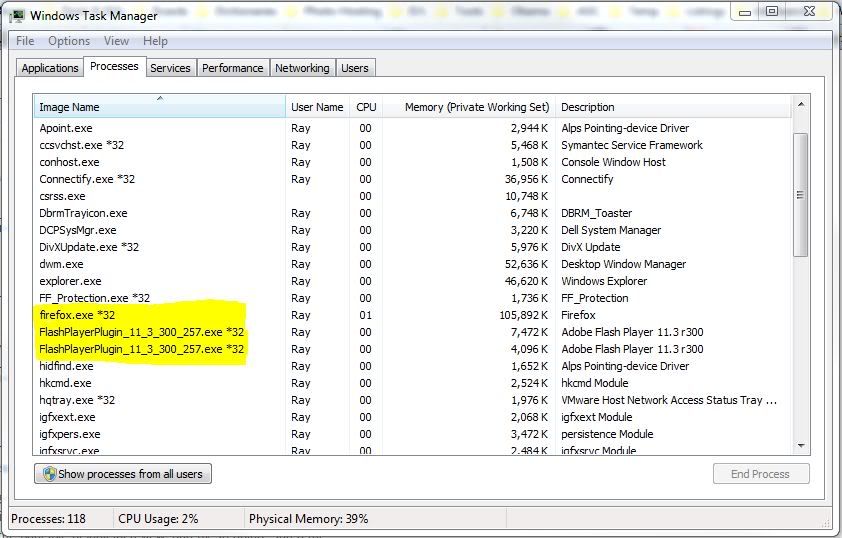
Is this the new normal or might this explain some of the complaints you're getting about the new Flash player? BTW, I discovered this because this website stopped working and Firefox hangs: http://pingtest.net/
Copy link to clipboard
Copied
Please, I am having the same issues with Twitch.tv, Streamworks and Youtube.
Copy link to clipboard
Copied
@VIPIrony : See my post above this one. Also, try one of those sites with all other browser windows and tabs closed. Please report your result.
Copy link to clipboard
Copied
I still get the buffering issue, although just after a while longer than usual. 
I am not exactly sure, but I dont seem to have 2 flash player process'
Copy link to clipboard
Copied
So you're saying that if you close all browser windows and tabs but the one then watch a game, it takes longer to freeze? If so, please try closing all but one window with a single tab in it, then close and reopen Firefox, and try the game again. After starting the game, close the main browser window and leave just the game window open. Again, please report your result.
BTW, I notice that NexDef isn't running. Do you have it installed or are you killing it before watching games?
About the Flash player, I notice that it isn't listed in your Task Manager, but you DO show two "plugin-container" tasks running. I guess the Flash plugin is running in plugin-container in your version of Firefox, and the two plugin-containers each contain a Flash Player plugin.
What version of Firefox are you using? They're all the way to 13 by now.
Copy link to clipboard
Copied
What exactly is nexdef?
Copy link to clipboard
Copied
It's an add-on distributed by MLB.com to help watch their streaming content. You're not a MLB.com subscriber I guess? Sorry for any confusion.
Would you mind doing the testing I recommended?
Copy link to clipboard
Copied
It was FireFox 12
Anyway I told you I tested with all tabs closed but the video (in this case youtube video in 1080p) and it loaded longer than usual, but then again, how far it buffers is usually random.
Copy link to clipboard
Copied
OK, thanks. Again, sorry for any confusion.
BTW, how fast is your internet connection? You can use this site to test it: http://www.speedtest.net
Copy link to clipboard
Copied
Between 8 and 10 download. (mbps)
Copy link to clipboard
Copied
For whatever reason now I only have 1 plugin container process running (updated firefox from 12 to 13.)
Copy link to clipboard
Copied
I think you're only supposed to have one. If you upgraded your browser you might want to try the test I suggested again.
Note that I suggested closing all tabs, then exiting and restarting Firefox, then trying it again. I found that the problem I observed disappeared when I restarted Firefox. I would suggest trying this even though you've upgraded, just to make sure that everything is unloaded from memory, all cache files are closed, etc.
Copy link to clipboard
Copied
I tested it, but it still stops buffering at some point in the video. Even when I turn the quality down so that its supposed to buffer ahead it stops at a certain point and has to be refreshed from there.
Copy link to clipboard
Copied
Please post a link to the video and I'll try it.
Copy link to clipboard
Copied
Pick any youtube video in HD, it's the same, I tried several.
Copy link to clipboard
Copied
OK, here is a 10.5 minute 1080p YouTube ideo that ran to completion for me: http://www.youtube.com/watch?v=YW8p8JO2hQw
The network traffic at the beginning of the video:

The network traffic as the video ends:

This is exactly what I would expect. Try this video and watch the network traffic. Let's see what you get.
BTW, it's 4:00AM here in Thailand. Time for me to sleep.
Copy link to clipboard
Copied
Mine stopped at 3:36
I mean stuff buffers just fine, then for whatever reason it just stops for no reason.
Copy link to clipboard
Copied
I would really appreciate if someone from adobe would read this topic through. It's really frustrating not to be able to use any media because you're relying on Flash.
Copy link to clipboard
Copied
I also once again have 2 plugin containers.
Copy link to clipboard
Copied
YouTube is a different case than MLB. The YouTube buffering change is intended and a change that YouTube made on the server side. I noted this in the second post in this thread:
http://forums.adobe.com/message/4434207#4434207
If it doesn't resume buffering, this might be a bug with YouTube's code. If I recall, you should be able to work around this by changing the YouTube player size.

Get ready! An upgraded Adobe Community experience is coming in January.
Learn more
 AdChoices