Exit
  • Global community
    • Language:
      • Deutsch
      • English
      • Español
      • Français
      • Português
  • 日本語コミュニティ
  • 한국 커뮤니티
Locked
0

Flash Player Download - Script Error

Guest
Sep 05, 2013 Sep 05, 2013

I have re-installed Windows 7 32-bit to my laptop, downloaded Flash Player setup file (via Firefox) to my computer and every time I want to start the setup it allways gives me this message!
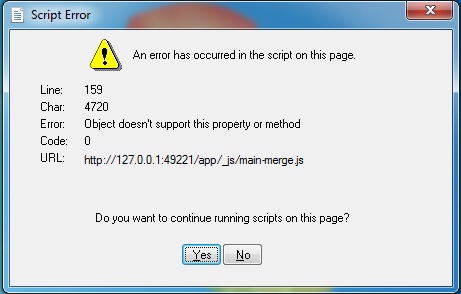
h8sn.jpg

And after that (no matter if I press yes or no) nothing happens!

If you know what might be the problem, your help would be appreciated!

665
Translate
Report
Community guidelines
Be kind and respectful, give credit to the original source of content, and search for duplicates before posting. Learn more
community guidelines
LEGEND ,
Sep 05, 2013 Sep 05, 2013
LATEST

You may need to try a different browser like Firefox.

Download the Adobe Flash Player installer directly by right clicking one (or both) of the following links. Choose "Save target as" (IE) or "Save link as" (Other browsers).

Flash Player for ActiveX (Internet Explorer)

Flash Player Plug-in (All other browsers)

Reboot, so nothing but Windows is running. THEN go to your downloads folder and double click the appropriate installer to run it.

Translate
Report
Community guidelines
Be kind and respectful, give credit to the original source of content, and search for duplicates before posting. Learn more
community guidelines

