Participating Frequently
March 9, 2013
Question

Flash Player has sound but video is a green screen.

  • March 9, 2013
  • 1 reply
  • 4837 views

I am running Windows 7 x64 and did a new install on a new HD. No problem with my old HD installation.  I have an ATI XFX 6700 series video card, 8 GB computer RAM.  I have tried manual un-install per the youtube video.  I have deleted two Windows update files KB2735855 and KB2750841.  I installed the latest version of Flash Player 11.6.602 after reboot and the problem is in my primary browser Maxthon 3 and in IE9.  Both of these browsers work just fine for video, on my old HD. 

I have re-installed the Maxthon browser as well.  Always a green screen in Flash video but the HTML video works ok.  The Adobe detector shows :
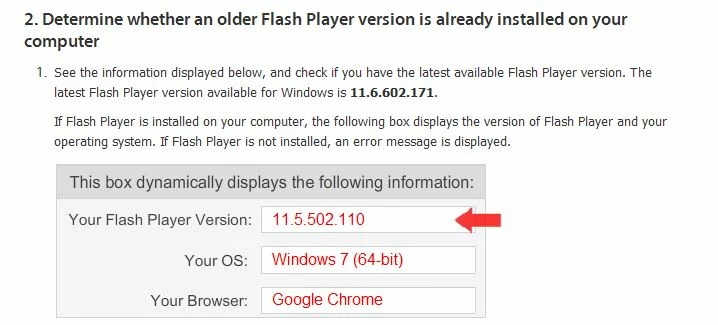
This is after the sucessful update to 11.6.602.171  I also don't understand why it shows Chrome browser which I didn't have untill the Flash update snuck it in on the last download.  This showed Chrome even before that and I don't beleive Maxthon is a Chrome browser.  I have run out of options except to try a Window restore.  What can I do to get this fixed? Very frustrated.

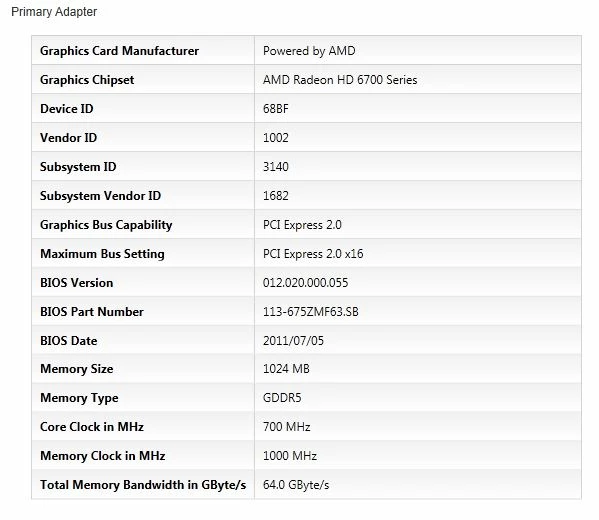
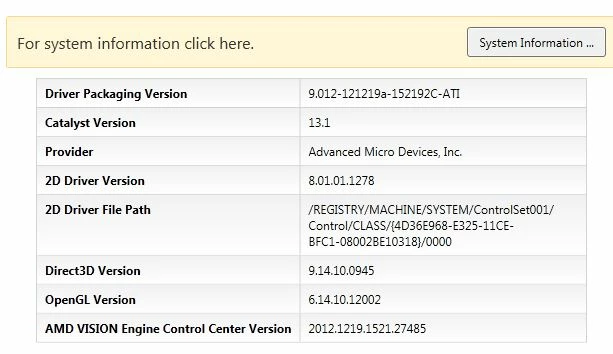
Other video card info:
This topic has been closed for replies.

1 reply

pwillener
Legend
March 10, 2013

Chrome comes with its own Flash Player; use Chrome update to update its Flash Player version.

Regarding the green screen, check if a newer driver is available for your graphics card: http://support.amd.com/us/gpudownload/windows/Pages/auto_detect.aspx

Babble_2Author
Participating Frequently
March 10, 2013

Pat, the video does work in Chrome.  But the Flash detector (1st picture) showed I was using Chrome before it was ever installed.  I think Adobe should at least recognize Maxthon browser and suggest the correct version of Flash.  

I have the latest video driver and it was installed during my Windows install on the HD.  Perhaps it is a newer version than the one on my old drive, I will have to check.  I still have the green screen and I want to get video working in Maxthon which is a far better browser than anything esle I have tried.

The Flash player in Chrome shows it is Adobe Flash 11.6.602.171, while the right clicking in the video player on Maxthon shows it is 11.5.502.110 so obviously Flash is not updating after I downloaded and ran the updater.  How can I get rid of this old version, I have tried the manual uninstall?  There must be some registry entries that are not being deleted.

Picture of green screen:  Most videos on Adobe TV do this but here is URL: http://tv.adobe.com/watch/featured-videos-on-peek/pixeltone/

pwillener
Legend
March 10, 2013

Babble 2 wrote:

I have the latest video driver and it was installed during my Windows install on the HD.

So what is your graphics driver version & date?