
Participant
August 15, 2019
Answered

Flash Player plug-in not appearing in safari 12.1.1 preferences

  • August 15, 2019
  • 3 replies
  • 4511 views

Hello, I am using a Mac 10.13.6 and I have installed the latest version of Flash Player. However, I am having problems with enabling Flash Player in Safari (version 12.1.1). The tutorials say to go to plug ins under the websites section of preferences which are under the safari section. However, the Plug-ins tab does not appear as you can see in my screenshot. How do I fix this?
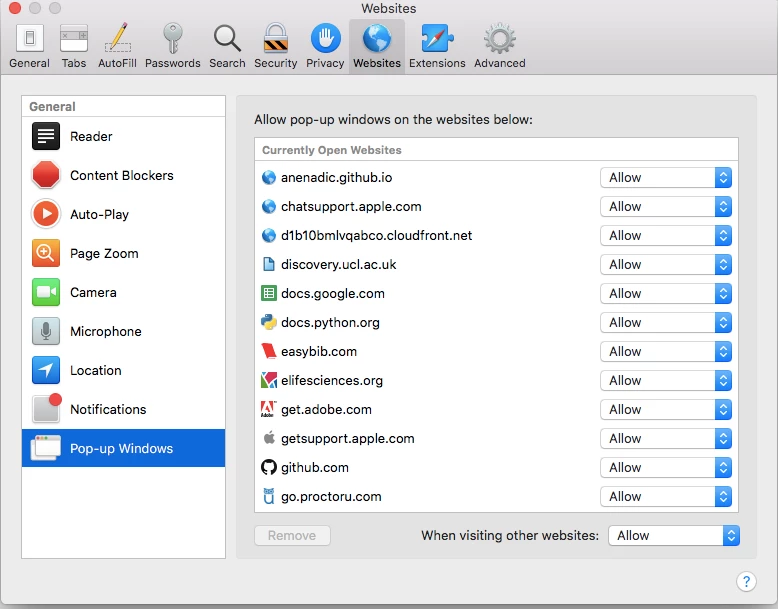
 

[moderator: edited title to include Safari version]

    This topic has been closed for replies.
    Correct answer jeromiec83223024

    Yeah, the trend has been that every recent Safari update moves the Flash preferences.


    Check out our guide, here: 

    https://helpx.adobe.com/flash-player/kb/enabling-flash-player-safari.html

    3 replies

    ger-jand27508821
    Participant
    September 24, 2020

    Hi Jeromiec: i have the exact same problem, on mac 10.14.6. My flash plugin doenst show up either in Safari/preferences/websites.

    i hve installed and deinstalled the latest Flash player version a few times but it doenst seem to be correctly installed? though i hv applications closed when installing and i get a Ok after installing.

    Maria1: pls find the screen shot of System pref>Flash player>updates When press the control button i get a reply that plugin is update and correctly installed?

    _maria_
    Community Manager
    Community Manager
    September 24, 2020

    This discussion topic doesn't apply to Safari 14.  Apple dropped support for Flash Player in Safari 14.  You'll need to use a different, supported, browser; Google Chrome, Firefox, or Opera.

    _maria_
    Community Manager
    Community Manager
    August 15, 2019

    Please post a screenshot of System Preferences > Flash Player > Updates.

    Legend
    August 15, 2019

    This suggests that in some older versions of Safari it might be under Security. Worth a look.

    Using Internet plug-ins in Safari for Mac - Apple Support

    jeromiec83223024
    Community Manager
    jeromiec83223024Community ManagerCorrect answer
    Community Manager
    September 27, 2019

    Yeah, the trend has been that every recent Safari update moves the Flash preferences.


    Check out our guide, here: 

    https://helpx.adobe.com/flash-player/kb/enabling-flash-player-safari.html

    Participant
    September 24, 2020

    Now on Safari Version 14.0 and MacOS 10.15.6.  This solution no longer works.