
Participant
June 22, 2012
Answered

Flash player won't install in windows 7

  • June 22, 2012
  • 4 replies
  • 39147 views

Flash player won't install in windows 7

This is what I get when trying to use "FLASH PLAYER HELP", as you can see, my flash player and OS are NOT listed and when asked on left side of screen if "THIS WAS HELPFUL", I clicked NO and could not complete my response.
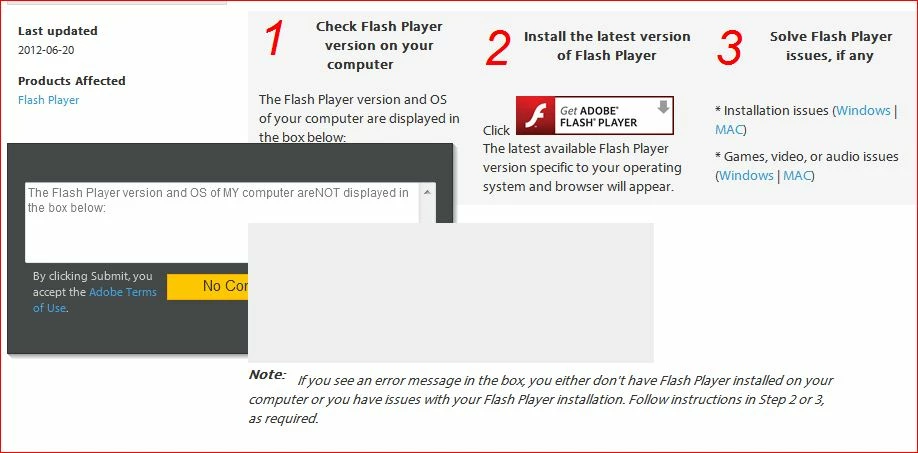
HOW DO I FIX THIS??? THERE ARE SEVERAL ITEMS THAT REQUIRE FLASH PLAYER & I CANNOT GET IT TO WORK. AFTER DOWNLOADING (AT LEAST4 TIMES) IT SAYS EVERYTIME "INSTALLATION SUCCESSFUL"

This topic has been closed for replies.
Correct answer pwillener

Download the offline installer from http://helpx.adobe.com/content/help/en/flash-player/kb/installation-problems-flash-player-windows.html#main-pars_header and save it to disk, then close all browser windows and run the downloaded installer.

If you still have problems, please post the contents of the FlashInstall.log file in

  • C:\Windows\system32\Macromed\Flash
  • C:\Windows\syswow64\Macromed\Flash

[topic moved to Flash Player forum]

4 replies

May 22, 2013

Here it is 23 May 2013 and this problem is still HERE.

I go go Hulu & try to watch something and am told to install Flash Player. The samething happens in youtube.com.

I have tried, I mean tried to install Flash Player and cannot get it to install. WHY??? The program states that I did a successful install and still cannot get anything done.

I used the unintall that I got from Adobe. Did a registry clean. Found a sub-DIR and deleted that. I am using IE10, Windows 7 Pro, 64-bit. Restarted computer and number of times. I tried the things in the above comments with NO luck, if I did have good luck I would not be writing this, right??

What is the matter Adobe?? Why can't we call Adobe and get help??

pwillener
Legend
June 23, 2012
pwillener
pwillenerCorrect answer
Legend
June 23, 2012

Download the offline installer from http://helpx.adobe.com/content/help/en/flash-player/kb/installation-problems-flash-player-windows.html#main-pars_header and save it to disk, then close all browser windows and run the downloaded installer.

If you still have problems, please post the contents of the FlashInstall.log file in

  • C:\Windows\system32\Macromed\Flash
  • C:\Windows\syswow64\Macromed\Flash

[topic moved to Flash Player forum]

Participant
June 22, 2012

Same thing happening to me.  Various sources insist I update Adobe Flash Player.  I've reinstalled umpteen times.  It tells me I'm now running the new version.  Then the next video effort insists I must update the Player.  What's going on?  Any Thots?