
Participating Frequently
September 20, 2011
Question

Flash with no GPU acceleration and good quality, how?

  • September 20, 2011
  • 4 replies
  • 17588 views

Hello

I'm using ATI Radeon hd4890OC @ 150/200 in force 2D mode with Ati Tray Tools. With catalyst 11.8 driver.

I want to get rid off only the GPU accelerator, or force it to use my CPU also. Because with this downclock, it's crashing all the time, when I open 2 youtube videos at least 480p+720p.

Message says: Amd Driver did not respond, but successfully recovered. (only in Flash 10-11, not in 9)
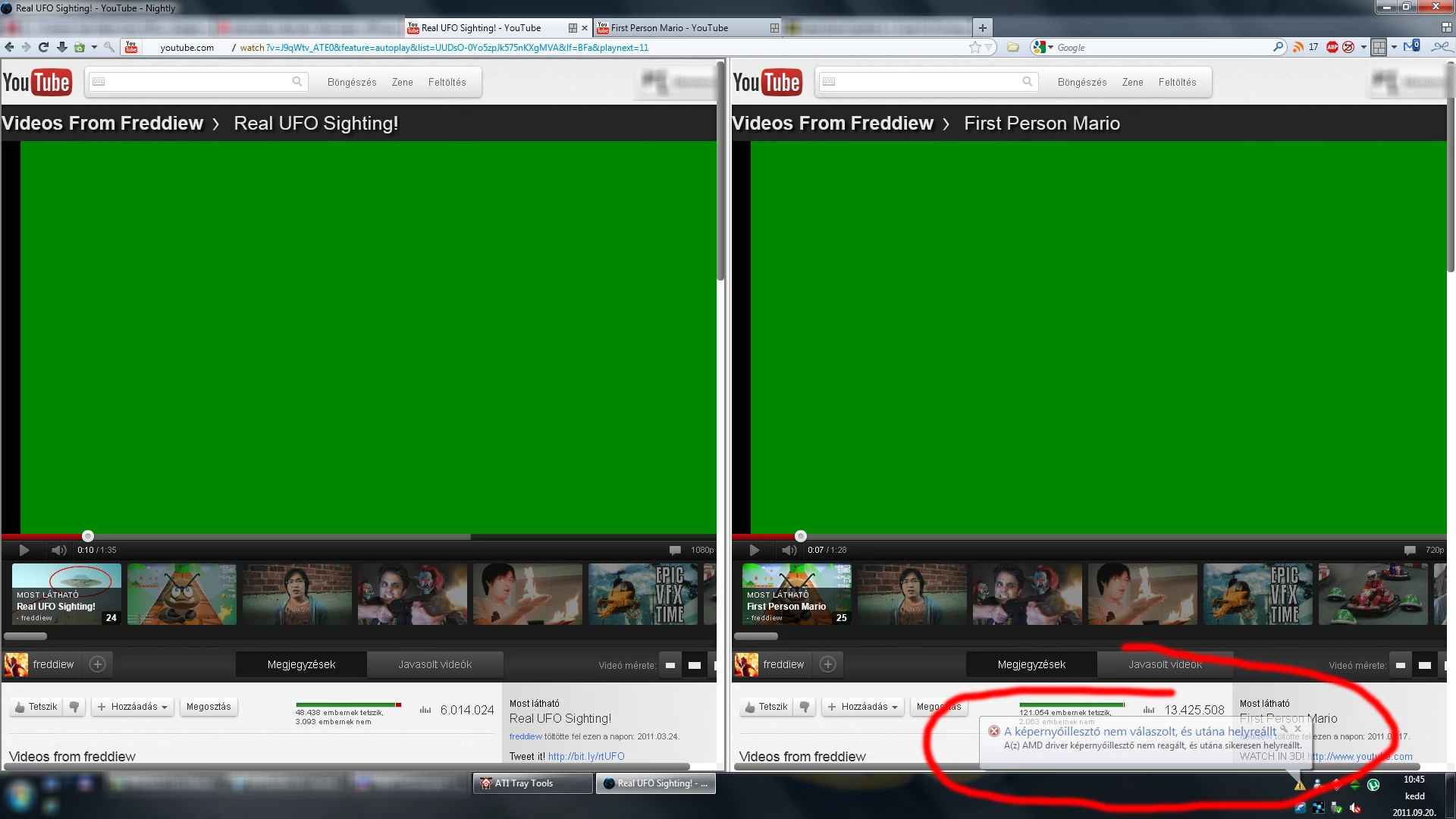
http://i.imgur.com/A2STF.png

Everything is perfect in Flash 9, but when I installed Flash 10, it started crashing, tried to ask for help on other forums, they said:

right click on flash -> settings -> uncheck "Hardware acceleration"

Of course it stopped crashing, but the quality of videos dropped down, check the 2 images:

With Flash Player 9-10-11rc (Hardware acceleration ON) Check the edges of stars, or the fonts on top left, they are smooth.

http://i.imgur.com/XKxg1.jpg

With Flash Player 10-11rc (Hardware acceleration OFF) Check the edges of stars, or the fonts on top left, they are serrated.

http://i.imgur.com/bCjDt.png

1) With Flash Player 9, which doesn't have GPU acceleration ( Hardware acceleration ON ), it has a smooth (just like 9-10-11rc) quality, 3-4 1080p youtube videos in the same time work perfectly, CPU using is around 70-80%~, but no crash, no lagg, it is perfect.

2) With FlashPlayer 10-11rc, does have GPU acceleration ( Hardware Acceleration ON ), two 720p videos in the same time, crash in 5-7 seconds. Nice quality, but impossible to use it.

3) With FlashPlyer 10-11rc, does have GPU acceleration ( Hardware Acceleration OFF ), no GPU use, only CPU, 3-4 1080p videos without lagg, 70-80%~ cpu usage. No crash, no lagg, but it has a terrible quality.

Tried to use Flash Player 9, but few flash games/players required the latest flash player. So now I'm stuck, because I do not want to use my GPU at a higher clock, because it has +30-40W power consumption and +10°C temperature, and can't use Flash9, because few pages need the newest flashplayer.

The main problem is, with Flash Player 10 and 11, they want to use ONLY GPU, and even if the GPU is at 100%, they keep trying to force use it, and they are too lazy to ask CPU to help a bit, so it just kill my AMD driver in no time.

Any1 has a pro idea, what should I do, to use Flash with gpu downclock? (be green)

This topic has been closed for replies.

4 replies

Participant
November 21, 2012

I still have nearest neighbor instead of bilinear or bicubic scaling without hardware acceleration in Firefox Flash YouTube.

chris.campbell
Legend
November 21, 2012

Hi John,

Given that this thread is a little over a year old, I'd recommend opening a new thread and bug report over at bugbase.adobe.com.  When reporting this issue, please see this post for additional details that we'll need.

http://helpx.adobe.com/flash-player/kb/video-playback-issues.html

Thanks,

Chris

Participant
October 7, 2011

I encountered a different, but somewhat related problem:

On three different business computers, which are used for office work only and don't have high-end graphics cards (all Intel onboard graphics), starting with Flash Player 11, Fullscreen modes started to look ugly.

This problem occurs regardless of the "Enable Hardware acceleration" checkboxes turned on or off. It did NOT occur in Flash Player 10!

It seems that the scaling of a "FullscreenRect" which is not the same size as the screen (often used for low-res video players in websites, product videos etc. - because of the much much better performance) is no longer done using a bilinear or bicubic interpolation, but rather via pixel doubling. If the screen size is not an integer multiple of the fullscreenRect, some pixels are tripled, some doubled, some only displayed once. This looks very ugly, it's the same look as depicted in the pictures above.

Maybe it has to do with the aforementioned change from DirectDraw to DirectX - but then why did this start to happen for me ONLY from FP 11 on? FP 10 looked perfect! Maybe the parameters telling DirectX to use a smooth (interpolated) scaling are wrongly set in FP 11?

I would really highly appreciate if some Adobe team member could have a look into this issue, as it really looks ugly and I reverted to FP 10.3r183.10 for now...

Best regards,

Fabian

Adobe Employee
October 7, 2011

Hi fabianswebworld, do you have a link to some media that reproduces the issue?  I will look into it.  You can email me directly at aaronc@adobe.com.  Thanks.

September 22, 2011

Hi Merwenuska,

We are investigating on this issue right now. May I ask one quick question?

Have you tried uncheck HW acceleration in flash player settings UI when play video in FP9? Is the video quality worse with hw off with FP11 as compared to hw off with FP9?

Thanks!

Yan

Participating Frequently
September 23, 2011

Installed FlashPlayer 9. All the pictures are almost lossless PNG.

No hardware acceleration, bad quality YT. Check the edge of the stars, or the numbers bottom left and right.

Hardware acceleration ON, smooth buttons, but with FP9, there is no title on pause top left, this is just 1 reason why I want to use FP10 or FP11, without GPU acceleration, but nice quality.


As you can see, with FlashPlayer 9, only CPU is working, and the VGA driver is not crashing with 4! 720p youtube videos (all 4 playing in the same time). Still, with hardware acceleration, the quality is good, and smooth. All I want is an option to turn off gpu acceleration for Flash 11 just like they way Flash 9 was.

Participating Frequently
September 30, 2011

Any news about it? 2 weeks past.

chris.campbell
Legend
September 20, 2011

The only setting to toggle HW acceleration is the one that you've toggled in the settings dialog.  Are you seeing these crashes with the card's default clock speed?

Chris

Participating Frequently
September 21, 2011

But there must be another, since Flash9 does not have GPU acceleration, but it has checkable Hardware acceleration box. And with FlashPlayer 9 it is nice and smooth. (but can't use because some pages need flash 10).

But with Flash 10-11 the youtube videos are really ugly.