
Inspiring
September 19, 2013
Answered

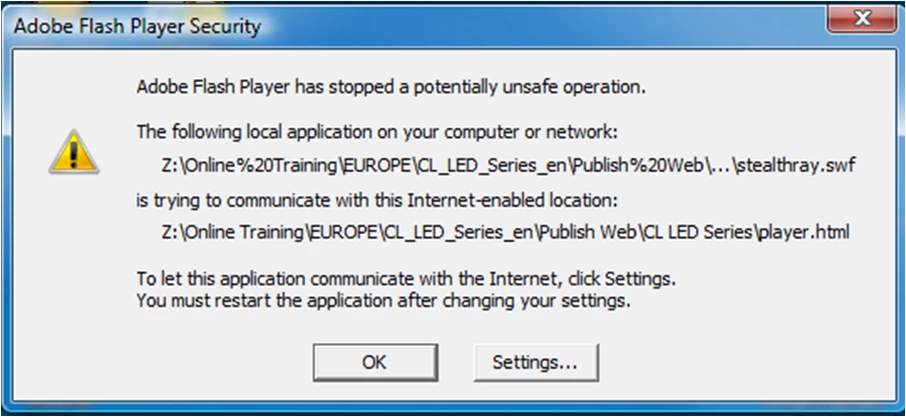
I get a message that says Adobe Flash Player has stopped a potentially unsafe operation.

  • September 19, 2013
  • 1 reply
  • 1836 views

I use Articulate to create my player.html files. When I double click my player.html file I get a message that says Adobe Flash Player has stopped a potentially unsafe operation.  Then it shows me the name of a swf file in my files that is trying to communicate with the player.html.  Then is say s to let this application communicate with the internet , click settings but that doesnt seem to help.  I've tried clicking on all the tabs that are under the settings window that opens up but the problem persists
This topic has been closed for replies.
Correct answer Mike_SG1

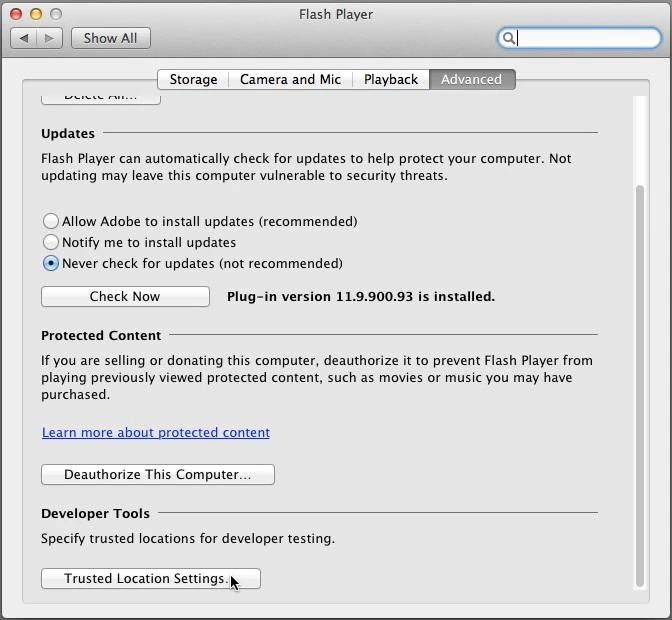
This is from my Mac, but it's the SAME on Windows.

I'll post a windows screen shot as soon as I reboot my laptop.


Ok.  I got it now.  I have to apologize and thank you for your patience.  I was completely missing it.  My bad.

1 reply

C_F_McBlob
Inspiring
September 20, 2013

You can allow the access in your Global Settings (in your Control Panel). Under the Advanced tab, click "Trusted Location Settings" and click the "+". Browse to the SWF file and choose it. That should stop the alert.

Mike_SG1Author
Inspiring
September 20, 2013

Thanks for the help.  Unfortunately, I cannot find anything called Global Settings in Control Panel.  Is there any other possibility?

C_F_McBlob
Inspiring
September 20, 2013

See below (Win 7 or 8):

You'll see a Flash Player (32 bit) icon after that. THAT's your Global Settings