


- Home
- Flash Player (read-only)
- Discussions
- Re: Is there a problem using Flashplayer with Macs...
- Re: Is there a problem using Flashplayer with Macs...

Copy link to clipboard
Copied
I have been a Flashplayer user for sometime using a iMac (using Osx version 10.7.5) and have been experiencing a lot of problems recently when trying to visit various sites e.g. BBC News, Tom Tom for upgrades. The website state I need to download the latest version of Flashplayer, which I then do and then once I have downloaded the latest version and click the prompt to revist the site I was on a) it doesn't take me back and b) when I go back to the same site it still saying I need to get the lastest version of FLashplayer! Annoying or what !!


 1 Correct answer

Solved!!!
I download the offline installer from another post from here!!
Thank you!!!

 28
Replies
28
28
Replies
28


Copy link to clipboard
Copied
From the Finder menu:
Click GO
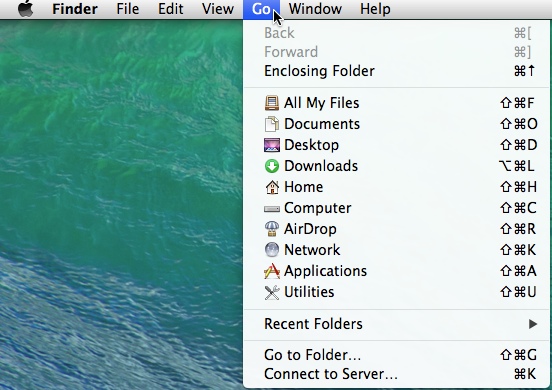
Click Go (holding the "Option" key)

Copy link to clipboard
Copied
Hi Mike!! My english it's not very well and sorry about that.
My system is Mac Pro 10.9.2 and i can't to update for my video edit program..
I have problem with flash player, i can't to install the new update and and I thought to try full uninstall..
I read your directions for uninstall and all folders and files is out from my mac..
So after that i try to instal again the Version 15.0.0.189
Βut this was impossible all the i have the same error and the mac it can't to install the flash player.
Now i read again here your directions and uninstall again with same way the flash player. I dont have nothing on my mac.
Please help i need flash player for my work..
You have full install for version 15.0.0.189 ?
Thank you!!
Video Editor
Copy link to clipboard
Copied
Solved!!!
I download the offline installer from another post from here!!
Thank you!!!
Video Editor

Copy link to clipboard
Copied
Thank you! This is exactly what I needed!

-
- 1
- 2
Get ready! An upgraded Adobe Community experience is coming in January.
Learn more
 AdChoices