
PJ_in_CA
Participating Frequently
November 9, 2013
Answered

Safari quits-gives plugin error message.

  • November 9, 2013
  • 1 reply
  • 3551 views

I have Mac OS X version 10.4.11 Processor 1.8 GHz PowerPC G5 and Safari version 4.1.3.

I do not have an Intel Processor. I do not know anything about or can't find if it's 65bit or ?

Yes, another oldie question.

I was told I needed to update my Flash Player on a site and nothing has been working ever since.

Safari keeps quitting while playing a game or viewing a movie or video online yet I can still view YouTube videos.

I put in the tweaked version plugin I got off YouTube from Steelbin and I thought my problems were solved because it started working. BUT...I removed my older flashplayer plug in without saving it. DUH! I don't even know which one I had or the Flashplayer version. 

Then Safari started quitting on me again.

I have uninstalled and reinstalled from the archived versions and I'm ready to scream! I've kept getting an alias or damaged application. It would have a white circle with a line in it on the application. Some kind of message it was damaged.

I finally got 10.3.183.90 installed and thought everything was okay. NO! My fan will start running which is a precursor to Safari quitting on me; and it does.

My Apple report dialog box that pops up after Safari quits, says 10.4-10.5 plug is everywhere in the report but I don't know what that means. I don't understand the encryption of the report but see 10.4-10.5 plugin everywhere in it.

Get this. I was told by a company I had a trojan virus and paid handsomely to have my OS cleaned. Safari's still crashing so it's not related. But I know I don't have a virus now. I hope.

Can anyone please help me solve this. My hair is already thin so I can't afford to pull any out.

Thank you,

PJ
This topic has been closed for replies.
Correct answer C_F_McBlob

First, ALL G5s are 64 bit.

Second, Flash Player 10.1.102.64 is the latest version of Flash Plater that will work with a PPC Mac. 10.3.183.90 is for Intel Macs with 10.5

Third, the white circle indicates an incompatible app (Intel app on a PPC or vice-versa).

Fourth, the company that told you you have a virus should be closed up permanently - because THERE IS NO SUCH THING AS A TROJAN HORSE VIRUS FOR OS X.

Here's what I'd recommend (and please understand, the last time I had a Mac with Tiger was six years ago, so I may be a little off in my instructions):


Spotlight search "Flash Player.plugin". Search the Mac HD.

Trash EVERYTHING that appears in the results.

Go to: Mac HD/Library/ Application support.

Look for a Macromedia folder. Trash it too, if it's there.

Empty the trash.

Go to: Applications/Utilities.

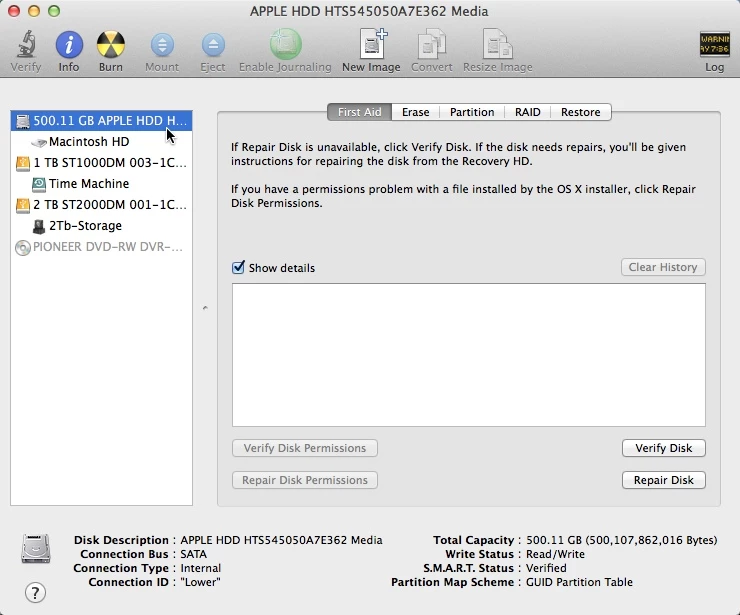
Open your Disk Utility.

Click your Hard drive (the HD itself, NOT the Mac HD volume)

Repair permissions, by clicking "Repair Disk".

When it finishes, run the Installer I linked to above. (It's the ONLY .dmg in the "10.1.102.64" folder)

Next, reset Safari by clicking Safari>Reset Safari from the menu bar.

Things should (hopefully) work like they used to.

1 reply

C_F_McBlob
C_F_McBlobCorrect answer
Inspiring
November 9, 2013

First, ALL G5s are 64 bit.

Second, Flash Player 10.1.102.64 is the latest version of Flash Plater that will work with a PPC Mac. 10.3.183.90 is for Intel Macs with 10.5

Third, the white circle indicates an incompatible app (Intel app on a PPC or vice-versa).

Fourth, the company that told you you have a virus should be closed up permanently - because THERE IS NO SUCH THING AS A TROJAN HORSE VIRUS FOR OS X.

Here's what I'd recommend (and please understand, the last time I had a Mac with Tiger was six years ago, so I may be a little off in my instructions):


Spotlight search "Flash Player.plugin". Search the Mac HD.

Trash EVERYTHING that appears in the results.

Go to: Mac HD/Library/ Application support.

Look for a Macromedia folder. Trash it too, if it's there.

Empty the trash.

Go to: Applications/Utilities.

Open your Disk Utility.

Click your Hard drive (the HD itself, NOT the Mac HD volume)

Repair permissions, by clicking "Repair Disk".

When it finishes, run the Installer I linked to above. (It's the ONLY .dmg in the "10.1.102.64" folder)

Next, reset Safari by clicking Safari>Reset Safari from the menu bar.

Things should (hopefully) work like they used to.

PJ_in_CA
PJ_in_CAAuthor
Participating Frequently
November 9, 2013

Thanks Mike. I'll try this. I couldn't edit the above... too late.

I do have 10.1.102.64 installed, or so the site says so.

I wrote down the other and mistakingly put that one in.

BUT... I will do as you've advised to see if any of it helps.

Thank you!

PJ

BTW: I kind of thought Macs were Trojan proofed and this guy caught me at a down time.

I hopefully am talking to him tomorrow.

I can still re-nig on purchasing StellarDriveDefrag but I bought that too.

I'm am such a do-do at times.

C_F_McBlob
Inspiring
November 9, 2013

Defragging is a background process that OS X has had enabled since 10.2. Manual defraggers may work, but they are a waste of money. By all means, return it.