
Strange bug/artefacts on Sprites rendering
Hi everyone,
I am experiencing some very strange rendering artefacts on the facebook game I am working on (Mutants: Genetic Gladiators).
I render our characters as a series of quads drawn with the Graphics class on a bunch of Sprites (no stage 3D here) that are animated by code. Each Sprite can have its own blending mode and color transform.
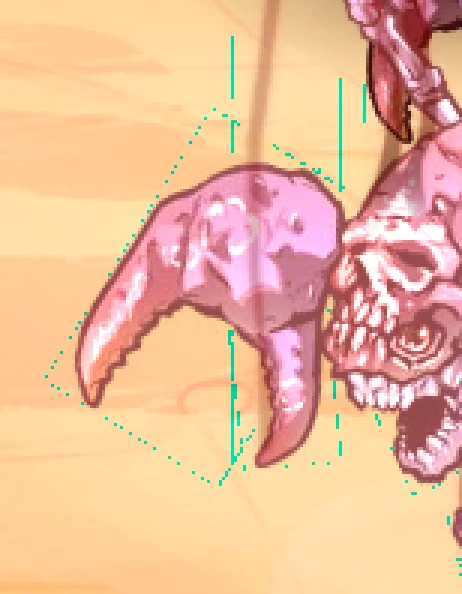
In some situations I can see some bright colored lines along what appears to be the borders of my quads although the image I use as my texture atlas is fully transparent in those areas.
I observed that the symptoms appear most often when I have quite a lot of overdraw. Especially with mixed blend modes. As an example The particles in the image below are rendered with the "add" blend mode. We can clearly see some unwanted purple outlines.
The issue is not systematic, it occurs randomly with the same setup but when it does it is repeatable. It has been reported with various versions of the flash player including 11.8.800 and in different browsers (Chome, Firefox, Safari).
Another interesting aspect is that artefacts don't appear if I hide the background (which is a large bitmapFilled quad with a colortransform).

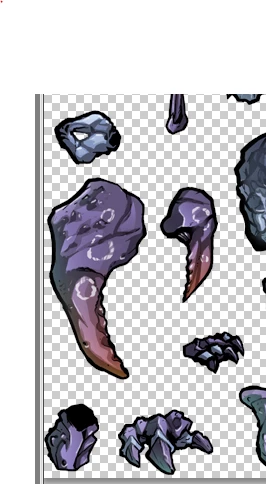
Here is another example during his attack, we can clearly see some bounding rectangles of my crabman, especially around the claw. I added a close-up on the artefact and a screen grab of the atlas I use.

EDIT: As a complimentary information, the artefacts don't appear if I remove the ColorTransforms that I apply on the characters and the background.
EDIT 2 : The artefacts don't appear in LOW stage quality (which is insufficient for my purposes). The higher the anti-aliasing, the more present the artefacts are.
Have you experienced similar artefacts? Is there a workaround? Am I doing something evil that breaks the Flash renderer?
Any help would be greatly appreciated.
Thanks,
Phil
 AdChoices