


- Home
- Flash Player (read-only)
- Discussions
- Re: Two different flash player plugins, which one ...
- Re: Two different flash player plugins, which one ...
Two different flash player plugins, which one should be enabled?

Copy link to clipboard
Copied
I'm using Google Chrome and the flash player is consistently crashing, stopping etc. I checked my plugins, and I have two flash players which one should be enabled, I've tried disabling and enabling between the two but sometimes it's better with one and then it's not, HELP, I'm beyond frustrated, and getting more and more confused.
Adobe Flash Player (2 files) - Version: 11.9.900.170 Shockwave Flash 11.9 r900
|


 2
Replies
2
2
Replies
2


Copy link to clipboard
Copied
They should BOTH be enabled and "always allowed". I did a FULL uninstall and reinstall just two days ago, and here's what it shows:
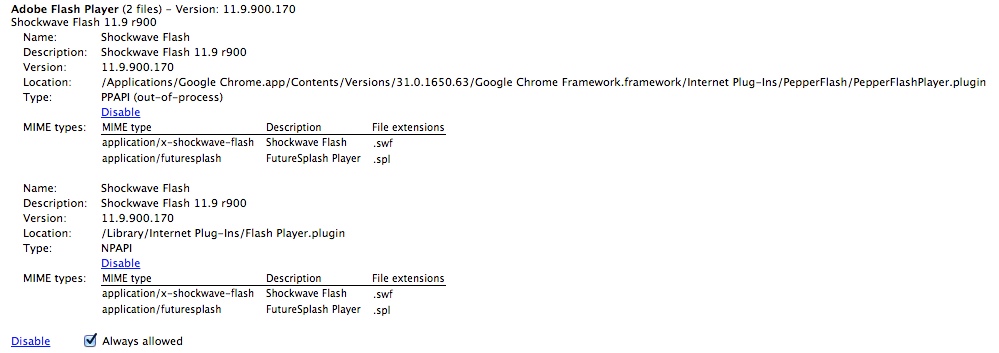
Try the following steps:
1. Exit chrome, make sure it is not running
2. Using Windows explorer go to C:\users\[user name]\AppData\local\Google\Chrome\User data\Pepperflash
3. Delete the folders you see there
4. Start chrome again, it should work now.
Notes:
[user name] is your logon name.
In order to access the AppData folder, you need to "Show Hidden Files and Folders" in your Folder Options.
Copy link to clipboard
Copied
Wow, I didn't expect an answer so soon, I've struggled with this for a long
time so I'm grateful for any and all suggestions but to know you just did
it, great! First thing in the morning I'll get to it and let ya know what
happens.. thanks for your time and help. Time for sleep, Good Night to one
and all.

Get ready! An upgraded Adobe Community experience is coming in January.
Learn more
 AdChoices