
MbdaLogicielsBureautiques
Participating Frequently
June 7, 2016
Question

Unable to autorize microphone use by Flash Player

  • June 7, 2016
  • 2 replies
  • 1314 views

Windows 7 64 bits / Firefox 45.0.1 32 bits / Flash Player 21.0.0.242

On a language learning site ( https://learning.telelangue.com/  ) on which our Users need to speak using a microphone, they are not anymore able to do so since we upgraded to Flash 21.0.0.242 (and Firefox 45.0.1 in the same time).

Previously, they had a Flash popup asking them to give the autorisation to use the microphone, and they were able to give this autorisation, but not anymore.

Now, the popup seems frozen : Your clicks are not changing anything on the popup and you can't even click "Close" to close this popup.
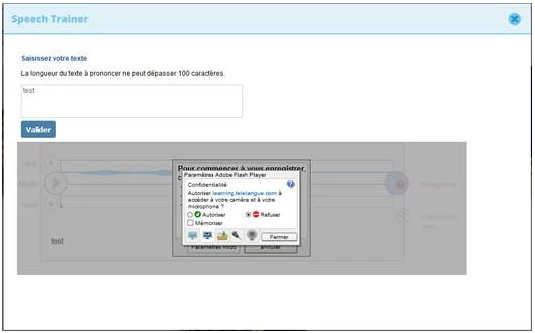
(sorry it's in French but it's basicaly asking to autorise Flash to use the Microsoft, but impossible to click "Autorise" nor "Refuse")

We've tried with or without the Flash protected mode but it doesn't change anything.

Has anyone any suggestion ?

Thanks in advance

    This topic has been closed for replies.

    2 replies

    MbdaLogicielsBureautiques
    Participating Frequently
    July 25, 2016

    I've finally found an explanation and a workaround.

    The cause : Security settings set in our Company to delete, everytime Firefox is closed, every cookies, and cache and offline data and so on. I'm not sure why it make Flash freezes even before those are deleted, but it seems the simple action to set those settings is directly creating the issue (the issue doesn't happens if those settings are not set).

    The workaround : Because our IT security doesn't want to change those settings that are compulsory for security reasons in their opinion, I've found a workaround using a script which copies the 3 files/cookies needed every time Firefox is started (every time since Firefox deletes them when it stops because of the security settings in question).

    For your information, those files are located here : C:\Users\<login>\AppData\Roaming\Macromedia\Flash Player\macromedia.com\support\flashplayer\sys

    chris.campbell
    Legend
    July 25, 2016

    I've been trying to reproduce this using this camera test site but have so far been unsuccessful.

    I'm glad to hear you were able to find a workaround, but I'm curious if this IT policy was new or could have coincided with the change of behavior with the dialogs no longer responding to clicks.

    MbdaLogicielsBureautiques
    Participating Frequently
    July 26, 2016

    The policy in question is not new, we've been using it for years so it's not a change in this policy that caused the issue but rather a change in Firefox or Flash since we upgraded both in the same time.

    In case it would help, I've tried your camera test site (but only the microphone part since our issue is with microphones not camera) and it also works fine.

    Also, according to my test, we could avoid the issue by changing the following setting in Firefox (except that this setting is compulsory according to our IT security team so we are not allowed to change it) :

    - in Firefox, open the options

    - go to the privacy settings (my Firefox is in French so I'm not sure I'm translating the options correctly)

    - click on "parameters" on the right of the line "clean/empty history when Firefox is closed"

    - uncheck "cookies"

    It's specificaly when this setting is checked that our issue occurs.

    Participating Frequently
    June 7, 2016

    Hi,

    The site requires login credentials.

    Can you please provide a dummy login credential so that I can verify the issue.

    Mail me @ [kragarwa][adobe][com]

    MbdaLogicielsBureautiques
    Participating Frequently
    June 7, 2016

    Thanks Kratika for your reply.

    I've asked (by email) to the hotline of the site https://learning.telelangue.com/ if it would be possible to get a test credential and I'll let you know as soon as I've got an answer.

    But, more generaly, may be you'd already have encountered this kind of trouble on some other site and could suggest some preliminary steps that we could try.