
Participating Frequently
January 3, 2015
Answered

Unable to download chrome adobe flash player plug-in

  • January 3, 2015
  • 1 reply
  • 6068 views

My PC OS is Windows 8.1, 64-bit and I am using Google Chrome Version 39.0.2171.95 m.

Looking at the plug-ins, I have the PPAPI installed by it says out-of-process, and I don't have a NPAPI plug-in of Adobe Flash Player. So I tried to download the plug-in and it can't even download to my computer, what's wrong? It has been causing great trouble when I am browsing on the internet and trying to work. Thanks.
This topic has been closed for replies.
Correct answer _maria_

hello erz206


Google is depracating NPAPI plugins on Chrome.  You can get more information on their strategy here NPAPI deprecation: developer guide - The Chromium Projects.

The PPAPI plugin has been the default plugin on Chrome for quite some time now, even though both NPAPI and PPAPI plugin are installed and enabled, Chrome defaults to the PPAPI plugin.

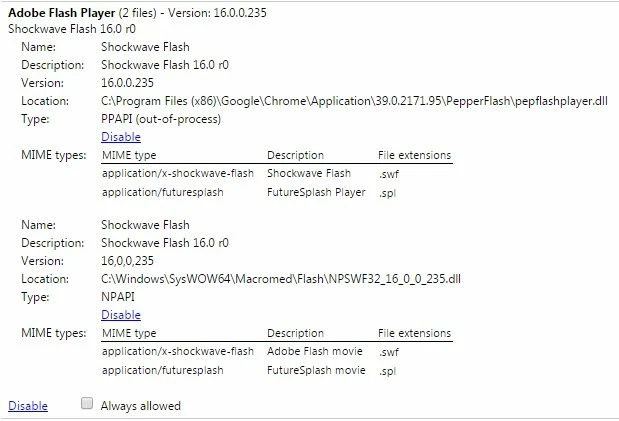
I am not able to reproduce the behaviour you describe using Windows 7 with Chrome 39.0.2171.95 (latest Chrome for Windows).  I have installed the NPAPI plugin, version 16, and it still shows enabled on my chrome://plugins list, however, the PPAPI is the plugin used by default, unless I disable it.  Here is a screenshot of the installed Flash Player plugins on my system:

--

Maria

1 reply

_maria_
Community Manager
Community Manager
January 3, 2015

Hello,

Google embeds the PPAPI version of Flash Player on Chrome and uses the PPAPI version by default.  There is no need to install the NPAPI version on Google Chrome. This version is also updated automatically by Google, either via a full Chrome update or component update, whenever a new version of Flash Player is released.  There is no need to manually install/update Flash Player PPAPI on Chrome.  If you want to install the NPAPI version you can use one of the following two options:

  1. Option 1:
    1. Go to Adobe - Install a different version of Adobe Flash Player
    2. In Step 1 select 'Windows 8/Windows Server 2012'
    3. In step 2 select 'Flash Player for Firefox - NPAPI'
    4. Click 'Download Now' button to download the installer
    5. Note the 'Download to' location.
    6. After download completes, go to the location where the installer was saved to, double-click to launch and follow the prompts to install.
      • this is the shim installer than then downloads/installs Flash Player silently in the background
  2. Option 2:
    1. Go to Installation problems | Flash Player | Windows
    2. Scroll to the bottom of the page and download the NPAPI installer from the 'Still having problems' section
    3. After download completes, go to the location where the installer was saved to, double-click to launch and follow the prompts to install.
      • this is the full flash player installer, not the shim installer from option 1.

After installing the NPAPI version you will need to configure Chrome to use the NPAPI version, instead of the PPAPI version by going to Chrome://plugins and disabling the PPAPI version.

--

Maria

erz206
Participant
January 5, 2015

I'm new to these terms but I believe that PPAPI Flash is Chrome's Pepper Flash and NPPAPI Flash is the version installed from Adobe's site.

If so, the NPAPI version no longer seems to work on Windows for Chrome 39 as of Flash version 16. I just updated my Flash Player version from Adobe's site and now this version is disabled and only the PPAPI version is available. The NPAPI version still works on Chrome 39 on Mac.

Is this intentional?

_maria_
Community Manager
_maria_Community ManagerCorrect answer
Community Manager
January 5, 2015

hello erz206


Google is depracating NPAPI plugins on Chrome.  You can get more information on their strategy here NPAPI deprecation: developer guide - The Chromium Projects.

The PPAPI plugin has been the default plugin on Chrome for quite some time now, even though both NPAPI and PPAPI plugin are installed and enabled, Chrome defaults to the PPAPI plugin.

I am not able to reproduce the behaviour you describe using Windows 7 with Chrome 39.0.2171.95 (latest Chrome for Windows).  I have installed the NPAPI plugin, version 16, and it still shows enabled on my chrome://plugins list, however, the PPAPI is the plugin used by default, unless I disable it.  Here is a screenshot of the installed Flash Player plugins on my system:

--

Maria