
July 21, 2015
Question

Unable to revert to the older version of Flash Player

  • July 21, 2015
  • 1 reply
  • 8674 views

Hi,

I am currently using Adobe flash player v18 (18.0.0.203). We have an application which runs with Adobe ActiveX player to render the charts. With the latest version of flash player, we are facing an issue. As a workaround, we need to revert to the older version of flash player 18 (version 18.0.0.194).

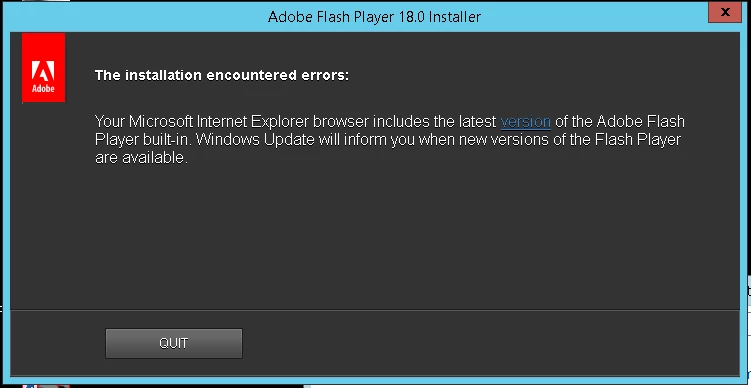
I was able to successfully uninstall the flash player with the help of Flash Player uninstaller but, when I try to install the older version it just says "Your Microsoft Internet Explorer browser includes the latest version of Adobe Flash Player built-in. Windows Update will inform you when new versions of the Flash Player are available".

Note: This issue is happening only in Windows 8.1 and 2012 OS machines.

Any Suggestions Please!!!!
This topic has been closed for replies.

1 reply

_maria_
Community Manager
Community Manager
July 21, 2015

Hi arprabu3190,

Beginning in Windows 8, Microsoft embeds Flash Player in Internet Explorer and updates are in Internet Explorer updates.  To revert to a previously installed version, go to Control Panel . All Control Panel Items > Windows Update > View update history and look for the "Update for Internet Explorer Flash Player for Windows 8.1..." entry.  Uninstall the update.  Flash Player will revert to the previous version (whatever that may be) that was installed on the system.  Note:  Do not use any sort of file unlocker utility software to manually delete Flash Player for Internet Explorer on Windows 8.x.  Since Microsoft embeds Flash Player in Internet Explorer they consider it to be a system component and lock the files to prevent users from deleting it.  From my experience users who have done this have had to re-install Windows to fix the issue and be able to install Flash Player on their system again.

Please note that 18.0.0.203 is NOT the latest version.  18.0.0.209 is the most recent version, released last Tuesday 14-July, and to address critical security vulnerabilities.  If you have not installed 18.0.0.209, please run Windows Update to get the update.  Alternatively, you can download the update from https://support.microsoft.com/en-us/kb/3079777

--

Maria

July 21, 2015

Hi Maria,

Thanks for the update. Will try the same.

And do you have any link/document for the changes that made in the recent version?

_maria_
Community Manager
Community Manager
July 21, 2015

Hi arprabu3190,

You're welcome.

Please see Security Bulletins and Advisories for information on Flash Player updates.  The page also contains a link to subscribe to receive security bulletin updates via email.  Unfortunatelly, there isn't an option to select notifiaitons by product, so you'd be getting notifications for all Adobe products.

--

Maria