
Participating Frequently
June 29, 2010
Question

What to do if it is telling me I have "Insufficient Permissions?"

  • June 29, 2010
  • 4 replies
  • 4714 views

Well I've been having several problems.
First is when I go to install it I get a screen saying that the file "C:\Windows\System\32\Macroomed\Flash\NPSWF32.dll:5" could not be written due to insufficient permissions. I have no idea how to fix this or change it.
Here's a picture of the message that pops up:
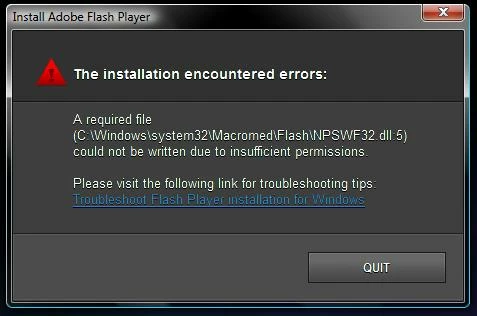
And whenever I try to click the troubleshooting for it, it wont take me anywhere. The link is basically useless. I've tried uninstalling and reinstalling flash player. But nothing seems to work.

Next is whenever I try to go install the plugins (for mozilla firefox) I get messages saying that the file cannot be downloaded. Or there is an error or something, but overall it basically says that the plugin cannot be installed.

I hope someone can help me. Any advice would be insanely helpful.

    This topic has been closed for replies.

    4 replies

    Participant
    October 22, 2010

    Help me I also have the same problems!

    My Firefox is 3.6.11

    pwillener
    Legend
    October 22, 2010

    Since you have the "same problem", have you tried all the solutions offered earlier in this topic?

    kml1308Author
    Participating Frequently
    June 30, 2010

    I have no idea what i did. Or how it happened but it worked. I didnt get the error message when i tried to reinstall it. Thank you for all your help.

    June 30, 2010

    Hi, are you saying that you have Flash Player Installed in IE and FF now? Can you do the test now and both browsers pass ? Are your websites working now, with both browsers?

    Thanks,

    eidnolb

    Participating Frequently
    June 30, 2010

    Hey eidnolb, I am having the same problem and have not had the same luck as the other guy.  I recently up graded to Firefox 3.6.6 and flash worked for awhile.  I had a 10.0.x.x. version.  Well silly me I tried to upgrade to the 10.1 and I got the exact message about not having permissions.  I have tried unistalling, reinstalling to no avail.  Firefox is unable to to the update either, so no flash for me in Firefox.  Now Flash does work in IE 8 just fine.  I understand that is an active x control whereas firefox uses a plugin.  Any help or magic you can perform would be much appreciated.

    kml1308Author
    Participating Frequently
    June 29, 2010

    Also i am the only administrator as well as user on the computer. So im not quite understanding why i would be lacking permissions.

    June 29, 2010

    Hi, What version of Flash Player are you trying to Install? Also post back your operating system and browser versions installed. Also what version of Flash Player do you now have Installed? Vs 10.0.45.2?

    Thanks,

    eidnolb

    kml1308Author
    Participating Frequently
    June 29, 2010

    The flash player version is the most recent one, the "10.1"
    My operating system is windows vista 32-bit.
    And the browser versions are Internet explorer 7 or 8, the latest version. Mozilla firefox 3.6. And safari 5.0 (7533.16).
    And yeah I do believe that is the version I have installed.

    June 29, 2010

    Hi, thanks for the info. I'll post back as soon as I check a couple of things. Just real quick, since Vista uses the UAC (User Account Control) do you know what setting it is on? Have you received an message from Internet Explorer regarding a Security issue?

    Thanks,

    eidnolb