
Can't save data on a local disc from Flash Player plugin in Firefox
Hello,
from some of the last Firefox version I can't save data from Flash Player applications.
Expected behavior that works in some of old Firefox version (I checked in v. 31):
1) I click on some button in a Flash application
2) a dialog window opens
3) I set a folder and a filename, click "Save"
4) success, I have a file on the local disc with a content provided by flash application
How it looks in the last version of Firefox:
1) I click on some button in the Flash application
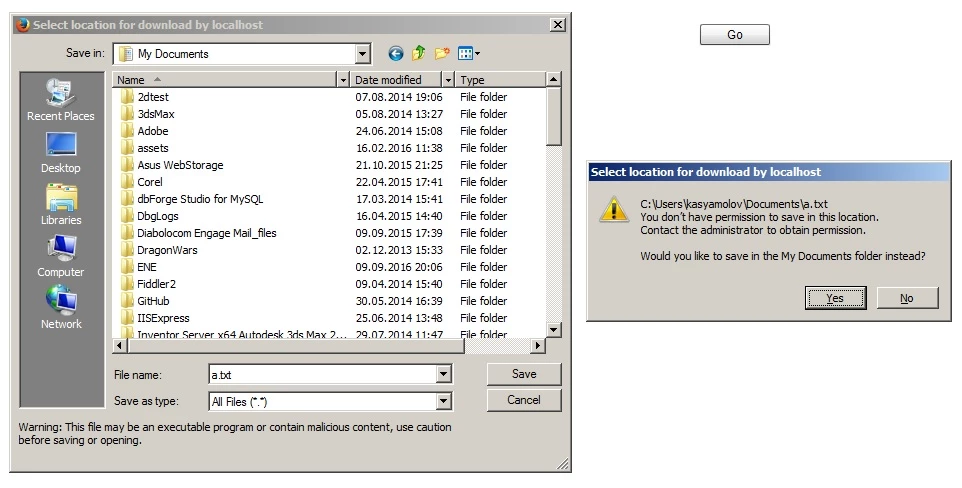
2) a dialog window opens
3) I set a folder and a filename, click "Save"
4) some security popup appears that I don't have permissions to save in this folder and propose me to save in another folder like My Documents. Weird but I click OK
5) it transfers me to the My documents folder, I try to save in this proposed folder but those permission popup appears again and again until I click Cancel
6) as a result I can't save anywhere One addition - if I select some existed file (like I want to rewrite it) there is no permission popup, but flash player throws a Input/Output Error.
I googled this problem but haven't found anything similar, that's weird too..
So, I look forward for your help.
OS: Windows 7 x64
Browser: Firefox 49.0.1
P.S. in Chrome it works.
 AdChoices