Sunil There is no Pepper Version available in this screen shot. Trust me I appreciate your assistance.
Plug-ins (10) Details
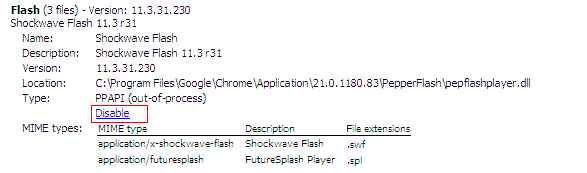
Flash (3 files) - Version: 11.3.31.230Shockwave Flash 11.3 r31
Name: Shockwave Flash
Description: Shockwave Flash 11.3 r31
Version: 11.3.31.230
Location: C:\Documents and Settings\Owner.OWNER-532735D01\Local Settings\Application Data\Google\Chrome\Application\21.0.1180.83\PepperFlash\pepflashplayer.dll
Type: PPAPI (out-of-process)
Disable
MIME types: MIME type Description File extensions
application/x-shockwave-flash Shockwave Flash .swf
application/futuresplash FutureSplash Player .spl
Name: Shockwave Flash
Description: Shockwave Flash 11.3 r300
Version: 11,3,300,271
Location: C:\Documents and Settings\Owner.OWNER-532735D01\Local Settings\Application Data\Google\Chrome\Application\21.0.1180.83\gcswf32.dll
Type: NPAPI
Disable
MIME types: MIME type Description File extensions
application/x-shockwave-flash Adobe Flash movie .swf
application/futuresplash FutureSplash movie .spl
Name: Shockwave Flash
Description: Shockwave Flash 11.3 r300
Version: 11,3,300,271
Location: C:\WINDOWS\system32\Macromed\Flash\NPSWF32_11_3_300_271.dll
Type: NPAPI
Disable
MIME types: MIME type Description File extensions
application/x-shockwave-flash Adobe Flash movie .swf
application/futuresplash FutureSplash movie .spl
Disable Always allowed
Remoting Viewer
Name: Remoting Viewer
Version:
Location: internal-remoting-viewer
Type: PPAPI (in-process)
Disable
MIME types: MIME type Description File extensions
application/vnd.chromium.remoting-viewer .
Disable Always allowed
Native Client
Name: Native Client
Version:
Location: C:\Documents and Settings\Owner.OWNER-532735D01\Local Settings\Application Data\Google\Chrome\Application\21.0.1180.83\ppGoogleNaClPluginChrome.dll
Type: PPAPI (in-process)
Disable
MIME types: MIME type Description File extensions
application/x-nacl Native Client Executable .nexe
Disable Always allowed
Chrome PDF Viewer
Name: Chrome PDF Viewer
Version:
Location: C:\Documents and Settings\Owner.OWNER-532735D01\Local Settings\Application Data\Google\Chrome\Application\21.0.1180.83\pdf.dll
Type: PPAPI (in-process)
Disable
MIME types: MIME type Description File extensions
application/pdf Portable Document Format .pdf
application/x-google-chrome-print-preview-pdf Portable Document Format .pdf
Disable Always allowed
Adobe Acrobat - Version: 10.1.4.38
Adobe PDF Plug-In For Firefox and Netscape 10.1.4
Name: Adobe Acrobat
Description: Adobe PDF Plug-In For Firefox and Netscape 10.1.4
Version: 10.1.4.38
Location: C:\Program Files\Adobe\Reader 10.0\Reader\Browser\nppdf32.dll
Type: NPAPI
Disable
MIME types: MIME type Description File extensions
application/pdf Acrobat Portable Document Format .pdf
application/vnd.adobe.pdfxml Adobe PDF in XML Format .pdfxml
application/vnd.adobe.x-mars Adobe PDF in XML Format .mars
application/vnd.fdf Acrobat Forms Data Format .fdf
application/vnd.adobe.xfdf XML Version of Acrobat Forms Data Format .xfdf
application/vnd.adobe.xdp+xml Acrobat XML Data Package .xdp
application/vnd.adobe.xfd+xml Adobe FormFlow99 Data File .xfd
Disable Always allowed
QuickTime (7 files) - Version: 7.7.1 (1680.42)
The QuickTime Plugin allows you to view a wide variety of multimedia content in Web pages. For more information, visit the QuickTime Web site.
Type: NPAPI
Disable
MIME types: MIME type Description File extensions
video/x-m4v Video (protected) .m4v
image/x-macpaint MacPaint image .pntg .pnt .mac
image/pict PICT image .pict .pic .pct
image/x-pict PICT image .pict .pic .pct
image/x-quicktime QuickTime image .qtif .qti
image/x-sgi SGI image .sgi .rgb
image/x-targa TGA image .targa .tga
image/jp2 JPEG2000 image .jp2
Name: QuickTime Plug-in 7.7.1
Description: The QuickTime Plugin allows you to view a wide variety of multimedia content in Web pages. For more information, visit the QuickTime Web site.
Version: 7.7.1 (1680.42)
Location: C:\Program Files\QuickTime\plugins\npqtplugin7.dll
Type: NPAPI
Disable
MIME types: MIME type Description File extensions
image/jpeg2000 JPEG2000 image .jp2
image/jpeg2000-image JPEG2000 image .jp2
image/x-jpeg2000-image JPEG2000 image .jp2
Disable Always allowed
Google Update - Version: 1.3.21.115
Name: Google Update
Version: 1.3.21.115
Location: C:\Documents and Settings\Owner.OWNER-532735D01\Local Settings\Application Data\Google\Update\1.3.21.115\npGoogleUpdate3.dll
Type: NPAPI
Disable
MIME types: MIME type Description File extensions
application/x-vnd.google.update3webcontrol.3
application/x-vnd.google.oneclickctrl.9
Disable Always allowed
Google Earth Plugin - Version: 6.2.0.5788
GEPlugin
Name: Google Earth Plugin
Description: GEPlugin
Version: 6.2.0.5788
Location: C:\Program Files\Google\Google Earth\plugin\npgeplugin.dll
Type: NPAPI
Disable
MIME types: MIME type Description File extensions
application/geplugin GEPlugin
Disable Always allowed
Silverlight - Version: 5.1.10411.0
Name: Silverlight Plug-In
Version: 5.1.10411.0
Location: c:\Program Files\Microsoft Silverlight\5.1.10411.0\npctrl.dll
Type: NPAPI
Disable
MIME types: MIME type Description File extensions
application/x-silverlight npctrl .scr
application/x-silverlight-2
Disable Always allowed
Windows Presentation Foundation - Version: 3.5.30729.1 built by: SP
Windows Presentation Foundation (WPF) plug-in for Mozilla browsers
Name: Windows Presentation Foundation
Description: Windows Presentation Foundation (WPF) plug-in for Mozilla browsers
Version: 3.5.30729.1 built by: SP
Location: c:\WINDOWS\Microsoft.NET\Framework\v3.5\Windows Presentation Foundation\NPWPF.dll
Type: NPAPI
Disable
MIME types: MIME type Description File extensions
application/x-ms-xbap XAML Browser Application .xbap
application/xaml+xml XAML Document .xaml
Disable Always allowed
The first one was Pepper plug-in, Casey. It says PepperFlash.
Please see the screenshot below and click Disable that I highlighted, by following the instructions in the link that I gave you.


 AdChoices