
TazmanianDevil
Participant
Juli 1, 2015 6:14 PM UTC
Beantwortet

How do I uninstall Flash player silently using command line

I have hundreds of Windows 7 machines that I want to uninstall Adobe Flash Player silently, without the user intervention. I read several forums , saying use the -silent switch with uninstall_flash_player.exe in a command prompt, but it doesn't work. If I go to C:\Windows\System32\Macromed\Flash and run the file FlashUtil64_18_0_0_194_ActiveX, it comes with the following message:
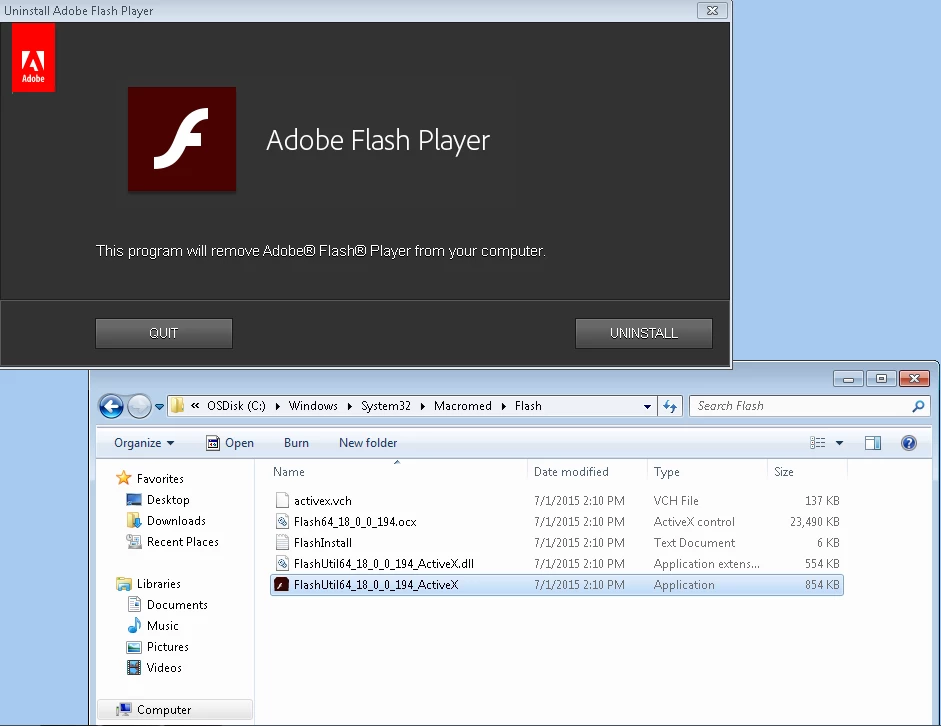
If anyone had done the silent uninstall before and ready to pass that knowledge, it is greatly appreciated!

Dieses Thema wurde für Antworten geschlossen.
Carm01
Carm01Antwort
Legend
Juli 1, 2015 10:27 PM UTC

The way i do it is grab this file:

http://download.macromedia.com/get/flashplayer/current/support/uninstall_flash_player.exe

then open a cmd window in the location of the file and do the following:

uninstall_flash_player.exe -uninstall

That works 100% of the time for me. The uninstaller Adobe offers is really nice, unlike java where you have to run a complicated wmic cmd to remove it.

Hope it helps ya?

by the way that will remove ANY flash player from your machine.

also specifically for that one it is FlashUtil64_18_0_0_194_ActiveX.exe -uninstall

6 Antworten

Participant
Dez. 12, 2018 8:39 PM UTC

I have tried this but it doesn't work anymore and I really need a way to silently uninstall this software. Did they remove the silent option?

Übersetzen
_maria_
Legend
Dez. 12, 2018 9:09 PM UTC

The silent option has not been removed.  Download the uninstaller posted at Uninstall Flash Player for Windows  and then run it from the command line with -uninstall:

uninstall_flash_player.exe -uninstall

To uninstall a specific player type (ActiveX, NPAPI, or PPAPI), use the following:

  • uninstall_flash_player.exe -uninstall activex
  • uninstall_flash_player.exe -uninstall plugin
  • uninstall_flash_player.exe -uninstall pepperplugin

This information is posted in Chapter 3 of the Flash Player Admin Guide​.  Reminder that the uninstaller does not remove any browser embedded version of Flash Player (e.g. Activex in Edge/IE, or PPAPI plugin in Chrome).


Which file are you using, and how, exactly, are you attempting to uninstall?

Übersetzen
Participant
Dez. 12, 2018 9:30 PM UTC

Hi,

Thank you, it is now working:

uninstall_flash_player.exe -uninstall

I tried that command again and realized it was working and was able to find the logs now.

C:\Windows\System32\Macromed\Flash

It was because my computer didn't have any NPAPI plugins installed.

Thanks again.

Übersetzen
TazmanianDevil
Participant
Juli 16, 2015 7:54 PM UTC

Carm01,

First of all, my apologies for responding to your comment. Thank you so much, this worked like a charm. I couldn't figure that -uninstall command except for the fact that I was using it with different uninstallers for each versions with additional switches like -activex etc. I tested it and verified it and got my task executed perfectly over 800 machines. Thanks again.

Übersetzen
Carm01
Carm01Antwort
Legend
Juli 1, 2015 10:27 PM UTC

The way i do it is grab this file:

http://download.macromedia.com/get/flashplayer/current/support/uninstall_flash_player.exe

then open a cmd window in the location of the file and do the following:

uninstall_flash_player.exe -uninstall

That works 100% of the time for me. The uninstaller Adobe offers is really nice, unlike java where you have to run a complicated wmic cmd to remove it.

Hope it helps ya?

by the way that will remove ANY flash player from your machine.

also specifically for that one it is FlashUtil64_18_0_0_194_ActiveX.exe -uninstall

Übersetzen