
Participating Frequently
January 16, 2013
Question

No video, only audio (Windows 7, Firefox)

  • January 16, 2013
  • 1 reply
  • 5546 views

I've been having this problem for a while and I don't really know how to fix it permanently.

I can't watch embedded videos, for example on facebook when someone links it from youtube or uploads a video to their accounts. Now with youtube, I can click on the link and view the video directly at the youtube site just fine, but it doesn't work for facebook vids, I get blank screens with sound. Not all fb games are working either, only some do. Sometimes I can get the videos to run just fine by installing a new codec pack, but as soon as I reboot my laptop or there's an update for windows or firefox it's gone again and often I can't refix it by just installing the codecs again (that has worked a time or two in the past though). I disabled the flash player hardware acceleration and disabled the real player plugin, then I even kicked real player off my computer, no change.

I use windows 7 on a laptop (Lenovo), Firefox 18 (but I've been having this problem for at least 4-5 months, so older versions of FF didn't change anything), Adobe Flash Player version 11.5.502.146. I have Windows Media Player, Media Player Classic and the VLC Player on my system. I have uninstalled and reinstalled both FF and Flashplayer multiple times, have uninstalled and reinstalled different codec packs for windows 7 several times, it doesn't change anything except sometimes that SOMETIMES with a brand new codec pack it works for a day or two untill I reboot the system. When upgrading the flash player from version 10 to version 11 for the first time, flash player told me I had no admin rights for my computer and therefore he couldn't install. First off, that's a joke because there is only one user on this computer, which is me, and I have all admin rights. After about two weeks that problem resolved itself and the flashplayer installed just fine, I'm just mentioning it in case it's related.

When I go to the adobe flash player help site the box to check the player doesn't even show up, no error message either.
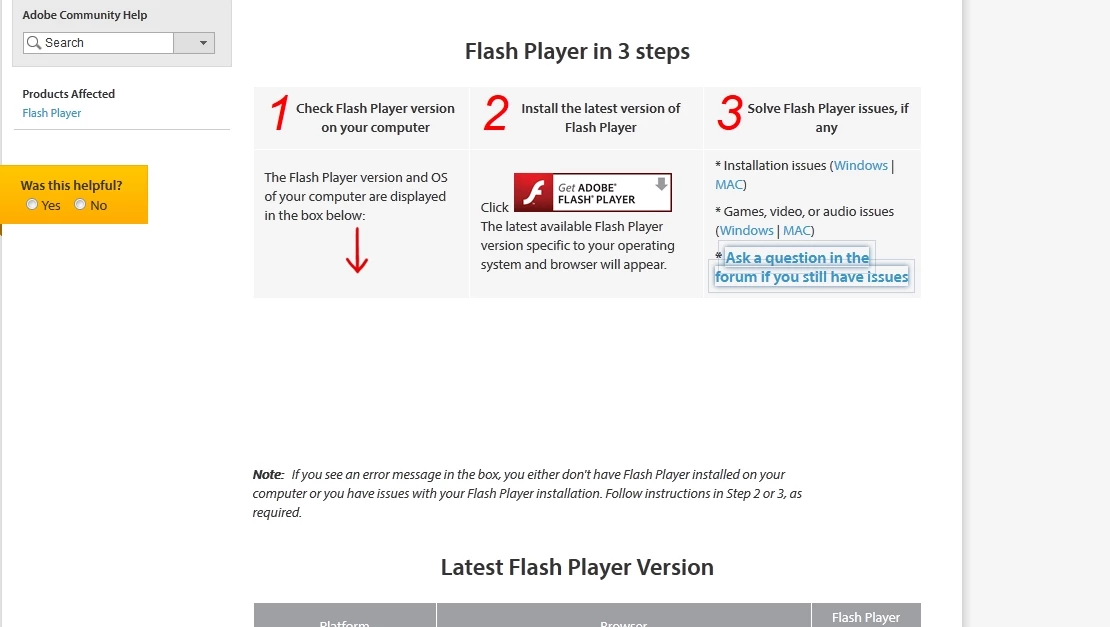
I don't really know what to do anymore, the next thing I could try is to kick off the flashplayer 11 and reinstall version 10, see if that works. But then again, there's a significant security risk, isn't there?

    This topic has been closed for replies.

    1 reply

    jeromiec83223024
    Inspiring
    January 16, 2013

    Basic Troubleshooting Info

    The first step is to work through the video troubleshooting guide, here:

    - Windows - http://helpx.adobe.com/flash-player/kb/video-playback-issues.html

    - Mac - http://helpx.adobe.com/flash-player/kb/video-playback-issues.htm

    Sometimes video and audio problems are caused at a lower level and not directly related to Flash Player.  I recommend trying both of the links below to see how they perform.  If the problem exists with both, then Flash Player is most likely not the culprit as the HTML5 video link does not use Flash Player when playing.  You can verify this by right clicking the HTML5 video and looking for the words "About HTML5" at the bottom of the menu.

    - HTML5 video - http://www.youtube.com/watch?v=cTl3U6aSd2w&html5=True

    - Non-HTML5 video - http://www.youtube.com/watch?v=cTl3U6aSd2w

    Participating Frequently
    January 17, 2013

    Hi Jerome,

    first of all thank you for taking the time to try and help me with this! :-)

    The video trouble shooting guide kept me busy for a while, my system is now sporting a brand new graphics driver, my windows system is as up to date as it can be, my old Java versions have been deleted and my new one has been uninstalled and reinstalled, I uninstalled and reinstalled shockwave and flashplayer, enabled and disabled the hardware acceleration about a thousand times and rebooted my system after almost each try. Still no change *sigh*

    For example, the trouble shooting guide looks like this for me:

    Again there is no box showing the adobe logo (yes I check twice and flash player is still installed on my laptop *lol*, also the automatic system scan on one of the adobe pages shows that I have the current version installed). When I right click the empty field where this box should be, I can choose settings, but again the settings box does not display. When I do the same in a facebook game that does still work, I can see the settings box (which is how I can enable and disable the hardware acceleration). When I right click the empty space where the logo should be and choose the global settings, I can access that box. But no possible change I make seems to make a difference (I deleted cache and browser data etc. several times).

    Of the two links you gave me above, I can only view the second one with both video and audio. The html-5 video only has audio - no video. Does that mean I'm lacking an html-5 player? Would it make a difference if I got one? Also for non-youtube videos?

    Of the stage videos on the adobe site: http://www.adobe.com/devnet/flashplayer/stagevideo.html I cannot view the top left one (Big Buck Bunny), but the top right and bottom left display just fine. Does that tell you anything?

    Is there any other info you need?

    Again, thanks a lot for taking the time!

    Participating Frequently
    January 17, 2013

    In an act of absolute desperation I just opened the Internet Explorer *shudder*

    At first it appeared to be the same deal - no video. Then I was told I need to install Adobe Flashplayer version 10 or higher to view. I thought, what the hell, and installed the player again, this time using the Internet Explorer download. Now I can watch videos with the IE (8, if that matters), but still not with firefox. I have no idea what could possibly be wrong here, seems like FF and AFP do not communicate fully for some reason. Also I absolutely despise the Internet Explorer and never use it, don't plan on changing that. And that the vids work NOW means nothing to me, because I got them to work with FF in the past as well, but it never lasted, so I'm doubtful that this will...*sigh* But does the info help?