Exit
  • Global community
    • Language:
      • Deutsch
      • English
      • Español
      • Français
      • Português
  • 日本語コミュニティ
  • 한국 커뮤니티
Locked
0

Playing an .swf file offline??

Community Beginner ,
Dec 27, 2016 Dec 27, 2016

​How or what is needed to do this????

TOPICS
How to
31.8K
Translate
Report
Community guidelines
Be kind and respectful, give credit to the original source of content, and search for duplicates before posting. Learn more
community guidelines

correct answers 1 Correct answer

Community Expert , Dec 27, 2016 Dec 27, 2016

i'm not sure what you see when you click the message 1 link, but this is what i see:
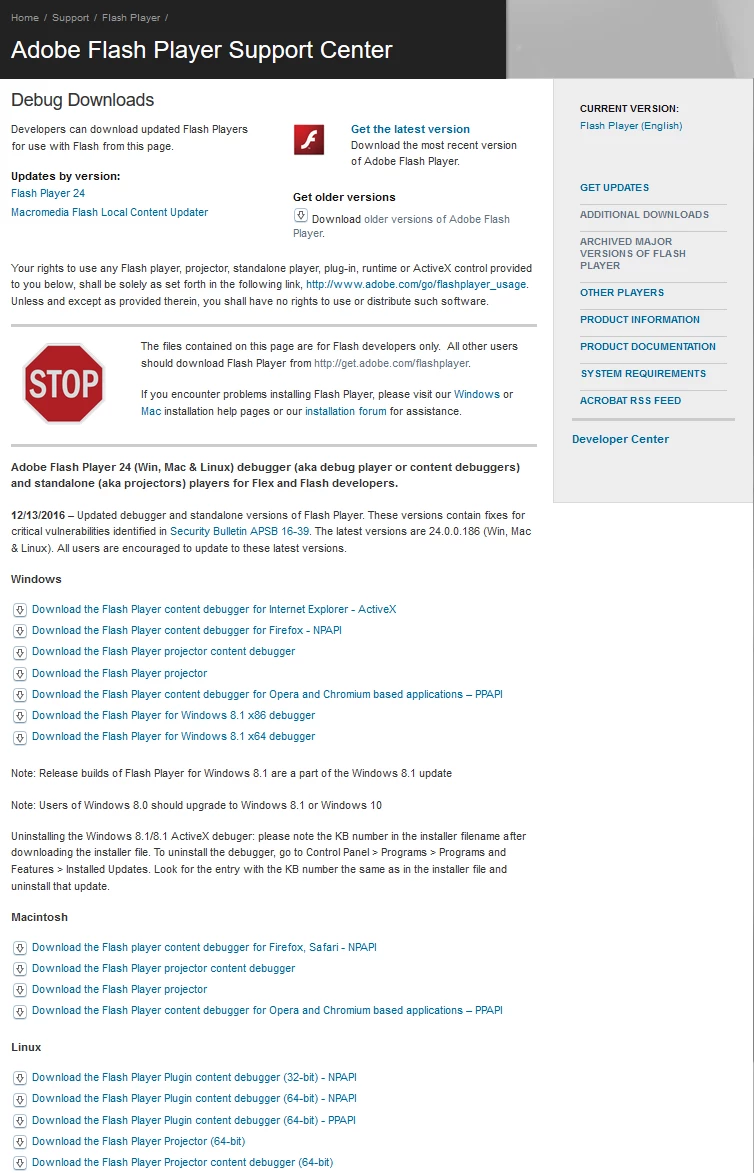
Screenshot - 12_27_2016 , 12_06_42 PM.png

the flash player projector for your os will play swf's outside a browser.

Translate
Community Expert ,
Dec 27, 2016 Dec 27, 2016
Translate
Report
Community guidelines
Be kind and respectful, give credit to the original source of content, and search for duplicates before posting. Learn more
community guidelines
Community Beginner ,
Dec 27, 2016 Dec 27, 2016

The keyword here is "offline"!   Sure, it plays fine if i click on it from the webpage.

My question is can it be played offline & if so how??

Flashplayer is installed in control panel only??  Cannot use "open with"??

Translate
Report
Community guidelines
Be kind and respectful, give credit to the original source of content, and search for duplicates before posting. Learn more
community guidelines
Community Expert ,
Dec 27, 2016 Dec 27, 2016

click the flash player link.

Translate
Report
Community guidelines
Be kind and respectful, give credit to the original source of content, and search for duplicates before posting. Learn more
community guidelines
Community Beginner ,
Dec 27, 2016 Dec 27, 2016

Wow! This doesn't help any bit!  Click the flashplayer link!  Which only takes you to downloading flashplayer (which i've done at least 5 times), and it only shows in control panel & you cannot direct any .swf files to open with flashplayer!

Since this is so difficult for me to do, lets just forget it!!  Thanks for the effort!!

Translate
Report
Community guidelines
Be kind and respectful, give credit to the original source of content, and search for duplicates before posting. Learn more
community guidelines
Community Expert ,
Dec 27, 2016 Dec 27, 2016

you're welcome.

Translate
Report
Community guidelines
Be kind and respectful, give credit to the original source of content, and search for duplicates before posting. Learn more
community guidelines
Community Beginner ,
Dec 27, 2016 Dec 27, 2016

You have a PhD in mathematics & also an MD from yale, but you toy around with adobe software!  Seems like a waste of talent to me. And yet you cannot tell me how to simply view this .swf clip without being online??  I mean to save it to my computer & send it to whomever i choose & have them to be able to play it??   Can this be done, yes or no ??

https://icq.com/img/friendship/static/card_16961_rs.swf

Translate
Report
Community guidelines
Be kind and respectful, give credit to the original source of content, and search for duplicates before posting. Learn more
community guidelines
Community Beginner ,
Dec 27, 2016 Dec 27, 2016

Forgot, i have one other question since you know adobe?  Before i delete all these trial programs from adobe, is there anyone of them that will open a swf file??

Translate
Report
Community guidelines
Be kind and respectful, give credit to the original source of content, and search for duplicates before posting. Learn more
community guidelines
Community Expert ,
Dec 27, 2016 Dec 27, 2016

i'm not sure what you see when you click the message 1 link, but this is what i see:

Screenshot - 12_27_2016 , 12_06_42 PM.png

the flash player projector for your os will play swf's outside a browser.

Translate
Report
Community guidelines
Be kind and respectful, give credit to the original source of content, and search for duplicates before posting. Learn more
community guidelines
Community Beginner ,
Dec 27, 2016 Dec 27, 2016

Whola!  Works perfect for offline viewing....Thanks so much for helping me with this one!

I have one last question & i'll stop bugging you with this!  I'm assuming that if i sent this clip link to another person, they cannot view it offline unless they have the flashplayer projector or must view it online, is this correct??

And i suppose that viewing & making it work on a cellphone is out of the question??????

Translate
Report
Community guidelines
Be kind and respectful, give credit to the original source of content, and search for duplicates before posting. Learn more
community guidelines
Community Expert ,
Dec 27, 2016 Dec 27, 2016

you're welcome.

correct, anyone wanting to view a swf will need a stand-alone player.  if you send an html that embeds the swf, you can open the html in (most non mobile) browsers and display the swf.

viewing a swf in a mobile (eg, cellphone) isn't going to work.  you can create (using the fla and adobe animate) an air file that will play on mobiles.

Translate
Report
Community guidelines
Be kind and respectful, give credit to the original source of content, and search for duplicates before posting. Learn more
community guidelines
Community Beginner ,
Dec 28, 2016 Dec 28, 2016

My goal is to put this on an iphone 6 and have it play with no problems or extras!

https://youtu.be/4s8ZzPwYa-Q

Translate
Report
Community guidelines
Be kind and respectful, give credit to the original source of content, and search for duplicates before posting. Learn more
community guidelines
Community Expert ,
Dec 29, 2016 Dec 29, 2016

you'll need to make an ipa file to make an app for ios.  you can do that with adobe animate pro.

but if you're starting with a swf, you'll need to decompile into a fla and then use that fla to publish the ios.

and that's just the start if you want to get this onto itunes.  do you?

Translate
Report
Community guidelines
Be kind and respectful, give credit to the original source of content, and search for duplicates before posting. Learn more
community guidelines
Community Beginner ,
Dec 30, 2016 Dec 30, 2016

Naw, it don't need it to go into itunes.  Far too much troubles just to play flash videos.I did open it with flash protector & tried posting it on youtube, but that didn't work either so i'm abandoning any more plans for these swf clips. I have many others trying to share them with friends but no one can open them so i'm done with this project.If adobe cant make it easier to open them, then nobody can.  Thanks for all your help & at least now i can play them offline on my computer using the flash protector.  Thanks!    

From: kglad <forums_noreply@adobe.com>

To: Mr C <mrhjc1@att.net>

Sent: Thursday, December 29, 2016 4:46 AM

Subject: Playing an .swf file offline??

Playing an .swf file offline??

created by kglad in Using Flash Player - View the full discussionyou'll need to make an ipa file to make an app for ios.  you can do that with adobe animate pro. but if you're starting with a swf, you'll need to decompile into a fla and then use that fla to publish the ios. and that's just the start if you want to get this onto itunes.  do you? If the reply above answers your question, please take a moment to mark this answer as correct by visiting: https://forums.adobe.com/message/9228752#9228752 and clicking ‘Correct’ below the answer Replies to this message go to everyone subscribed to this thread, not directly to the person who posted the message. To post a reply, either reply to this email or visit the message page: Please note that the Adobe Forums do not accept email attachments. If you want to embed an image in your message please visit the thread in the forum and click the camera icon: https://forums.adobe.com/message/9228752#9228752 To unsubscribe from this thread, please visit the message page at , click "Following" at the top right, & "Stop Following" Start a new discussion in Using Flash Player by email or at Adobe Community For more information about maintaining your forum email notifications please go to https://forums.adobe.com/thread/1516624. This email was sent by Adobe Community because you are a registered user.

You may unsubscribe instantly from Adobe Community, or adjust email frequency in your email preferences

Translate
Report
Community guidelines
Be kind and respectful, give credit to the original source of content, and search for duplicates before posting. Learn more
community guidelines
Community Expert ,
Dec 30, 2016 Dec 30, 2016

you're welcome.

Translate
Report
Community guidelines
Be kind and respectful, give credit to the original source of content, and search for duplicates before posting. Learn more
community guidelines
Community Beginner ,
Dec 30, 2016 Dec 30, 2016

Just thought i'd let you know that i finally did get to view & play my swf clip on my iphone 6 without all the downloading & configuring as before mentioned. Now i'm in the process of being able to send it & have others play it with no problems!

This could lead to a milestone in software development!  Not easy & very time consuming. 

Translate
Report
Community guidelines
Be kind and respectful, give credit to the original source of content, and search for duplicates before posting. Learn more
community guidelines
Community Expert ,
Dec 30, 2016 Dec 30, 2016

how'd you get your swf to play on an iphone?

Translate
Report
Community guidelines
Be kind and respectful, give credit to the original source of content, and search for duplicates before posting. Learn more
community guidelines
Community Beginner ,
Dec 30, 2016 Dec 30, 2016

Well actually it was quite simple. Naturally u know it must have a flash player that will play swf files.

I just went to the apple app store & downloaded an app called puffin browser which has a built-in flash player in it.

Then i loaded my swf url into puffin & it played ok.  Now, the problem for others to play it is that they'll need a flash player also. (i'm working on a solution for that now). There's got to be some type of conversion process that will play it.                  I'll keep u posted!

Translate
Report
Community guidelines
Be kind and respectful, give credit to the original source of content, and search for duplicates before posting. Learn more
community guidelines
New Here ,
Jun 30, 2020 Jun 30, 2020

I really need an answer to this too. I have created a simple page flip design on indesign. Saved as a SWF file and I want to send it to customers but nobody can open it. How do i work with this? I need help!

Translate
Report
Community guidelines
Be kind and respectful, give credit to the original source of content, and search for duplicates before posting. Learn more
community guidelines
LEGEND ,
Jun 30, 2020 Jun 30, 2020
LATEST

malvikathapa23, Give up on this right away. Start again and make your design without using SWF. I am mentioning this in case you missed it, because it is very important. At the end of 2020 Flash Player reaches end-of-life and will be blocked for almost all users. Almost all Flash-based web sites and apps will stop working. More info from Adobe https://www.adobe.com/products/flashplayer/end-of-life.html

Translate
Report
Community guidelines
Be kind and respectful, give credit to the original source of content, and search for duplicates before posting. Learn more
community guidelines
