


June 15, 2015
Answered

When you install the most current Extended Support Release (ESR) - Flash Player 13.0.0.292 I get the message that this is not the latest version and can not continue the installation. What is wrong?

  • June 15, 2015
  • 1 reply
  • 646 views

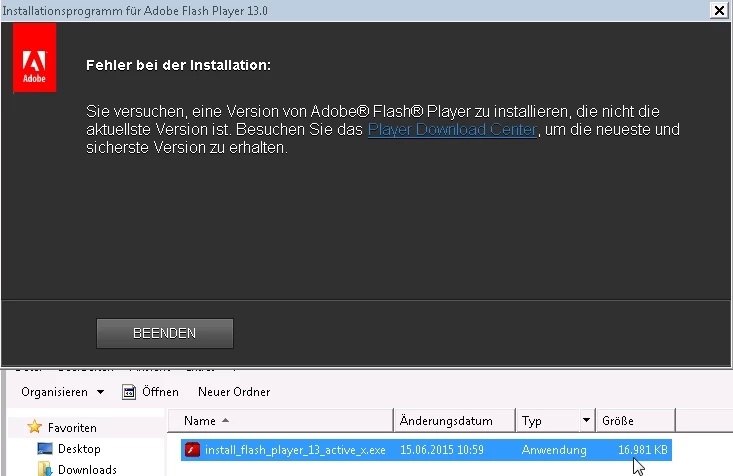
When you run the file install_flash_player_13_active_x.exe I get on many computers, the German (translated with Google Translate) error message:

"Error during installation: You try to install a version of Adobe Flash Player that is not the latest version. Visit to get the latest and most secure version of the Player Download Center. "

Why these "wrong" error message on many computers? Why does the installation on other computers without any Problems?

in German:

Beim Installieren der aktuellsten Extended Support Release (ESR) - Flash Player 13.0.0.292 erhalte ich die Meldung, dies sei nicht die aktuellste Version und kann die Installation nicht fortsetzen. Was ist falsch?

Beim Ausführen der Datei  install_flash_player_13_active_x.exe erhalte ich auf vielen Computern die deutsche (übersetzt mit Google Translate) Fehlermeldung:

„Fehler bei der Installation: Sie versuchen, eine Version von Adobe Flash Player zu installieren, die nicht die aktuellste Version ist. Besuchen Sie das Player Download Center, um die neueste und sicherste Version zu erhalten.“

Warum erhalte ich diese „falsche“ Fehlermeldung auf vielen Computer? Und warum funktioniert die Installation auf anderen Computern ohne Probleme?

Message was edited by: Testilie Bzam

This topic has been closed for replies.
Correct answer _maria_

Hi bzam,


You'll need to run the uninstaller (Uninstall Flash Player | Windows) first and then the ESR build will install.

--

Maria

1 reply

_maria_
Community Manager
_maria_Community ManagerCorrect answer
Community Manager
June 15, 2015

Hi bzam,


You'll need to run the uninstaller (Uninstall Flash Player | Windows) first and then the ESR build will install.

--

Maria

June 16, 2015

Halllo Maria,

thank you for pointing out the procedure (https://helpx.adobe.com/flash-player/kb/uninstall-flash-player-windows.html) for deletion. Your tip has helped me a lot.

For an unattended (silent) Installation (ESR-Update) I use from now on the following procedure:

@echo off
REM https://helpx.adobe.com/flash-player/kb/uninstall-flash-player-windows.html
SET ACTIVEXEXE=install_flash_player_13_active_x.exe
SET PLUGINEXE=install_flash_player_13_plugin.exe
X:\uninstall_flash_player.exe -uninstall
if exist %windir%\system32\Macromed\Flash rmdir /S /Q %windir%\system32\Macromed\Flash
if exist %windir%\sysWOW64\Macromed\Flash rmdir /S /Q %windir%\sysWOW64\Macromed\Flash
rmdir /S /Q "%appdata%\Adobe\Flash Player"
rmdir /S /Q "%appdata%\Macromedia\Flash Player\macromedia.com"
rmdir /S /Q "%appdata%\Macromedia\Flash Player"
X:\%ACTIVEXEXE% -install
X:\%PLUGINEXE% -install
if exist %windir%\system32\Macromed\Flash copy X:\mms.cfg %windir%\system32\Macromed\Flash\mms.cfg
if exist %windir%\sysWOW64\Macromed\Flash copy X:\\mms.cfg %windir%\sysWOW64\Macromed\Flash\mms.cfg

REM mms.cfg:
REM AutoUpdateDisable=1
REM SilentAutoUpdateEnable=0