


bold text in toc won't display

Copy link to clipboard
Copied
I've formatted my toc to display titles as bold text but for some reason it will not display all titles as bold text. By the way, it's russian and all lower headings in the screenshot should be bold. I know I have displayed a screenshot for a LOF but it goes for both TOC and LOF. I am aware of the difference in layout methods.
reference page
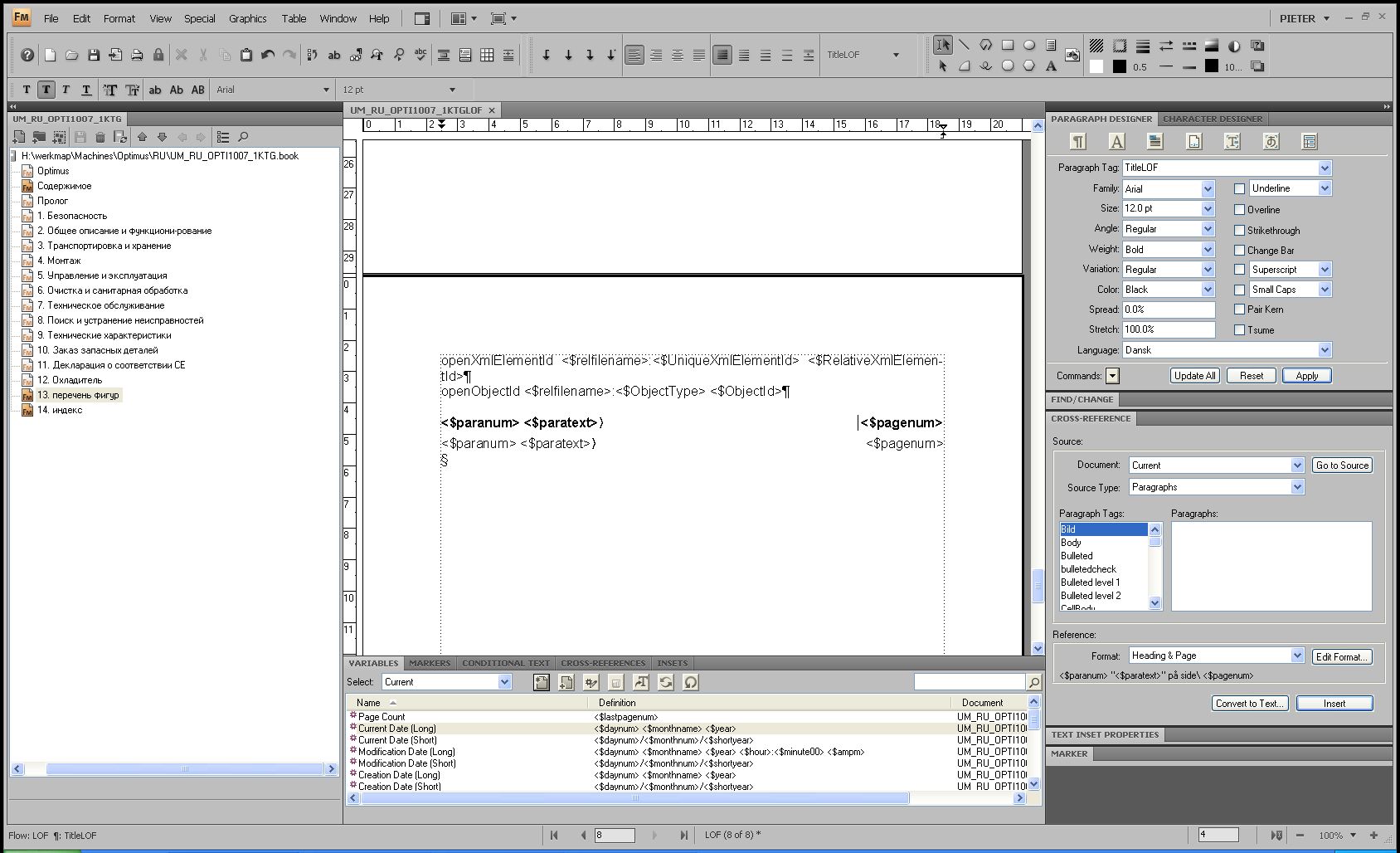
body page


 13
Replies
13
13
Replies
13


Copy link to clipboard
Copied
Your reference page looks as if you have two TOC entries, the only difference appears to be bold or plain. I am guessing that these apply to different TOC levels, correct?
If the above is correct, check that each of your titles is using the same style. Maybe you have two styles that look the same but one is being applied to some cases and the other is being applied to other cases.
Copy link to clipboard
Copied
Hi Van,
The following are in the respective documents: Heading 1, heading 2, heading 3 and title (of chapter) are all in the TOC. All should be numbered displayed and have their page number outlined on the right of the column. This all works but I cannot get the text of the title chapter to display as bold.
The LOF (displayed in screenshots) contains the title (of chapter) and the tag figure. Again, the title paragraph tag should be bold.
One remark should be made. i have imported the Toc formats to this toc from a toc that does work.
Copy link to clipboard
Copied
Pieter,
The only other thing I can suggest is to make sure that the paragraph tag for the chapter TOC paragraph IS applied to the appropriate paragraph on the reference page AND that font bolding IS INDEED in the chapter TOC paragraph tag, that is, make sure that you have not applied the bold as an override to the chapter TOC paragraph tag.
Good luck,
Van

Copy link to clipboard
Copied
Van Kurtz wrote:
Pieter,
The only other thing I can suggest is to make sure that the paragraph tag for the chapter TOC paragraph IS applied to the appropriate paragraph on the reference page AND that font bolding IS INDEED in the chapter TOC paragraph tag, that is, make sure that you have not applied the bold as an override to the chapter TOC paragraph tag.
Good luck,
Van
Thanks for making this point, Van!
While I was writing my suggestions, I kept thinking that I was leaving something out. I believe you'e hit it. Namely, when Pieter creates and applies the bold paragraph format on the body page of the generated LOF, if format is not preserved by saving the LOF at that time, the next generation will overwrite the paragraph format definition and the bold will be lost.
HTH
Regards,
Peter
_______________________
Peter Gold
KnowHow ProServices
Copy link to clipboard
Copied
Hi guys
I need to have a good look at the documents and your suggestions, but things are starting to make sense. Peter's suggestion of using <boldface> was not successful but perhaps the saving moment is of more importance and I just have to figure out better how this generation works.
Thanks, and I'll keep you updated.
Pieter
Copy link to clipboard
Copied
Pieter van de Sande wrote:
I've formatted my toc to display titles as bold text but for some reason it will not display all titles as bold text. By the way, it's russian and all lower headings in the screenshot should be bold. I know I have displayed a screenshot for a LOF but it goes for both TOC and LOF. I am aware of the difference in layout methods.
reference page
body page


I can't tell the following from the screen shots:
* Is the bold reference page prototype line formatted by selecting its text up to the paragraph return, and applying bold directly from Format > Style > Bold, by Ctrl+B, or by applying a character format whose only attribute is bold?
* Is the paragraph format of the bold reference page prototype line defined with the bold attribute in it?
In some fonts, bold may be named bold, Bold, Bolded, bolded, or other names, and unless the exact name is used, the bold look won't appear.
Also, the bold feature of some fonts doesn't appear bold on screen, but may appear correctly in printed or PDF output. Does your output appear in bold correctly?
It's possible that one or more of these formatting methods that has been applied to the problem line, is interfering with the desired bold format instruction. Try clearing out all formatting for the problem line, deleting the line, and rebuild it from scratch.
You may want to experiment with the method of applying a character format within your generated file's prototype line by inserting a building block, such as <BoldFace> to turn on the character format named BoldFace, and a building block like </BoldFace>, or </>, to turn it off. For example, <BoldFace><$paratext></> <$pagenum> would generate something like:
Paragraph heading 1
Perhaps trying this approach will help find the problem, and its solution.
HTH
Regards,
Peter
_______________________
Peter Gold
KnowHow ProServices
Copy link to clipboard
Copied
Hi Peter
,
The formatting in LOF is applied by selecting the text on the body page and formatting the paragraph tag for the text to be bold. In the TOC it is formatted by doing the same on the reference page.
I haven't produced any form of output yet so I do not know how it is displayed. The program crashes when i want to update the book so I need to look into that first.
I will try your suggestions.
Thanks
Pieter
Copy link to clipboard
Copied
Pieter van de Sande wrote:
Hi Peter
,
The formatting in LOF is applied by selecting the text on the body page and formatting the paragraph tag for the text to be bold. In the TOC it is formatted by doing the same on the reference page.
I haven't produced any form of output yet so I do not know how it is displayed. The program crashes when i want to update the book so I need to look into that first.
I will try your suggestions.
Thanks
Pieter
Hi, Pieter:
You might not think that the different steps you're using to format the generated entries would cause the difference, FrameMaker can have good reason for working differently.
Is there a reason for not formatting the prototype line in the LOF on the reference page, rather than on the body page - the same method you use for the TOC?
When working with FrameMaker's generated files, you need to be keenly aware of which file you're working with. I don't have FrameMaker available at the moment, but I believe it works something like this (it may have changed from older FrameMaker versions to newer ones:)
* When you create a new generated file FrameMaker creates the generated file's reference page and the corresponding reference page text flow; they are named for the kind of generated file, such as TOC, LOF, etc.
* I think the location of the reference page and its flow depend on whether you're generating from a stand-alone file, or from a file that belongs to a book. The reference page and flow may be created in the generated file, or in the source file, but not in both.
* In later FrameMaker versions, I believe the book file is more involved with the processing than in earlier versions. In the more-recent versions, I believe that the output of generated files is taken from the generated-file reference pages and flows in the first file in the book list.
* If there is a generated reference page and its flow in the source file, and also in the generated file, there's a possible precedence conflict over which settings control the output of the generated file. Formatting properties set in the higher-precedence file will be applied, and those in the lower-precedence file will be ignored.
Because the TOC is working correctly, follow the same procedure for the LOF. Verify that there reference page and flow are in the same file that works for the TOC - if the TOC reference page is in the TOC itself, then verify that the LOF reference page is in the LOF file, and verify that there's no LOF reference page in any of the source files in your book. If the TOC reference page is in the first file in the book and not in the TOC, then create the LOF the same way.
HTH
Regards,
Peter
_______________________
Peter Gold
KnowHow ProServices
Copy link to clipboard
Copied
"Is there a reason for not formatting the prototype line in the LOF on the reference page, rather than on the body page - the same method you use for the TOC?"
- No, not really. Someone told me that there was a differerence in layout methods for TOCs, LOFs and IOMs and the TOC had to be formatted on the reference page, while the others had to be formatted on the body page. Also, I was told this also had to do with the importing of formats and formats for TOCs and LOFs etc. were not interchangeable.
"Because the TOC is working correctly, follow the same procedure for the LOF. Verify that there reference page and flow are in the same file that works for the TOC - if the TOC reference page is in the TOC itself, then verify that the LOF reference page is in the LOF file, and verify that there's no LOF reference page in any of the source files in your book. If the TOC reference page is in the first file in the book and not in the TOC, then create the LOF the same way."
- The working of TOC differs per language and seemingly also per generation. Applying bold text to the lines on the reference page is effective but not for all entries of the same heading. I have tried regenerating and opening source files and reformatting the source file text but figured, since the user guids mentions correcting errors is needed after generation of files, that it is a normal issue. Also, the choice of language seems of effect on generated files. Upon creating an index for a russian book it entered symbols and one list of entries probably because of not recognizing the used alphabet.
Copy link to clipboard
Copied
Pieter,
You said:
Someone told me that there was a differerence in layout methods for TOCs, LOFs and IOMs and the TOC had to be formatted on the reference page, while the others had to be formatted on the body page. Also, I was told this also had to do with the importing of formats and formats for TOCs and LOFs etc. were not interchangeable.
As you may have discovered, there is no difference between how various generated files are formatted. Furthermore, there is no difference how these formats are imported into other documents. When you import formats, be sure to select Reference Pages, Paragraph Formats, and Character Formats; these should cover everything required for the generated files. Note that you can format each generated file differently, because each has its own reference page.
Applying bold text to the lines on the reference page is effective but not for all entries of the same heading.
Applying bod to a paragraph on the reference page is not enough. You need to make it part of the paragraph format tag itself. When FrameMaker formats a generated file, it applies the appropriate paragraph format tags; to my knowledge, it does not apply any overrides that you have applied on the reference page (not sure about the latter point; I have not tested it).
This is my workflow: I add the desired generated file to the book and let FrameMaker update the book. I open and save the newly generated file. Then I look in the reference pages; a new reference page is created for the generated file, with default formatting. I then format the reference page the way I want it to be, saving all my changes in the Frame-created paragraph format. Note that you now have a new reference page and a new paragraph format, or possibly several new paragraph formats if there are several levels to the generated content. Then I import the new reference page and the new paragraph formats into all the other files in my book; this makes sure that FrameMaker always uses the correct reference page and format. This latter may be overkill, because FrameMaker uses only one reference page and one set of formats in a generated file; but I do this so that I know Framemaker is using the correct set.
I have no idea why FrameMaker would treat different languages differently, other than maybe the font used for the other language does not have a bold variation in it.
Hope this helps,
Van
Copy link to clipboard
Copied
Pieter van de Sande wrote:
"Is there a reason for not formatting the prototype line in the LOF on the reference page, rather than on the body page - the same method you use for the TOC?"
- No, not really. Someone told me that there was a differerence in layout methods for TOCs, LOFs and IOMs and the TOC had to be formatted on the reference page, while the others had to be formatted on the body page. Also, I was told this also had to do with the importing of formats and formats for TOCs and LOFs etc. were not interchangeable.
I the past I'm sure I posted on some FrameMaker forum that there is an important difference between defining the paragraph format of a generated-file's prototype line on the generated file's body page vs. its reference page. The issue is that the generated file's body-page text-frame width may differ from the one on the reference page. If the body-page's text frame or column width is narrower than that on the reference page, defining tab stops on the reference-page instance of the prototype paragraph format will create badly-wrapped generated entries. The content of the generated entries is not affected by this mismatch, only the wrapping of the entries.
Perhaps you're referring to this.
HTH
Regards,
Peter
_______________________
Peter Gold
KnowHow ProServices
Copy link to clipboard
Copied
after comparing books of different languages and versions and how these were made up
and formatted I concluded that probably during translation something went wrong as the original and other (translated) files were correct and identically made out. I have not been able to correct the russian manual for mistakes but have been able to optically erase them.
Copy link to clipboard
Copied
I'm thinking the problem is at the source. Importing formats from any toc does not make a difference so I conclude from that that my chapters are corrupt in some way. I have tried reformatting them but that did not make much difference.


Get ready! An upgraded Adobe Community experience is coming in January.
Learn more
 AdChoices