


- Home
- FrameMaker
- Discussions
- Re: Conversion table-nesting elements
- Re: Conversion table-nesting elements
Conversion table-nesting elements

Copy link to clipboard
Copied
Hi,
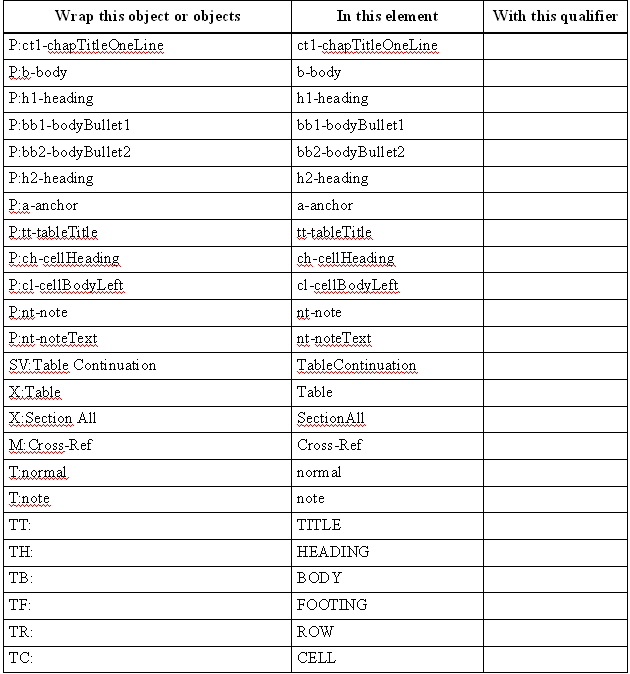
I am new to structured FM and was trying to migrate a few unstructured FM documents to structured using the "conversion table". After generating the conversion table, I am not able to create a proper heirarchy (nesting) of the elements.
Could any one help me with the basics of 'element nesting'. I read the documentation provided by Adobe and tried to do it, but without much success.
The generated conversion table is given below.
Regards,
Radhin


 4
Replies
4
4
Replies
4



Copy link to clipboard
Copied
Hi Radhin,
It would be difficult to provide a comprehensive explanation over this forum. It's a big subject with lots of complexities. If you are unable to get it figured out, you may need to consider paying for some kind of training or to have someone do it for you.
That said, I have some working samples here that may help you learn how it all works. The samples are old but I believe they still function OK.
http://www.weststreetconsulting.com/WSC_ResourceDownloads.htm
Good luck,
Russ

Copy link to clipboard
Copied
Radhin,
Do you already have a structured template? Are you developing your own element definitions or basing your structured documents on an industry-standard XML DTD or schema?
It is always tempting to move into structure by converting existing unstructured documents. However, building a conversion table can be separated from the other steps in putting together a structured environment and it's often easier to gain some experience with the other components before adding in the last step. Besides, starting with the conversion table can have a subtle effect on the results--you might wind up with element definitions that are optimized for converting legacy documents rather with definitions that are optimized for creating new content.
That said, the generated conversion table is essentially a list of the objects in your unstructured document that must be mapped to elements. As you've noted, it produces a very flat structure. In most projects, in the finished conversion table, entries in the second column are completely replaced and several new rows are added. Remember that, in each row, the first column contains an expression involving objects in the original unstructured document and/or those in the partially converted document. The second column specifies an element to wrap around content that matches the pattern in the first column.
Your table has a row with first column P:bb1-BodyBullet1. Instead of mapping it to an element with the same tag as the paragraph, you could map it to an element tagged Item. Then you could add another row with Item+ in the first column (which means a sequence of Item elements) and List in the second column.
Is bb2-BodyBullet2 for nested lists? If so, the structure can be more complicated.
--Lynne
Copy link to clipboard
Copied
Thanks, Lynne, for helping me out.
As Russ says, there is a lot to learn.
Luckily, I got this link: http://tmaldous.com/2013/06/10/7-part-e-seminar-series-unstructured-to-xml-framemaker-10-instruction...
I am learning the concepts through these recored sessions.
Regards,
Radhin
Copy link to clipboard
Copied
Thanks, Russ.
I will try them out.


Get ready! An upgraded Adobe Community experience is coming in January.
Learn more
 AdChoices