


Copy link to clipboard
Copied
When I have the following line in a FrameMaker Script:
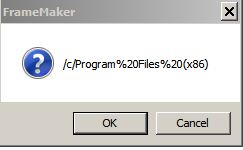
Alert(Folder.commonFiles.path)
I get the following:
I would have expected:
c:/Program Files(x86)/Common Files


 1 Correct answer

To summarize:
var oFile = Folder.commonFiles.path;
$.writeln(oFile);
var oFile = File.decode(Folder.commonFiles.path);
$.writeln(oFile);
var oFile = File.decode(Folder.commonFiles);
$.writeln(oFile);
var oFile = File.decode(Folder.commonFiles.fsName);
$.writeln(oFile);
leads to
/c/Program%20Files%20(x86)
/c/Program Files (x86)
/c/Program Files (x86)/Common Files
C:\Program Files (x86)\Common Files
So you can pick your solution, that fits for you

 9
Replies
9
9
Replies
9


Copy link to clipboard
Copied
You can get the expected result using fsName as follows:
Alert(Folder.commonFiles.fsName);


Copy link to clipboard
Copied
Or leave off the .path property. The commonFiles property is already a "folder". When you ask for .path, it gives you the next folder up the tree.
Copy link to clipboard
Copied
But that would just return the Object type of 'Folder'...
Copy link to clipboard
Copied
I am not exactly sure what the original poster is looking for. I thought he was wondering why "Common Files" got dropped, but maybe I misunderstood.
Copy link to clipboard
Copied
"Common Files" is dropped because that's the purpose of the path property.
bobsteamer If you use the ESTK's Object Model Viewer you will find the definition of the Folder object and its properties. The Path property is defined as "The path portion of the object absolute URI for the referenced file, without the folder name."
Copy link to clipboard
Copied
To summarize:
var oFile = Folder.commonFiles.path;
$.writeln(oFile);
var oFile = File.decode(Folder.commonFiles.path);
$.writeln(oFile);
var oFile = File.decode(Folder.commonFiles);
$.writeln(oFile);
var oFile = File.decode(Folder.commonFiles.fsName);
$.writeln(oFile);
leads to
/c/Program%20Files%20(x86)
/c/Program Files (x86)
/c/Program Files (x86)/Common Files
C:\Program Files (x86)\Common Files
So you can pick your solution, that fits for you
Copy link to clipboard
Copied
Klaus, there is no need to use File.decode() on line 7, fsName already does that...
Copy link to clipboard
Copied
Hi Ian,
I know. That is only to show all different ways, results and syntaxes.
Copy link to clipboard
Copied
Originally I was looking for a preset path to the Program Folder but could only find "commonfiles" but now realise that ".path" is a path to the folder.
>leads to
>/c/Program%20Files%20(x86)
which is what I really wanted - this has solved my problem which was to call an external installed program in my script !
Sorry for the delay in replying but somehow I was not notified that there had been any replies - Many thanks.


Get ready! An upgraded Adobe Community experience is coming in January.
Learn more
 AdChoices