


- Home
- FrameMaker
- Discussions
- Re: FrameMaker 12 and czech export to epub does no...
- Re: FrameMaker 12 and czech export to epub does no...
FrameMaker 12 and czech export to epub does not work


Copy link to clipboard
Copied
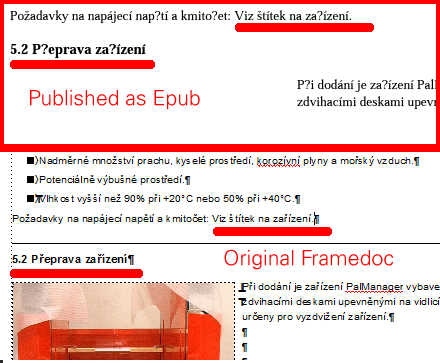
I have a number of files done in FrameMaker 12 and want to export them as epub files. While I can make FrameMaker generate an epub file, I can not make it export the the text with correct czech characters.
Also the export wizard does not seem to be able to handle tables. What am I supposed to to do with documents containing tables?
regards
Bjørn
Bjørn Smalbro - FrameMaker.dk


 5
Replies
5
5
Replies
5


Copy link to clipboard
Copied
> ... I can not make it export the the text with correct czech characters.
What do you get instead?
How are you implementing the Czech text?
Unicode, or the legacy route of Frame roman characters with a codepage font applied?
Copy link to clipboard
Copied
I am running ArialCE and all character and paragraph tags have been set to czech in their language settings. On the reference pages export settings have been set to UTF 8.
Bjørn Smalbro - FrameMaker.dk
Copy link to clipboard
Copied
Based on a few quick searches:
- ArialCE is a codepage font, and not Unicode.
- EPUB format appears to require Unicode (UTF-8).
Your document actually contains basic 8-bit Frame roman characters (Western European/North American character code points, roughly ISO 8859). The Paragraph formatting that you are applying is telling the rendering engine (Frame during edit, Acrobat Reader in PDF) to substitute the ArialCE glyphs for each codepoint (apply a codepage in Windows parlance). This is failing for EPUB workflow.
EPUB format apparently does not support codepage localization. It requires multi-byte Unicode. What may be happening here is that what surviving the output process is the original Frame roman codepoints, albeit encoded as UTF-8.
If so, you need to:
- switch to using a reasonably well populated Unicode font (Arial Unicode MS if you can't find anything else handy)
- use only the Spelling setting for localization in Paragraph Designer
- [ the hard part ] convert all your text from Roman+codepage to its Unicode codepoint equivalents
There may be tools available for batch converting roman text (that expects a codepage overlay) to native Unicode. I've never needed to do this, and have no idea if Frame can manage it on open or output. I'm sure it's a common problem for pre-FM8 legacy documents.
Copy link to clipboard
Copied
Hi
Thanks for your answer. It does sound right but in this case the trouble is from somewhere else. I discovered that the trouble arises from Adobe Digital Edition which is the default epubreader installed from Technical Communication Suite. In the link below the problem is discussed.
http://beranger.org/2013/05/13/epub-and-diacritics-a-problem-and-a-solution/
When using another epub reader like the free epubreader:
http://www.epubfilereader.com/index.html
the epubs show correctly. So the conversion is actually ok - but Adobe Digital Edition is not so good.
regards
Bjørn Smalbro
Bjørn Smalbro - FrameMaker.dk
Copy link to clipboard
Copied
> When using another epub reader ... the epubs show correctly.
> So the conversion is actually ok - ...
Interesting - entirely apart from what is happening in Adobe Digital Editions ...
Arial CE is presumably a code page 850 or 1250 central/eastern European font.
It contains some glyphs not present in the
A1h to FFh code point range of ISO 8859-1 or
00A1h to 00FFh range of Unicode Latin-1 Supplement.
The specific characters that got rendered as "?" are now in the Unicode 0100 to 017F Latin Extended-A script.
So if you entered all of the text using the legacy route, something in the workflow, somewhere between Frame opening the file and writing to the EPUB, is converting the supplementary Latin character (Czech) code points from 8-bit to entirely different UTF-8 multi-byte.
That's not a trivial task. If the original font is present on the system, the codepoint-to-glyph map can presumably be extracted from the cmap data (TTF) or a similar structure in the Type 1 font files. If the font is not present, whatever is doing the conversion would have only the font name to go by, and would have to have it's own tables equivalent to cmap for the many commonly encountered typefaces.


Get ready! An upgraded Adobe Community experience is coming in January.
Learn more
 AdChoices