

Inspiring
December 24, 2023
Question

how to have this graphic

  • December 24, 2023
  • 18 replies
  • 1843 views

Hello,

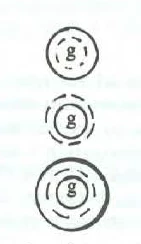
I would like to create this graphic in FrameMaker. Is it possible to create it inside Frame Maker, and how ?

 

This topic has been closed for replies.

18 replies

Barb Binder
Community Expert
January 2, 2024

Hi Pierre:


Run into paragraph can be either on the left or right side (or side closer or further from binding edge), but it's always aligned with the top of the paragraph. It's meant for a drop cap like you might see in a novel (but I've never seen in technical documents). Yours is set to left/gauche like the example below, so it is aligned with the top of the first paragraph and on the left side.


The spacing comes down to simple math. For the image above to have equal spacing to the right and below, the frame containing the image needs to end at the previous baseline, or even slightly above. Then adjust the spacing/gouttière value.


FrameMaker doesn't have an option to anchor in the middle of the paragaph and have text wrap around it, probably because it makes it hard to read the text that hops over the image. If you really need it in the center of the paragraph and are willing to make the text harder to read, you can add the frame the page and then enable Run Around Properties. The text will do what you want, but it will not be anchored so you will have to move it manually if the text reflows.


~Barb

~Barb at Rocky Mountain Training
Inspiring
December 29, 2023

Hi Barb,

Thank you for the videos. This is the second video that is corresponding to my needs ("Run into paragraph" mode). My goal is to have the text surrounding completely the anchored frame.

But if I try to do the same, I noticed that  :

1) First I put my cursor at the vertical red line (at the middle of the text).

2) Then I insert the anchored frame (with "Run into paragraph")

Problem : FM put the anchored frame at the top left of the paragraph (not at the cursor position at the middle of the text). Why ?

3) on your video the text is surrounding perfectly the anchored frame, but it is not the case for me. Why ?


Barb Binder
Community Expert
December 28, 2023

Hi Pierre:


Here's what I was trying to say in my post from Dec 27:


This option allows you to use the paragraph style to control the position of the graphic. But in your last two screen shots, you have ¶¶¶s sitting to the right of the graphic. Is this a better option?


If I missed the mark on both, please sketch what you're looking for, and we can give you a hand getting there. 


~Barb

~Barb at Rocky Mountain Training
Inspiring
December 28, 2023

Hi Barb,

If I put my cursor outside the anchor, I have this setting :


Barb Binder
Community Expert
December 27, 2023

Hi Pierre:


Can you share the last screen shot again with View > Text Symbols enabled, and your cursor on the anchor ¶?


~Barb

~Barb at Rocky Mountain Training
Inspiring
December 27, 2023

Hi Barb,

1) I have created an anchored frame "inserted into the paragraph".

2) I have set the anchored frame/gouttiere to 0 :


3) I have selected the anchored frame and created a new paragraph designer called "anchored" with 5pt above/below the paragraph :

Is it OK ?

Barb Binder
Community Expert
December 27, 2023

Hi Pierre:


When you set the anchored frame position to "at insertion point/insérer dans paragraphe" the bottom of the frame will align with the baseline (the bottom of the letters). The value for "gouttière" will move the frame up or down from its original alignment with the bottom of the letters.


Assuming you want the image on its own line, I would set that value back to 0 and instead, create a paragraph style (commonly called "anchor") and set the space above, below etc in the Paragraph Designer. Import or paste the image into the anchored frame.


Then you can shrinkwrap the frame by tapping Esc m p sequentially. This does two things at one time: it tightens up the frame to match the graphic inside, and it anchors at insertion point. 


~Barb

~Barb at Rocky Mountain Training
Inspiring
December 26, 2023

I have chosen to put my graphic inside an anchored frame (inserted into the paragraph) , and I tried to put some text around the anchored frame.

I have set an offset of 30 pt around it, but you can see that the distance between the anchored frame and the text is different : at the top, at the right, at the bottom. Why ?


Bob_Niland
Community Expert
December 26, 2023

re: I have set an offset of 30 pt around it

What is "it"?
The anchored frame and each element in it can have their own run-around properties. Indents, space-above & space-below also arise from the surrounding text.

Inspiring
December 26, 2023

About the distance between the anchored frame and the text around, I have used this window :

Is there other window that could set this ?

Inspiring
December 26, 2023

Do I need to put my graphics in an anchored frame, to prevent them to be modified (like in that case) ?

frameexpert
Community Expert
December 26, 2023

FrameMaker's screen display is notoriously bad so it probably won't matter. You will have to use Control+L periodically anyway. However, if you want your graphics to float with the document's text, then you should put them in anchored frames.

Inspiring
December 26, 2023

After having created a circle here, I have put my cursor before the graphic, and I have noticed that by using the "enter" key several times, it erases the top of the graphic. Why ?

The cursor is actually at the red line.


frameexpert
Community Expert
December 26, 2023

Press Control+L to refresh the screen.