- Home
- FrameMaker
- Discussions
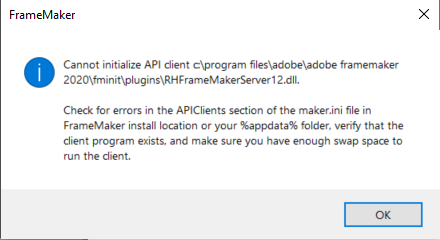
- I get this two error dialog boxes while starting u...
- I get this two error dialog boxes while starting u...
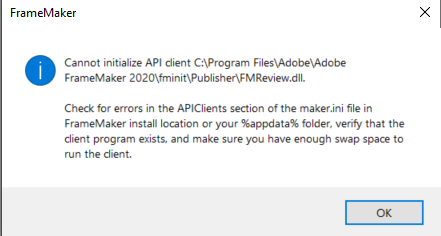
I get this two error dialog boxes while starting up the Framemaker 2020.

Copy link to clipboard
Copied



 8
Replies
8
8
Replies
8




Copy link to clipboard
Copied
Are you all patched up? Check Help > Updates to check. Did you install FM with Admin rights?
Copy link to clipboard
Copied
Yes my IT department installed it with admin rights. Do I need to be running it as an admin also to not see these errors?
Copy link to clipboard
Copied
Won't hurt to try. I forget what 16.0.1.817 represents in FM version, but were you able to update it?
Copy link to clipboard
Copied
I did try updating.. it said the current version is up-to-date..
Copy link to clipboard
Copied
See this thread for an idea - https://community.adobe.com/t5/framemaker/rhframemaker12-dll-error-message-on-opening-framemaker/m-p...
Or see https://helpx.adobe.com/contact/enterprise-support.other.html#framemaker for your support contact options.
Copy link to clipboard
Copied
Thank you for your reply.. I did try installing Adobe Acrobate Professional and still it didn't solve my problem. Working with my IT support to troubleshoot the errors..

Copy link to clipboard
Copied
Hi,
There are some more threads about such error messages. Specifically:
The poster commented a line out in maker.ini.
If you do the same, close FrameMaker and make a backup of maker.ini first!
The line in maker.ini is:
FMReview = Standard, Review FrameMaker Documents, fminit\Publisher\FMReview.dll, all, null, fminit\Publisher
To comment this out, add a semicolon at the beginning of this line.
More ideas:
Did you check, whether these dll files are in the FrameMaker installation folder? (I found them.
What happens, when you deactivate your anti-virus application?
Best regards
Winfried
Copy link to clipboard
Copied
Thank you for all these idea Winfried! I will try do the things you have mentioned here.. I have to work with my IT support guys to do all of this as they require Admin permissions!


Get ready! An upgraded Adobe Community experience is coming in January.
Learn more
 AdChoices