Copy link to clipboard
Copied
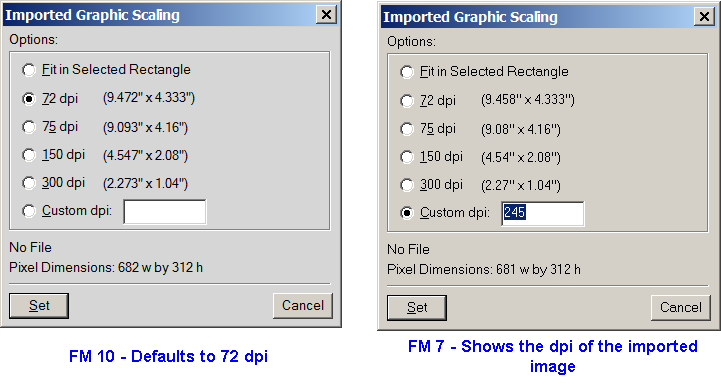
Just converted from FM 7.1 to FM 10 and noticed that the Import Graphic Scaling function does not work the same. It appear that FM 10 does not read the dpi of the imported file, where as FM 7 does. I have tested this on these files types, psd, png, jpeg all with the same results, it works in FM 7 and does not in FM 10. This really is a pain in the back. This requires the authors to reset the dpi even through it was set in Photoshop to a specific value.
My group uses Photoshop to scale and to set the dpi for our images before we import them into FM. In FM 7 images would import at the correct size (100%) and at the preset dpi.
Is there any way to set FM 10 to read the dpi from the imported files? ![]()

Copy link to clipboard
Copied
> ... where as FM 7 does.
What platform?
FM7.1 Unix does not show the encoded dpi. I won't be able to corss-check on Windows until this evening.
We're consequently accustomed to needing to know what our defaults are for various image types, and it's almost always 600 for TIFFs, so not a big deal.
Most of our rasters, other than bitmaps, come in as EPS, and FM never discusses dpi in the context of EPS, just percentage or overall dimensions. We work with that too.

Copy link to clipboard
Copied
We are using Windows XP and Windows 7
Copy link to clipboard
Copied
> I won't be able to cross-check on Windows until this evening.
FM7.0 on XP32 does pre-load the dpi for TIFF.
Get ready! An upgraded Adobe Community experience is coming in January.
Learn more