


Menu bar missing options?

Copy link to clipboard
Copied
Menu bar missing Format, View, Special, Graphics and Table options for one picky .fm file? The complete menu of options (File, Edit, Format, View, Special, Graphics, Table, CMS, Window and Help) DO appear when viewing most .fm files, but for some reason DO NOT appear with the picky .fm file?


 4
Replies
4
4
Replies
4


Copy link to clipboard
Copied
It's hard to visualize what you're experiencing. Can you provide a screenshot?
**Shots in the dark**
Is the file locked?
Have you renamed your prefs folder to force a new one to be built?
-Matt
FrameMaker Course Creator, Author, Trainer, Consultant
Copy link to clipboard
Copied
The file is "locked", although the other files I use are also "locked" when using? 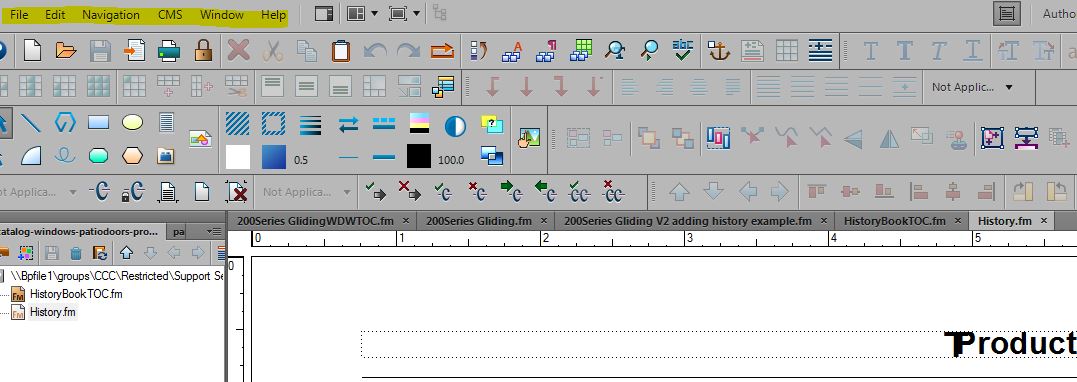
Copy link to clipboard
Copied
It looks like the file is set to View Only (Actually, that's what I meant when I said "Locked")
Try using the Esc, F,l,k shortcut.
To do this, press and release each of the following keys independently:
Escape (Esc)
Uppercase F
Lowercase L
Lowercase K
FrameMaker Course Creator, Author, Trainer, Consultant

Copy link to clipboard
Copied
Or just click the golden lock icon on your toolbar. It's a toggle between locked and unlocked, but the icon doesn't change—just the menus do.

~Barb


Get ready! An upgraded Adobe Community experience is coming in January.
Learn more
 AdChoices