
Exit
  • Global community
    • Language:
      • Deutsch
      • English
      • Español
      • Français
      • Português
  • 日本語コミュニティ
  • 한국 커뮤니티
0

Show/Hide the Screenshot

New Here ,
Dec 13, 2016 Dec 13, 2016

Can you please tell me how I can create a "Click to show/hide the screenshot" in my documents?  Thanks

1.7K
Translate
Report
Community guidelines
Be kind and respectful, give credit to the original source of content, and search for duplicates before posting. Learn more
community guidelines

correct answers 1 Correct answer

Community Expert , Dec 18, 2016 Dec 18, 2016

I have the 2015  Framemaker manual but I don't know what to look for.

To clarify, this is not something you can set up in FrameMaker. You can use Show/Hide Fields command in Adobe Acrobat to enable the user to click the button to show/hide the screen shot.
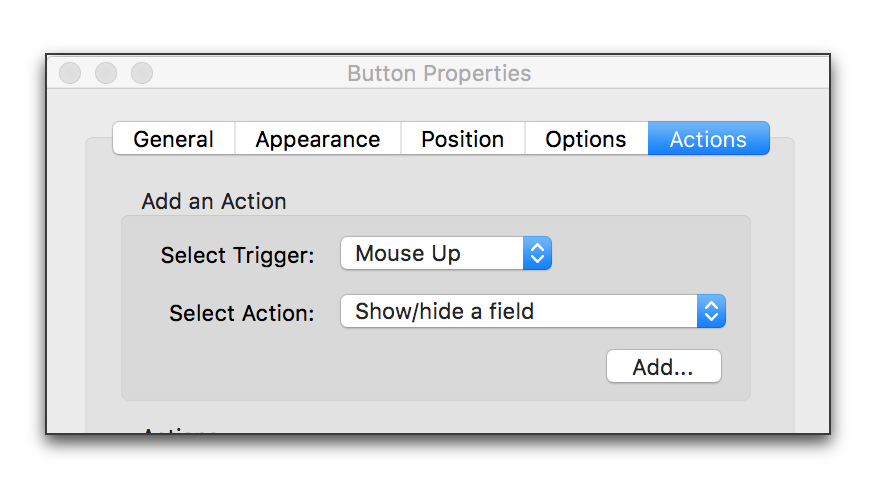
Acrobat Pross_001.png

Translate
Community Expert ,
Dec 14, 2016 Dec 14, 2016

Hi,

I do not know, if I understand you correctly.

You can change, if all your graphics in your document should be shown or hidden.

In the View menu click Options. Then activate or deactivate Graphics.

This option affects not only imported graphics files, but also all objects which are created with the Graphics tools.

Best regards

Winfried

Translate
Report
Community guidelines
Be kind and respectful, give credit to the original source of content, and search for duplicates before posting. Learn more
community guidelines
Community Expert ,
Dec 14, 2016 Dec 14, 2016

Or you can set up condition tags, with one called ScreenShots assigned to the anchored frames containing the screen shots, and then use Special > Conditional Text > Show/Hide Conditional Text to manage their display.

Adobe FrameMaker (2015 release)

Translate
Report
Community guidelines
Be kind and respectful, give credit to the original source of content, and search for duplicates before posting. Learn more
community guidelines
Engaged ,
Dec 17, 2016 Dec 17, 2016

My guess is desireed wants to generate a pdf from their Frame project, which shows a button (or somesuch) that will allow the user to show/hide the screenshot.

Translate
Report
Community guidelines
Be kind and respectful, give credit to the original source of content, and search for duplicates before posting. Learn more
community guidelines
Community Expert ,
Dec 17, 2016 Dec 17, 2016

desireed65070526​: we are all guessing at what you mean. Coming back to clarify would be helpful.

Translate
Report
Community guidelines
Be kind and respectful, give credit to the original source of content, and search for duplicates before posting. Learn more
community guidelines
New Here ,
Dec 18, 2016 Dec 18, 2016

Hi all

Sorry - it was the weekend here. The attached is what I want to do. When you click that link, it shows the screen capture below the text.

Thank you so much.

Translate
Report
Community guidelines
Be kind and respectful, give credit to the original source of content, and search for duplicates before posting. Learn more
community guidelines
Engaged ,
Dec 18, 2016 Dec 18, 2016

Hi desireed... unfortunately, no attachment.

Translate
Report
Community guidelines
Be kind and respectful, give credit to the original source of content, and search for duplicates before posting. Learn more
community guidelines
New Here ,
Dec 18, 2016 Dec 18, 2016

Hopefully this works.

Translate
Report
Community guidelines
Be kind and respectful, give credit to the original source of content, and search for duplicates before posting. Learn more
community guidelines
Community Expert ,
Dec 18, 2016 Dec 18, 2016

not yet.

Translate
Report
Community guidelines
Be kind and respectful, give credit to the original source of content, and search for duplicates before posting. Learn more
community guidelines
New Here ,
Dec 18, 2016 Dec 18, 2016

Capture1.PNG

Sorry - I was adding it from my outlook email. duhhh

Translate
Report
Community guidelines
Be kind and respectful, give credit to the original source of content, and search for duplicates before posting. Learn more
community guidelines
Community Expert ,
Dec 18, 2016 Dec 18, 2016

No worries! Do you want to be able to click that button in a PDF to toggle the display on the screen shot off and on? (If so, jagged peak​ wins the guessing game. )

You can set up show/hide fields to accomplish this in Adobe Acrobat (not free Adobe Reader and not in FrameMaker).

Translate
Report
Community guidelines
Be kind and respectful, give credit to the original source of content, and search for duplicates before posting. Learn more
community guidelines
New Here ,
Dec 18, 2016 Dec 18, 2016

Yes.  I have the 2015  Framemaker manual but I don't know what to look for.

Thanks for your patience

Translate
Report
Community guidelines
Be kind and respectful, give credit to the original source of content, and search for duplicates before posting. Learn more
community guidelines
Community Expert ,
Dec 18, 2016 Dec 18, 2016
LATEST

I have the 2015  Framemaker manual but I don't know what to look for.

To clarify, this is not something you can set up in FrameMaker. You can use Show/Hide Fields command in Adobe Acrobat to enable the user to click the button to show/hide the screen shot.

Acrobat Pross_001.png

Translate
Report
Community guidelines
Be kind and respectful, give credit to the original source of content, and search for duplicates before posting. Learn more
community guidelines
Community Expert ,
Dec 18, 2016 Dec 18, 2016

Use this button to add the screen capture:
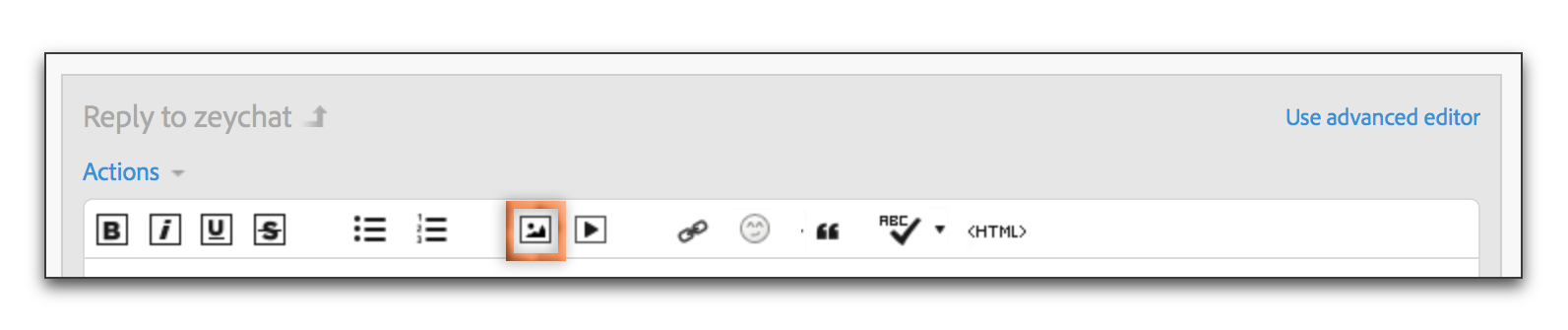
JIVE Add screen shot to reply.png

Translate
Report
Community guidelines
Be kind and respectful, give credit to the original source of content, and search for duplicates before posting. Learn more
community guidelines



