Copy link to clipboard
Copied
Adobe Fresco: Creativity for Everyone
Fresco 7.0 for iPad is here! Unleash your creativity with pixel, vector, and live brushes—all in one powerful app. Whether you’re sketching, painting, or animating, Fresco makes it effortless to bring your ideas to life.

|
Pose with precision Adjust individual strokes or whole illustrations while maintaining proportions, making it easy to refine your composition seamlessly. Whether crafting expressive linework or designing characters, the tool provides precise control while keeping your creative flow uninterrupted.
Want to learn more about the Pose tool? Click here. |

|
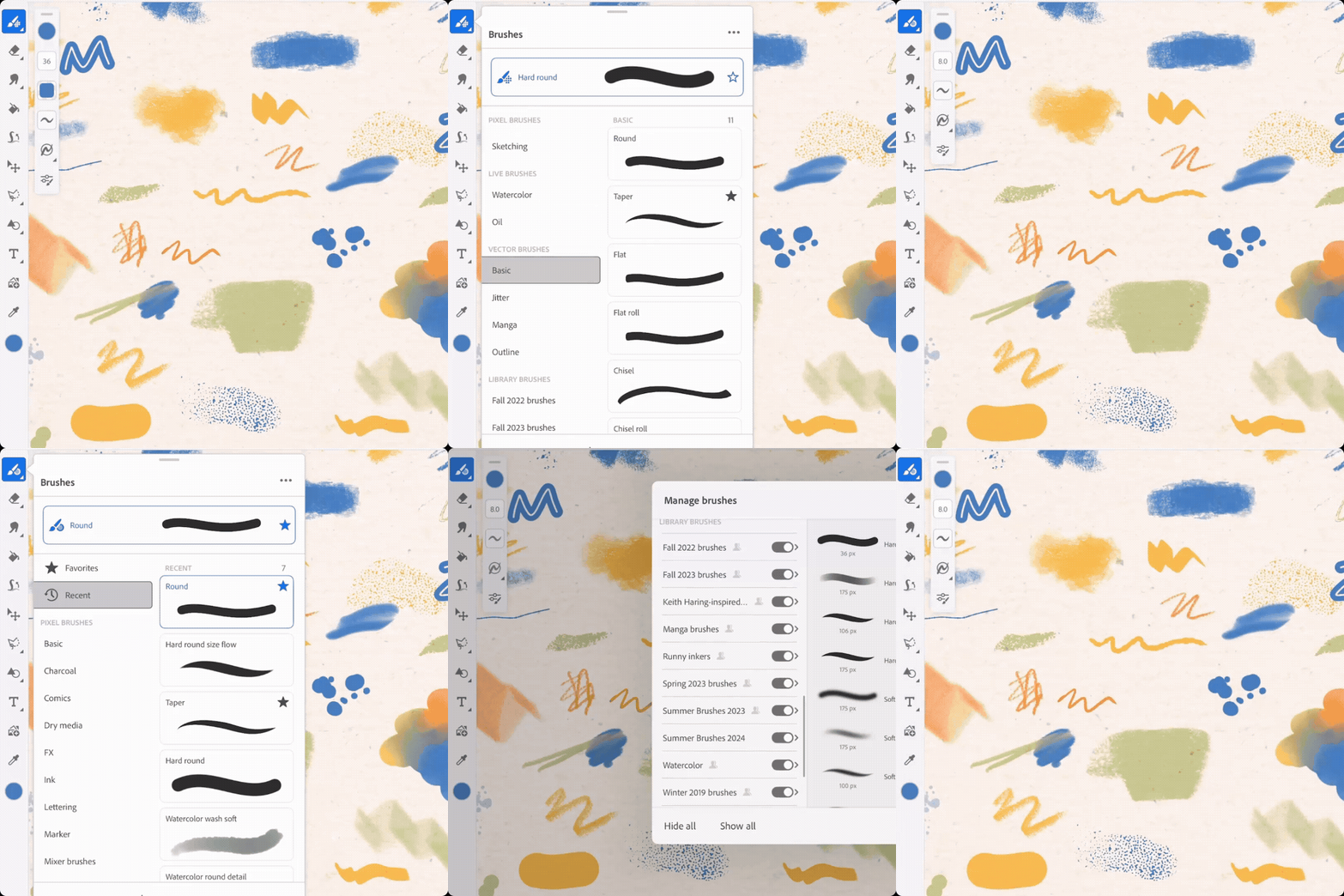
Explore the Redesigned Brush Panel Quickly locate your favorite brushes with a unified, streamlined panel that brings all brush types together for an intuitive browsing experience. The unified brush panel enhances usability and simplifies brush management.
Want to dive deeper into the redesigned brush panel? Check out the link here. |
Curious about what's new in Fresco? Take a look at the latest features here.
Want to see if Fresco works with your iPad? Click here.
Need help or feedback? Drop your questions here in the community, and we'll be happy to help.
We'd love to hear from you!
Try out Adobe Fresco, and let us know your thoughts. Feel free to reach out if you have any questions or suggestions!

|
|
If this was helpful, please click the Upvote icon in the top left corner of this post. Your feedback helps us improve the experience. Thank you! |
We'd love to see what you've created and hear about your experience or feedback! Click 'Reply' below.
Click 'Follow' below to bookmark this post for easy reference.
For other questions, feel free to start a new post in the community.
Copy link to clipboard
Copied
When do you plan to release new updates and features simultaneously across all platforms? I stopped using Fresco because of this support policy — and no, I won’t buy an iPad or an Apple computer because of it 🙂
Copy link to clipboard
Copied
I'm on Windows and can't locate the new 'pose' tool, is it because it's currently not on the windows version?
Copy link to clipboard
Copied
Still exploring the updates, but so far the new brush panel names/brush previews are too large (requiring too much scrolling). I would like an option to decrease the brush thumbnails so more could be seen at once.
Copy link to clipboard
Copied
The new brush selection is definitely very hard to navigate with the best option often being the favorites. While it takes time getting used to, atleast label the brush with pixel vector or live icons for better selection.
Copy link to clipboard
Copied
Hi,
I just updated Fresco ... and the vector brush icon has disappeared!!!!
where is it???
I can only work with pixel brushes
so irritating!
Copy link to clipboard
Copied
I am on IPAD pro.
Copy link to clipboard
Copied
O i just found it, is is all brushes now... prefered the order version. Ah well...
Copy link to clipboard
Copied
The new pose tool is very cool, thank you very much for that!
But I came here to say exactly same as most of the above - the new "redesigned" brush panel is really NOT an improvement for me, way too huge and now requires much more scrolling and searching... I don´t understand why would we need double brush preview (in the list and the huge one above)?? There is no good overview of the brushes anymore and the panel is way way way overcluttered. Please go back to the old version and don´t fix what was not broken!
I´m following very closely all the requests and updates for Fresco as I´m waiting desperately for more vector brushes and tools, and I have not seen a single request from anyone for such huge, redesigned and cluttered brush panel... We did ask though for more vector brushes and gradient tool since forever!
Copy link to clipboard
Copied
Indeed!
Copy link to clipboard
Copied
Is the pose feature coming to windows?
Copy link to clipboard
Copied
You wouldn't want the update, the menu will ensure an often confusing change.
Copy link to clipboard
Copied
When will the new Pose tool come to Windows?
Copy link to clipboard
Copied
i would love to have the old brushpanel back
this panel is user unfriendly (to the way i work) its endless scrolling and clicking instead of seamless like before
i work mainly in vector and have very little interest in having to choose and click multiple times before getting to any vector brushes- these new features bummed my experiences as an artist.
Copy link to clipboard
Copied
'Has anyone figured out how to downgrade to old version? Love the pose option and love adobe but hate the fact there is only one brush tab and would love the old version back ASAP 😞
Copy link to clipboard
Copied
Game Changer! This pose tool is so cool!!!
Get ready! An upgraded Adobe Community experience is coming in January.
Learn more