Participating Frequently
August 25, 2021
Answered

Assistance Trying to Make a Diagonal Wave Print Seamless

  • August 25, 2021
  • 11 replies
  • 2256 views

Hi,

I am trying to create the attached into a seamless print however, I am coming across issues making it seamless given than there is a slight angle change and I was hoping someone would be able to assist without having to completely change my pattern. It started off as layer one but I wanted to scale it down to 60% and rotate it 315 degrees and now it is no longer seamless :(. Thank you in advance for your help 🙂

PS. I couldn't get my AI file to upload so I've set up a link
Download Link 


This topic has been closed for replies.
Correct answer Ton Frederiks

Diagonal pattern tiles are difficult to create.

A very good document about diagonal patterns from Teri Petit (one of the first Illustrator programmers) can be found here: http://tpettit.verio.com/adobe/index.html

Dowload (right click): Constructing Diagonal Pattern Fills (AI 9) and remove the .ps

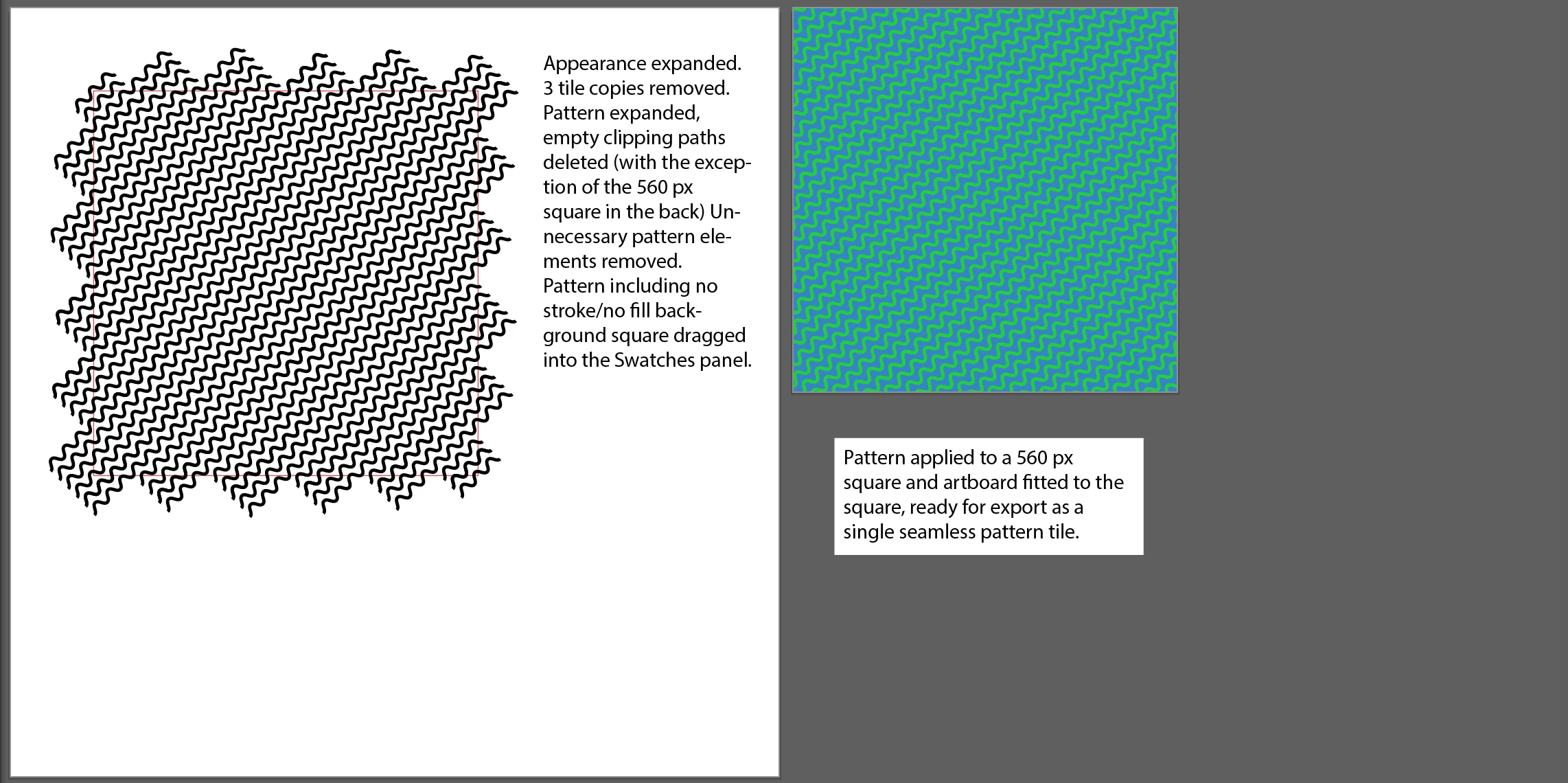
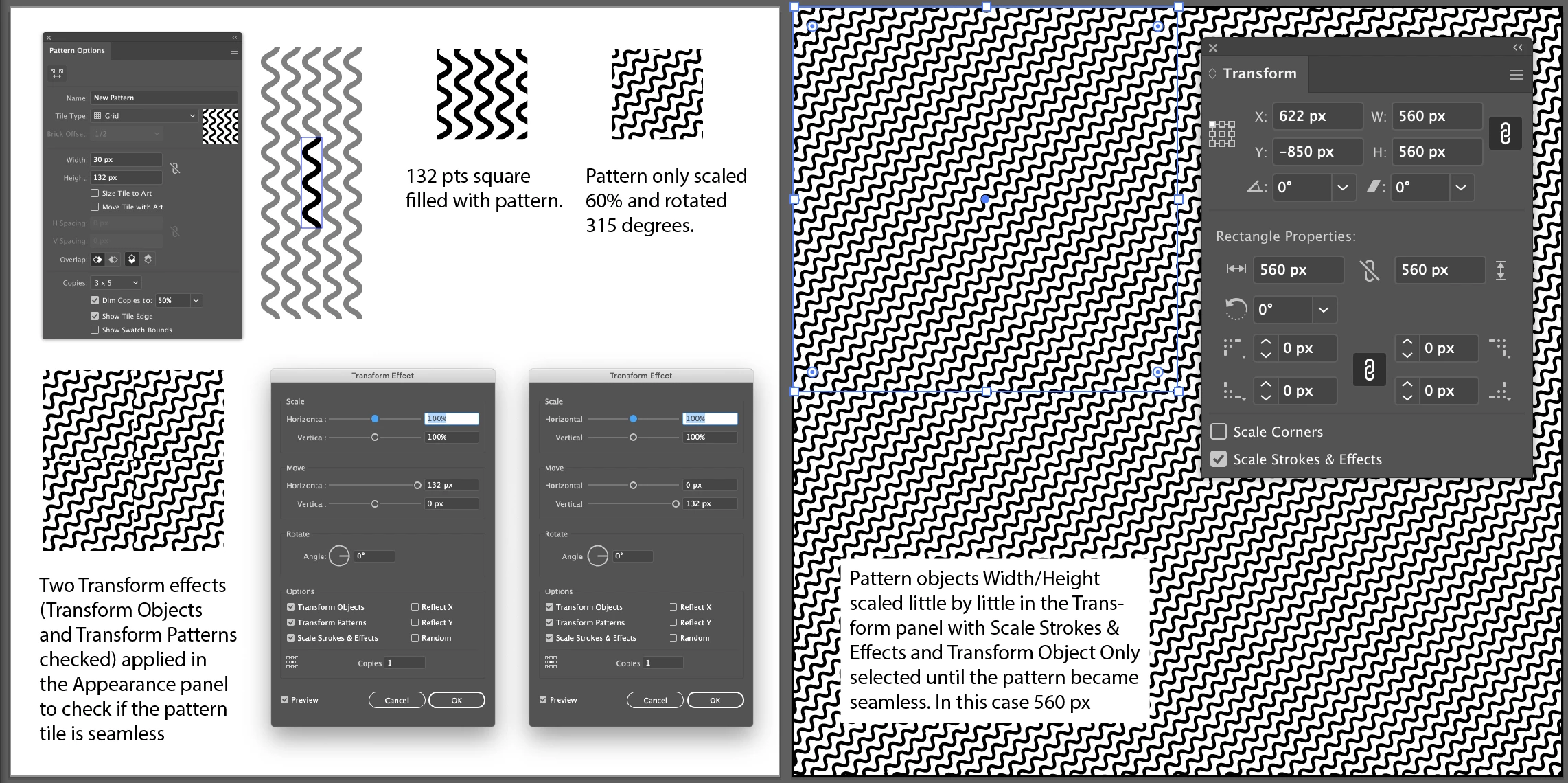
As far as I understand your problem, the end result should be a rectangle with a single seamless repeatable pattern element.

This is not easy to do with a transformed pattern.

The method shown below (using effects in the Appearance panel) is by scaling the pattern box until it looks seamless. This can result in very large tiles (to infinity and beyond!).


11 replies

Kurt Gold
Community Expert
August 31, 2021

That is a very inspiring site, Ton.


Sometimes pattern tiles can make you kind of insane, don't they?


Ton Frederiks
Community Expert
August 31, 2021

It has not happened yet 🙂

Kurt Gold
Community Expert
August 31, 2021

Ton, today I stumbled upon an entertaining movie from the great British Pathé that shows how right you were (compared to my stupid assumptions).


Take it as a compensation.


https://youtu.be/lre_HIVsiAc


Ton Frederiks
Community Expert
August 31, 2021

Thanks Kurt, I really enjoyed that!

Kurt Gold
Community Expert
August 27, 2021

You are right, Ton.


I overlooked or misunderstood the "cycle" detail.


Sorry for my naughtiness.


Ton Frederiks
Community Expert
August 27, 2021

No problem Kurt.

Participating Frequently
August 27, 2021

Hello,


Thank you for all your responses it has been really helpful. As Ton illustrated, I needed a complete pattern 'cycle' or 'repeat' in one rectangle to work with and I had a feeling I would need to make the space incredibly big to ensure a complete repeat was captured as Ton confirmed. Thank you for your help I have gone with that solution and scaled it down to ensure my file size is no extremely big. Thanks again!

Ton Frederiks
Community Expert
August 27, 2021

Glad to hear we could help.

Kurt Gold
Community Expert
August 26, 2021

OK, Ton. Let´s see what defaultwjwk88ifwaxg may answer.


Kurt Gold
Community Expert
August 26, 2021

That may be true, Ton.


But as far as I can see there was no desire for using it in Photoshop or any other application.


Good Night, by the way. 🙃


Ton Frederiks
Community Expert
August 26, 2021

KURT,

he mentioned: "i need to give someone the original swatch which has a complete pattern "cycle" in it to print. " cycle, pattern tile, repeat are names for a single object that can be repeated endlessly.

Good night to you too...

Kurt Gold
Community Expert
August 26, 2021

Hmh, Ton, I am not quite sure about this laborious procedure.


Of course, it can be done using the big tile route, but as far as I can see it is absolutely not necessary in this case (see my sample file with the pattern provided by defaultjwk88ifwaxg).


Am I overlooking something?

Ton Frederiks
Community Expert
August 26, 2021

I think we both understand it different. I understand that he wants to export/save the pattern in order to be able to use it in an application like Photoshop (or an app that prints patterns) and define it there as a pattern. How do you export your example and use it in Photoshop as a pattern?

Ton Frederiks
Ton FrederiksCorrect answer
Community Expert
August 26, 2021

Diagonal pattern tiles are difficult to create.

A very good document about diagonal patterns from Teri Petit (one of the first Illustrator programmers) can be found here: http://tpettit.verio.com/adobe/index.html

Dowload (right click): Constructing Diagonal Pattern Fills (AI 9) and remove the .ps

As far as I understand your problem, the end result should be a rectangle with a single seamless repeatable pattern element.

This is not easy to do with a transformed pattern.

The method shown below (using effects in the Appearance panel) is by scaling the pattern box until it looks seamless. This can result in very large tiles (to infinity and beyond!).


Kurt Gold
Community Expert
August 26, 2021

As Mike mentioned, your pattern is fine, but probably you want to apply the pattern fill at a higher level (group or layer level).


See this sample file (pattern fill applied at the layer level).


https://drive.google.com/file/d/1bnH5DIxojMEHwUA0if0PkgcW2Z9U_csJ/view?usp=sharing


Ton Frederiks
Community Expert
August 26, 2021

You need a much larger tile to make it seamless.

It is late over here, hope to explain my process tomorrow.

Participating Frequently
August 26, 2021

this is what I suspected. Do you know if there is any alternative? For example, would tweaking the lines resolve it. I would assume increasing the angle would mean the tile would have to be smaller but ideally I would like to keep the angle