
Inspiring
March 4, 2020
Question

Blending from zero to 100 percent opacity

  • March 4, 2020
  • 4 replies
  • 732 views

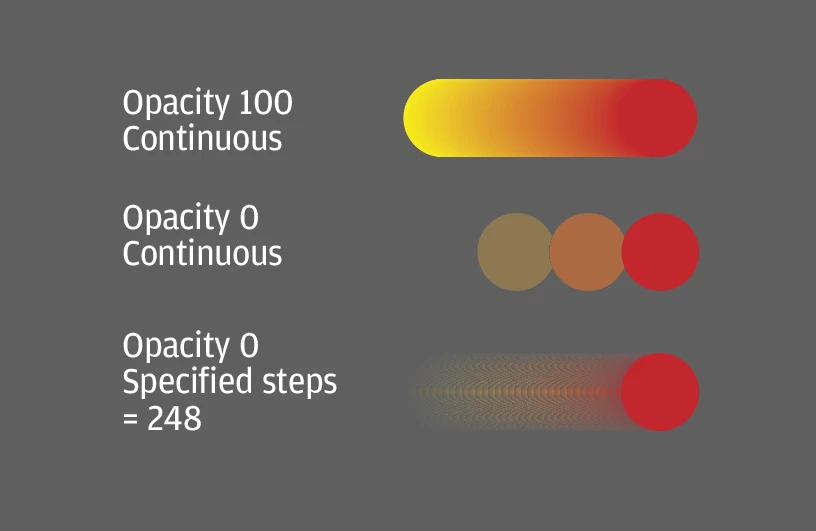
Is it possible to do this? I have two objects that I'm using to make a blend. When opacity of both is 100 percent all works as expected. When one of the objects has opacity less than 100 percent, the continuous blend breaks up into discrete steps, and increasing the number of steps does not result in a smooth blend. What am I missing?


This topic has been closed for replies.

4 replies

Inspiring
March 5, 2020

Try resetting your preferences. It should work in Illustrator.

1. Exit the application

2. Press and hold Alt+Control+Shift (Windows) or Option+Command+Shift (macOS) as you start Adobe Software. You may be prompted to delete the current settings. The new preferences files are created when you start the application.

Michael Bullo
Community Expert
Community Expert
March 5, 2020

I was able to recreate your problem and then fix it by turning off the GPU Performance option within the Performance tab of the Illustrator Preferences.

Inspiring
March 5, 2020

Thank you to all for your quick responses. I'm on a Mac using High Sierra and the latest update of Illustrator.


Looks like the problem was due to human error. When setting the opacity of one of the objects I selected fill opacity instead of object opacity in the Appearance panel. Just the end of a long day.


Seems to be working now, though if I run into this again I'll try disabling the GPU performance and will report back.


Mike_Gondek10189183
Community Expert
Community Expert
March 5, 2020

What OS & Illustrator version?

Could be a redraw issue of your graphics card/OS. Try exporting to a bitmap format like .png and opening in Photoshop as a test. You cna also just copy from illustrato r and paste in photoshop as a test.

Monika Gause
Community Expert
Community Expert
March 4, 2020

Can you please tell us the exact colors you used? Is maybe a spot color among it?