
Exit
  • Global community
    • Language:
      • Deutsch
      • English
      • Español
      • Français
      • Português
  • 日本語コミュニティ
  • 한국 커뮤니티
0

HELP with Clipping Mask!!

New Here ,
Jan 08, 2020 Jan 08, 2020

Hiya,


I am trying to put an image in to a simple triangle shape. I understood that all I needed to do was highlight only the two elements and go to Object>Clipping Mask>Make - now this appears to work in the layers panel with the two objects merged in to one group and the image disappears from my workspace; however, in the design the triangle just turns white.


Can anyone help me with this!? 


TIA
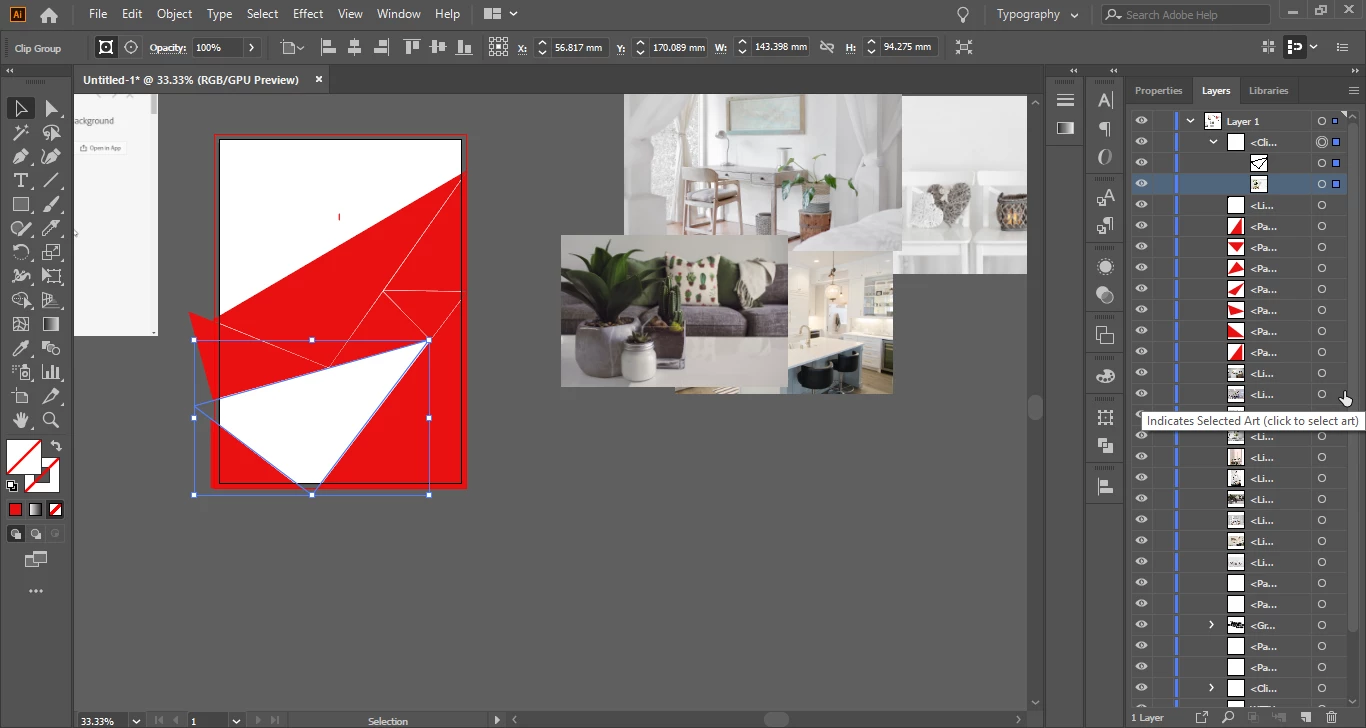
 

Illustrator_rWSWHYr7yD.png

TOPICS
Draw and design , Tools
747
Translate
Report
Community guidelines
Be kind and respectful, give credit to the original source of content, and search for duplicates before posting. Learn more
community guidelines

correct answers 1 Correct answer

Community Expert , Jan 08, 2020 Jan 08, 2020

Maybe the image is outside the clipping mask.

Try to select the image in the layers panel and move it into the visible area of the clipping mask.

Translate
Adobe
LEGEND ,
Jan 08, 2020 Jan 08, 2020

Can you show a Before screenshot? Is the photo you are trying to clip located inside the area described by the triangle? 

Screenshot 2020-01-08 11.59.03.pngScreenshot 2020-01-08 11.59.40.png

Translate
Report
Community guidelines
Be kind and respectful, give credit to the original source of content, and search for duplicates before posting. Learn more
community guidelines
Community Expert ,
Jan 08, 2020 Jan 08, 2020

Maybe the image is outside the clipping mask.

Try to select the image in the layers panel and move it into the visible area of the clipping mask.

Translate
Report
Community guidelines
Be kind and respectful, give credit to the original source of content, and search for duplicates before posting. Learn more
community guidelines
New Here ,
Jan 08, 2020 Jan 08, 2020

Hi Ton, 


I actually thought it might be that but don't know how to move the image once it's in there? Sorry I'm a novice! Any chance you could explain? 

Translate
Report
Community guidelines
Be kind and respectful, give credit to the original source of content, and search for duplicates before posting. Learn more
community guidelines
New Here ,
Jan 08, 2020 Jan 08, 2020

Nevermind! I've done it, thank you!!!


Translate
Report
Community guidelines
Be kind and respectful, give credit to the original source of content, and search for duplicates before posting. Learn more
community guidelines
Community Expert ,
Jan 08, 2020 Jan 08, 2020

Select the clipping mask and choose Object > Clipping Mask > Release.

Select the image and drag it below the object you want to use as mask.

Then select both and make the clipping mask again.

Translate
Report
Community guidelines
Be kind and respectful, give credit to the original source of content, and search for duplicates before posting. Learn more
community guidelines
Community Expert ,
Jan 08, 2020 Jan 08, 2020
LATEST

here is some info:

Screen Shot 2020-01-08 at 09.40.10.png

Translate
Report
Community guidelines
Be kind and respectful, give credit to the original source of content, and search for duplicates before posting. Learn more
community guidelines