

Swandive stream
Inspiring
November 21, 2022
Answered

How do I change the pasteboard color?

  • November 21, 2022
  • 2 replies
  • 1774 views

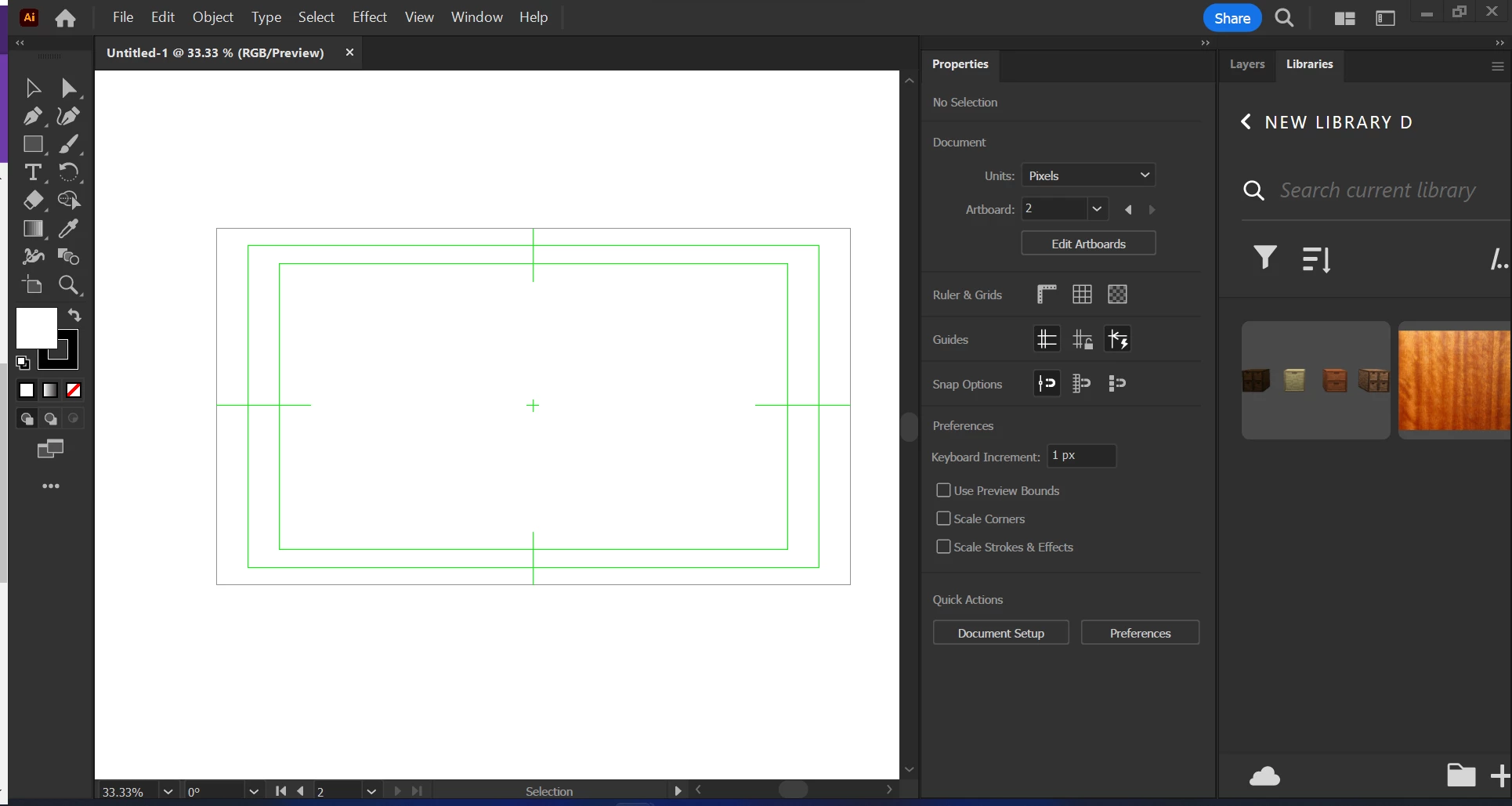
I managed this before but I've since reinstalled Illustrator and can't remember how I did it. I want to make the pasteboard colour default as different (light grey usually) from the canvas as white on white is hard to see. Like the pasteboard in Photoshop. How do I achieve this?

Thanks
 

P.S. I'm British but thought American spelling of colour would get more views so faster answer.

Correct answer Ton Frederiks

Looks like you have a Video preset used to create a new document which uses a large second artboard behind the smaller one.

Unless you want to make video or an animation in After Effects, create a new file based on Print or an Art & Illustration profile.

2 replies

Ton Frederiks
Community Expert
Ton FrederiksCommunity ExpertCorrect answer
Community Expert
November 21, 2022

Looks like you have a Video preset used to create a new document which uses a large second artboard behind the smaller one.

Unless you want to make video or an animation in After Effects, create a new file based on Print or an Art & Illustration profile.

tromboniator
Community Expert
Community Expert
November 21, 2022

Set your preference here.

I don't know about other Americans, but some of us Alaskans have no objection to British spelling!


Peter