


New Participant
June 23, 2021
Question

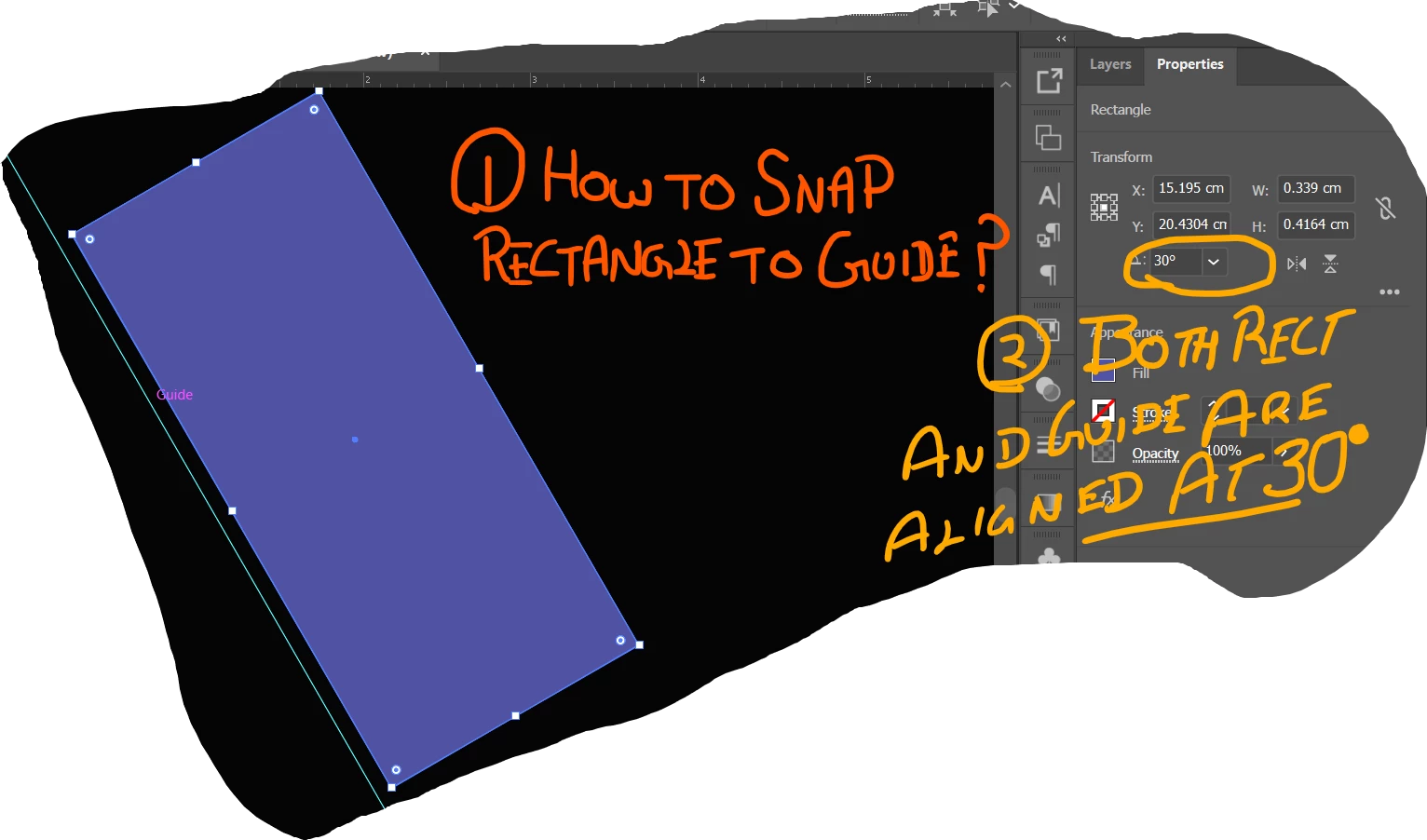
How to snap object to guide aligned at an angle

  • June 23, 2021
  • 1 reply
  • 1207 views

New to Illustrator and I am trying to snap my object to guide. Both of them are aligned at the same 30-degree angle.  Is this possible or there is another way to do it.

My expectation is the edge of the rectangle will align with the guide. Smart guides are on.


This topic has been closed for replies.

1 reply

Jacob Bugge
Adobe Expert
June 23, 2021

sumgup,


What happens if you deselect the rectangle, then ClickDrag it by the top left Anchor Point (or by somewhere on the edge) to snap to the guide?

sumgupAuthor
New Participant
June 24, 2021

Hi Jacob,


I tried what you suggested but still, it's not snapping.  I tried playing around with a horizontal guide and rectangle and snapping works. Looks like with angled guide snapping is not working.  Is this an expected behavior of Illustrator?
Have attached a file that demonstrates the issue.

Thanks for looking into the issue.


-Sumit

Jacob Bugge
Adobe Expert
June 24, 2021

sumgup,


Are Smart Guides on with suitable settings?


https://helpx.adobe.com/illustrator/using/rulers-grids-guides-crop-marks.html