
Participant
February 8, 2020
Answered

Issues aligning text/shapes in AI

  • February 8, 2020
  • 1 reply
  • 1541 views

First time poster, I tried finding my solution online and here in the forums to no avail. Figured I'd give the community a shot - and I appreciate any help here.

Below is a screengrab of the issue I'm having. The "B" in before is tight against the text box, whereas the "E" in were is not.  Whenever I go to center align something, it is aligned to the size of the bounding box around the text or shape - not the text/shape itself.
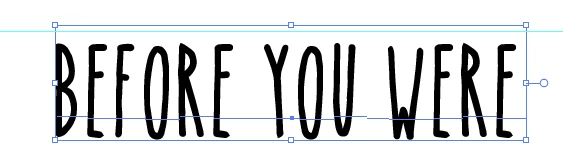
My question is what I'm doing wrong here or if there is an option to have the box tighter to the object within it?


[Moving from generic Start/Help forum to the specific Program forum... Mod]
[To find a forum for your program please start at https://community.adobe.com/]

This topic has been closed for replies.
Correct answer Monika Gause

You're not doing anything wrong. The font designer decides how the tracking of the font is.

If you want to align it, you can use this trick:

apply Effect > Path > Outline object to the text

Uncheck "Use preview bounds" in Preferences> General


Delte the effect from the text before saving a PDF.

1 reply

Monika Gause
Community Expert
Monika GauseCommunity ExpertCorrect answer
Community Expert
February 9, 2020

You're not doing anything wrong. The font designer decides how the tracking of the font is.

If you want to align it, you can use this trick:

apply Effect > Path > Outline object to the text

Uncheck "Use preview bounds" in Preferences> General


Delte the effect from the text before saving a PDF.