
May 8, 2017
Answered

Paths as symbols

  • May 8, 2017
  • 2 replies
  • 578 views

Hello!

Isometric vector icons are full of such things. Should be the way to go in Illustrator as this is done not otherwise.

But how on earth change them into smth else quickly?

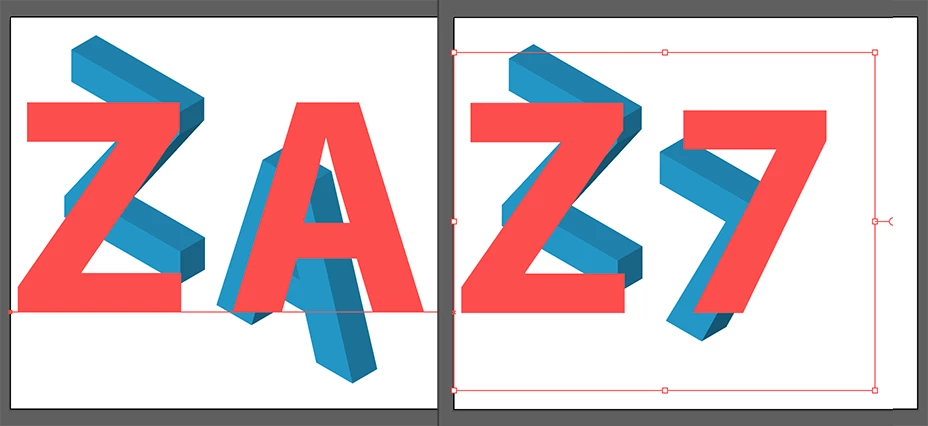
E.x. I would like to change A into 7 to have Z7 instead of ZA.
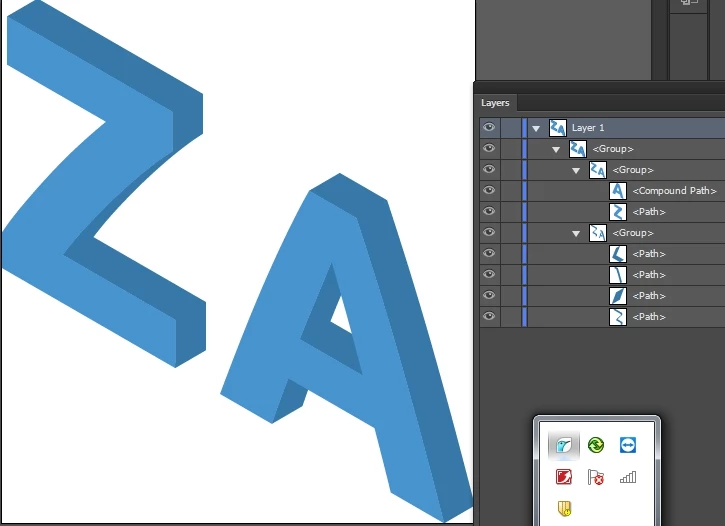
Trying to figure that out with googling, but guru advice would be very welcomed!
This topic has been closed for replies.
Correct answer Ton Frederiks

Type some text.

Apply Effect > 3D > Extrude & Bevel

Use the Position > Isometric Left

Because it is an Effect you can always change the text into something else.

2 replies

Ton Frederiks
Community Expert
Ton FrederiksCommunity ExpertCorrect answer
Community Expert
May 8, 2017

Type some text.

Apply Effect > 3D > Extrude & Bevel

Use the Position > Isometric Left

Because it is an Effect you can always change the text into something else.

May 8, 2017

It's clear now

Thank you!

Ton Frederiks
Community Expert
Community Expert
May 8, 2017

Good to hear that your problem is solved.

barbara_a7746676
Community Expert
Community Expert
May 8, 2017

To change the A to a 7, you would need to break the link to the symbol so that it is no longer a symbol. Or you could create a new symbol for the 7.

May 8, 2017

Thank you for the reply, Barbara!Could you please elaborate on how to break the link to the symbol?

the file is here, if it helps https://drive.google.com/open?id=0B5zZbLwOwIcRVUlzd3FFN0h0Znc

barbara_a7746676
Community Expert
Community Expert
May 8, 2017

You can break the link by selecting the symbol and clicking the chain icon at the bottom of the Symbols panel.

Symbols are very efficient to use if you don't need to change the contents of the symbol. If you do, Ton's suggestion is the better workflow.

You don't need to break the link to a symbol if you are changing it with a transformation such as resizing or rotating.

Hope this helps clarify.