
Answered
Populating SwatchGroup Colors over Panel
I'm trying to create a script with a dropdown for swatchgroup selection.
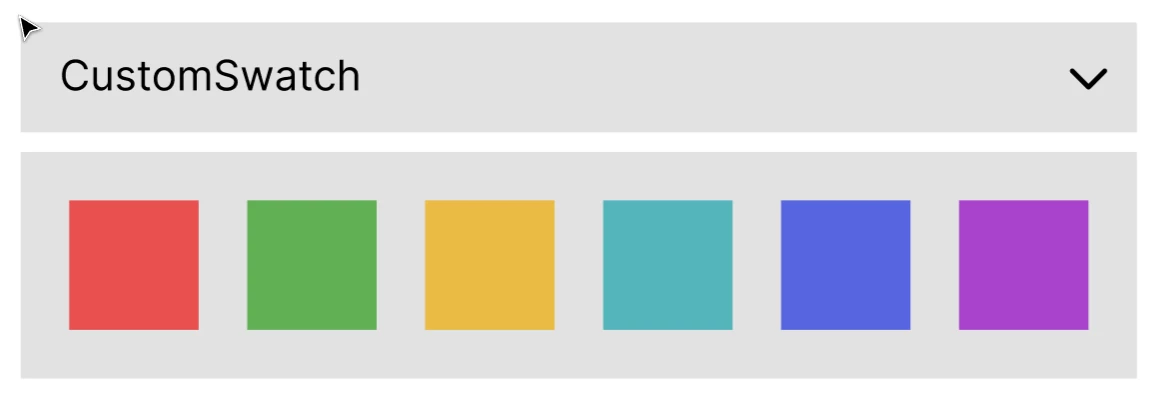
All included colors should be displayed over the panel as small icons below the dropdown once a swatch group is selected. This should get changed on each dropdown change.
Not sure if this is even possible. I'm quite new to javascript and not sure how to get color box (small color icons over the panel) to render on dropdown change.
With the help of AI, I have managed the layout but cannot make it work for rendering colors over the panel.
var colorGroups = [];
var parentFolderPath = null;
var fileName = null;

var doc = app.activeDocument;
var swatchGroups = doc.swatchGroups;

// Get color groups
for (var j = 0; j < swatchGroups.length; j++) {
    var currentGroup = swatchGroups[j];
    colorGroups.push(currentGroup.name);
}

// Create dialog window
var dialog = new Window("dialog", "Color Group Selection");
dialog.preferredSize.width = 380; // Set width to 380 pixels

// Add panel for export options
var exportPanel = dialog.add("panel", undefined, "Export Options");
exportPanel.alignment = "left";
exportPanel.preferredSize.width = 380; // Set width to 380 pixels

// Add dropdown for color group selection
var colorGroupDropdown = exportPanel.add("dropdownlist", undefined, colorGroups);
colorGroupDropdown.selection = 0;
colorGroupDropdown.size = [300, 20]; // Set size of the dropdown

// Add panel for color boxes
var colorBoxGroup = exportPanel.add("panel", undefined, "");
colorBoxGroup.orientation = "row";
colorBoxGroup.size = [300, 20]; // Set initial size of the color box group

// Add button to close the panel
var closeButton = exportPanel.add("button", undefined, "Close");
closeButton.size = [80, 25]; // Set size of the button

// Function to update color boxes based on the selected swatch group
function updateColorBoxes() {
    var selectedGroupIndex = colorGroupDropdown.selection.index;
    var selectedGroup = swatchGroups[selectedGroupIndex];
    var swatches = selectedGroup.getAllSwatches();
    var totalColors = swatches.length;

    // Clear existing color boxes
    while (colorBoxGroup.children.length > 0) {
        colorBoxGroup.remove(colorBoxGroup.children[0]);
    }

    // Calculate the width of each color box
    var totalWidth = 300; // Total width available for color boxes
    var numColors = swatches.length; // Total number of colors
    var colorBoxWidth = totalWidth / numColors; // Calculate the width of each color box

    // Create color boxes for each swatch
    for (var i = 0; i < swatches.length; i++) {
        var swatch = swatches[i];
        var colorBox = colorBoxGroup.add("panel", undefined, "");
        colorBox.size = [colorBoxWidth, 20]; // Set the width and height of the color box

        // Get the swatch color components and normalize them
        var red = swatch.color.red / 255;     // Normalize red component
        var green = swatch.color.green / 255; // Normalize green component
        var blue = swatch.color.blue / 255;   // Normalize blue component

        // Ensure the color values are within the range [0, 1]
        red = Math.max(0, Math.min(1, red));
        green = Math.max(0, Math.min(1, green));
        blue = Math.max(0, Math.min(1, blue));

        // Create a new ScriptUI RGBColor object
        var rgbColor = new RGBColor();
        rgbColor.red = red * 255;     // Scale to [0, 255]
        rgbColor.green = green * 255; // Scale to [0, 255]
        rgbColor.blue = blue * 255;   // Scale to [0, 255]

        // Set the background color of the color box
        colorBox.graphics.backgroundColor = rgbColor;
    }
}

// Add event listener to colorGroupDropdown
colorGroupDropdown.onChange = updateColorBoxes;

// Close button click event handler
closeButton.onClick = function () {
    dialog.close();
};

// Call the function initially to populate the color boxes
updateColorBoxes();

// Display dialog window
dialog.show();
 AdChoices