Participant
October 24, 2022
Answered

Removing white line

  • October 24, 2022
  • 1 reply
  • 369 views

Hey

When I draw a line or a path, a whithe line appears. Even with no fill og stroke, there is this white line. However when i doubble-click the line and enter the white mode (can´t remember what it is called) it doesn´t appear. The white line also appears when exported. But if I open up another document this doesn´t seem to be an issue, so i guess i must have selected something but i can´t figure out how to solve this. 

Any tips? 
This topic has been closed for replies.
Correct answer Mike_Gondek10189183

Since this is happening on one document, my guess is you might for example have a white stroke assigned to a layer in the appearance palette. Copy the element and paste into a new document to test what happens, this can help us troubleshoot.


Even better fix the existing document.


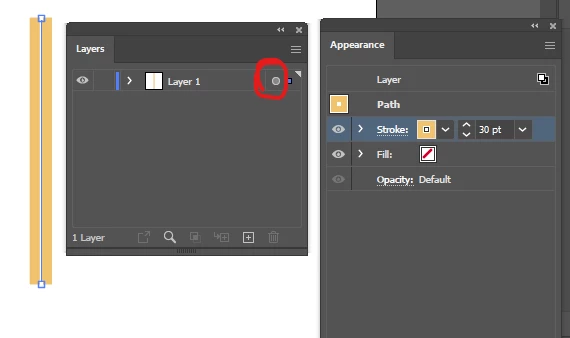
Select the element then click where I circled in red to select the layer.

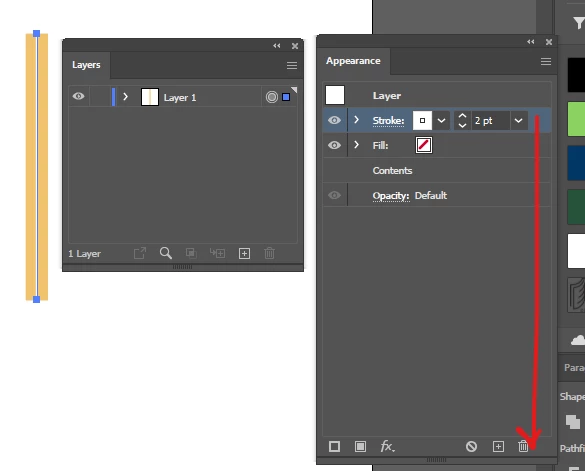
You are now showing the attributes assigned to the layer. Then delete the stroke in the trash


1 reply

Mike_Gondek10189183
Community Expert
Mike_Gondek10189183Community ExpertCorrect answer
Community Expert
October 24, 2022

Since this is happening on one document, my guess is you might for example have a white stroke assigned to a layer in the appearance palette. Copy the element and paste into a new document to test what happens, this can help us troubleshoot.


Even better fix the existing document.


Select the element then click where I circled in red to select the layer.

You are now showing the attributes assigned to the layer. Then delete the stroke in the trash


MarmeladeAuthor
Participant
October 24, 2022

Yes, that was very helpful thank you!!