
Participating Frequently
May 7, 2017
Question

Spiral "Shrinking" Text Script

  • May 7, 2017
  • 5 replies
  • 9839 views

Good day all,

Reaching out to experts to see if anyone can assist to update this script to work with new CC Illustrator.

This is an older script which i came across years ago,

ChangeSizesOfTextSelection.js

and made the 2 small changes suggested by Larry G. Schneider

if (pageItemType == "TextArtItem")

change to

if (pageItemType == "TextFrame")

and

theTextRange = pageObject.textRange();

change to

theTextRange = pageObject.textRange;

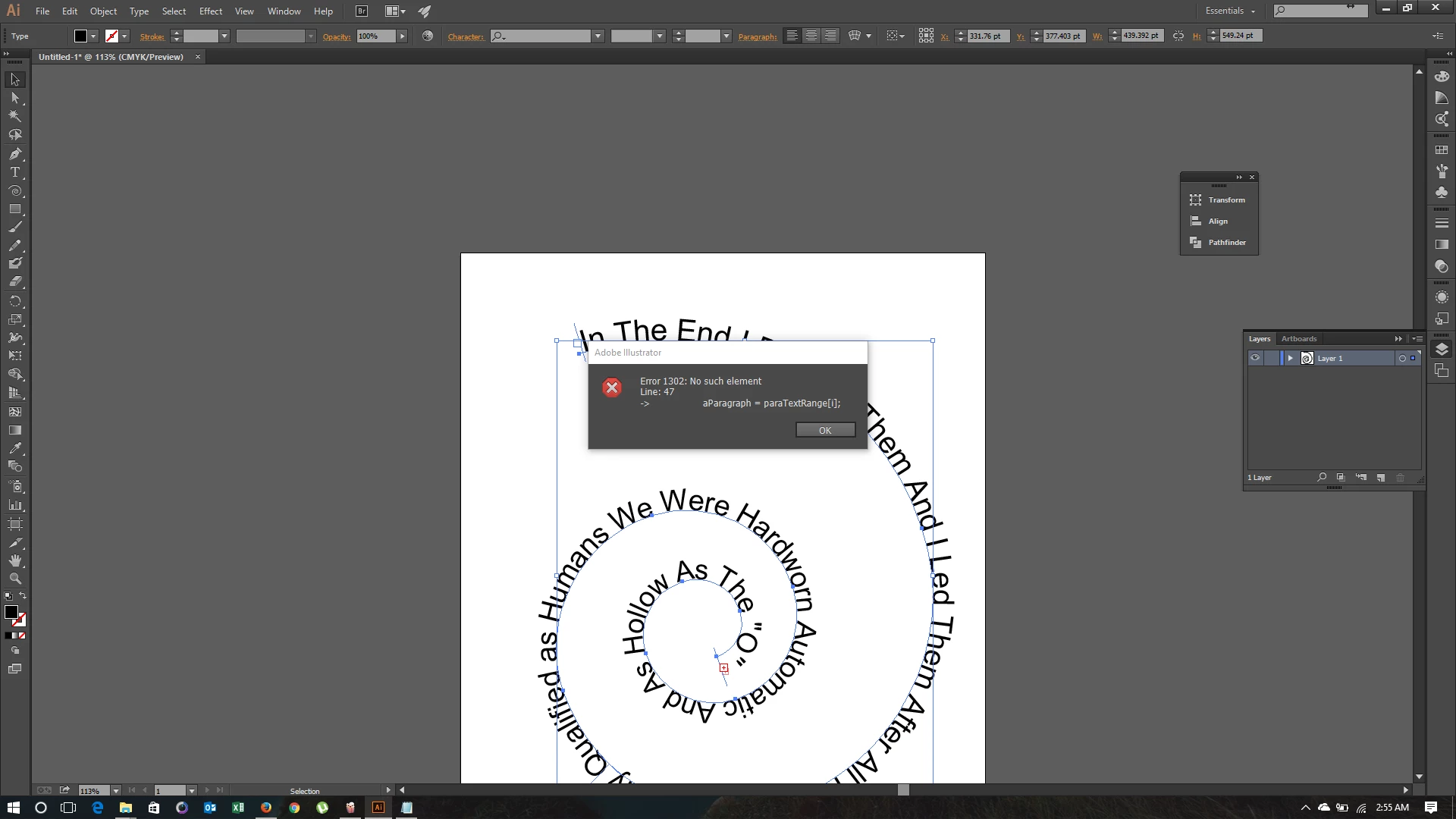
Yet this will not function properly on CC2014 as I get an error every time i try to run this.

I love the effects of this and seeing if someone can help update or fix so this works on newer versions. Below is link to original post.

THANKS MUCH in advance for anyone that can help.
    This topic has been closed for replies.

    5 replies

    pixxxelschubser
    Community Expert
    Community Expert
    April 2, 2021

    Do not copy unnecessary parts (the numbers at the beginning of each line of code)


    Try this:


    // CharSizeChangeFromFirst2LastInProportion.jsx
    
    // https://community.adobe.com/t5/illustrator/illustrator-spiral-shrinking-growin-text-scaling-down-up-on-spiral-path/m-p/10998741?page=1#M170469
    // http://forums.adobe.com/thread/1414597?tstart=0
    
    // select a text frame or pathtext before running this script 
    // test this script at first with only a few characters!
    // The more letters, the longer it takes
    
    // If the screen seems to be frozen - please wait for a while
    
    // regards pixxxelschubser  25/Febr./2014
    
    var aDoc = app.activeDocument;
    if (aDoc.selection.length > 0) {
        if (aDoc.selection.length < 2 && aDoc.selection[0].typename == "TextFrame") {
            var aTFrame = aDoc.selection[0];
            var theChars = aTFrame.characters;
            var charLength = theChars.length;
            var startSize = prompt("size of first character", 25,"start size");
            var endSize = prompt("size of last character", 5,"end size");
            var step = (startSize-endSize)/(charLength-1);
            for (i = 0; i < charLength; i++) {
                theChars[i].size = (startSize - i*step).toFixed (2);
                redraw();
                }
            } else {alert("Please select only one text frame")}
        } else {alert("No selection")}


    If that works for you

    have fun

    😉

    allysondohan
    Participant
    April 2, 2021

    Yes! That worked beautifully! Thanks for the quick reply and helping out an inexperienced non-scripter! 🙂

    kphotopage
    Legend
    May 10, 2017

    https://forums.adobe.com/thread/1414597?tstart=0

    razo.ad1985 reply #2

    “i borrowed second image from online as looked similar to what i am trying to achieve....”

    I did that Illustrator file over 10 years ago and posted on another forum.

    I just tested my script. Still works. (YIPPEE)

    • macOS Sierra (version 10.12.4)

    • Illustrator CC 2017 (version 21.1.0)

    As I recall from long ago, I modified a script that came shipped with maybe CS2.

    I made a new script, SizeTextOneDirection.js

    I am NOT a scripting person!

    I opened the script using Text Edit app.

    Here is the text for SizeTextOneDirection.js

    selection = app.activeDocument.selection;

    for(i=0, scale=100.0; i< selection.characters.length; i++, scale *= 0.99) {

    selection.characters.characterAttributes.horizontalScale = scale;

    selection.characters.characterAttributes.verticalScale = scale; }.

    Here is my sample file created with Illustrator CC 2017 (version 21.1.0)

    Set your text.

    With the Text Tool, select all your text, run the script SizeTextOneDirection.js

    Copy your text, Paste on a path. (Text on a Path)

    Hope that helps.

    K

    Participant
    February 19, 2020

    Thank you, but is this the full code?
    I think no. Does't works for me.
    Please write the full text.

    Participant
    January 12, 2021
    1. // CharSizeChangeFromFirst2LastInProportion.jsx 
    2.  
    3. // http://forums.adobe.com/thread/1414597?tstart=0 
    4.  
    5. // select a text frame or pathtext before running this script  
    6. // test this script at first with only a few characters! 
    7. // The more letters, the longer it takes 
    8.  
    9. // If the screen seems to be frozen - please wait for a while 
    10.  
    11. // regards pixxxelschubser  25/Febr./2014 
    12.  
    13. var aDoc = app.activeDocument; 
    14. if (aDoc.selection.length > 0) { 
    15.     if (aDoc.selection.length < 2 && aDoc.selection[0].typename == "TextFrame") { 
    16.         var aTFrame = aDoc.selection[0]; 
    17.         var theChars = aTFrame.characters; 
    18.         var charLength = theChars.length; 
    19.         var startSize = prompt("size of first character"25,"start size"); 
    20.         var endSize = prompt("size of last character"5,"end size"); 
    21.         var step = (startSize-endSize)/(charLength-1); 
    22.         for (i = 0; i < charLength; i++) { 
    23.             theChars[i].size = (startSize - i*step).toFixed (2); 
    24.             redraw(); 
    25.             } 
    26.         } else {alert("Please select only one text frame")} 
    27.     } else {alert("No selection")}
    Om Nath Jha
    Legend
    May 9, 2017

    Hi razo.ad1985,

    I believe the suggestions above are great and it should get your desired output. In case you need further assistance, I would suggest you to check Illustrator Scripting​ forum as well for dedicated Scripting support.

    Regards,

    Om

    Monika Gause
    Community Expert
    Community Expert
    May 9, 2017

    John Wundes' TextTweaker script can do that and many other things: wundes.com

    barbara_a7746676
    Community Expert
    Community Expert
    May 7, 2017

    I remember that script from way back. Try this:

    1. // CharSizeChangeFromFirst2LastInProportion.jsx 
    2.  
    3. // http://forums.adobe.com/thread/1414597?tstart=0 
    4.  
    5. // select a text frame or pathtext before running this script  
    6. // test this script at first with only a few characters! 
    7. // The more letters, the longer it takes 
    8.  
    9. // If the screen seems to be frozen - please wait for a while 
    10.  
    11. // regards pixxxelschubser  25/Febr./2014 
    12.  
    13. var aDoc = app.activeDocument; 
    14. if (aDoc.selection.length > 0) { 
    15.     if (aDoc.selection.length < 2 && aDoc.selection[0].typename == "TextFrame") { 
    16.         var aTFrame = aDoc.selection[0]; 
    17.         var theChars = aTFrame.characters; 
    18.         var charLength = theChars.length; 
    19.         var startSize = prompt("size of first character", 25,"start size"); 
    20.         var endSize = prompt("size of last character", 5,"end size"); 
    21.         var step = (startSize-endSize)/(charLength-1); 
    22.         for (i = 0; i < charLength; i++) { 
    23.             theChars.size = (startSize - i*step).toFixed (2); 
    24.             redraw(); 
    25.             } 
    26.         } else {alert("Please select only one text frame")} 
    27.     } else {alert("No selection")}