


IPad Illustrator won’t save

Copy link to clipboard
Copied
I started using Illustrator IPad version and while I'm working it won't save my work progress. I keep making changes to my illustration but changes are not being saved.
Is this a major bug and can this be solved?


 32
Replies
32
32
Replies
32


Copy link to clipboard
Copied
Hi there,
Sorry to hear about this. Is this happening with a specific file and other files are saving fine?
Thanks,
Om

Copy link to clipboard
Copied
Hi,
I am having the same issue. It seems to be just one file for me. I duplicated the file and it still won't save any new work. I've come to terms with starting over but I'm afraid that this might happen in the future again. Everything is synced and working with all of my other files.
Thanks for any insight to the issue.
Sarah

Copy link to clipboard
Copied
I too am having issues with saving. For me, this error has occurred when creating an Illustrator document on the Mac containing a jpeg image on a layer for tracing and then opening the cloud document on the iPad. Subsequent work on the iPad will not reliably save. To be clear, this is not an issue of slight latency in the display of updates or a minor sync error. An hour of work on the iPad can easily be lost. -- Unrecoverable on the iPad or desktop.
My guess is that Adobe's testing might have focused on workflows where new documents are begun on the iPad rather than on the desktop. It is hard to imagine how major issues with saving documents make their way past internal beta testing.
While I appreciate the simplicity of the iPad app's design with regard to documents (everything is intended to save automatically to the cloud), might I suggest Adobe add a manual save/save as from within the document view? The ability to manually save to the device or export a standard ".ai" file would not be without utility even if the auto save/cloud features worked reliably.

Copy link to clipboard
Copied
I'm also experiencing the same issue. Just started using the app today. imported a PDF and started to create layers and new paths. Backed out of the document but only a few of my newly created items were there. Went back in and and worked some more, then did not want to loose what I did, so I clicked on the "help" button in the top right corner to see if there was a save frequency or something I was doing wrong. I tapped "take the tour" and it exited out from the file and went to the hands-on turorials screen. When I tapped "your work" then opend the file back up, (the file preview did not have my recent edits) but when it opened, for a split second, my edits were there but then they quickly disappeared. How are we supposed to save our work?

Copy link to clipboard
Copied
Yep! Exacly the same issue as Alan16B8 here!

Copy link to clipboard
Copied
Still have this problem! Still!
Can't save anything in any format
Copy link to clipboard
Copied
Still have this issue. It's now February 2022

Copy link to clipboard
Copied
Same here, nothing i can do. It seems to be fail in sync to CC and export file in any format.


Copy link to clipboard
Copied
This is happening for me if I start the file on my desktop and then continue on the iPad. If I start on the IPad, files save no problem. Unfortunately the first time this happened I lost a lot of work.

Copy link to clipboard
Copied
Same here...sometimes it creates a copy, attaching a number to the name. I lost hours of work and thinking of returning the iPad

Copy link to clipboard
Copied
No answer after two years, the problem still exists. Thats under all critic!

Copy link to clipboard
Copied
I'm having the same exact problem too!

Copy link to clipboard
Copied
2025 STILL HAPPENING!!


Copy link to clipboard
Copied
Hello @RastaMind,
Could you confirm the version of the OS/Illustrator installed, your iPad model, if Illustrator behaves this way with all files, and a small screen recording/screenshots of the problem, so we can better assist you?
Looking forward to hearing from you.
Anubhav

Copy link to clipboard
Copied
Hello Adobe team.. why has this question not been answered yet when so many people keep having the same issue? I don't want to pay for something that doesn't work.

Copy link to clipboard
Copied
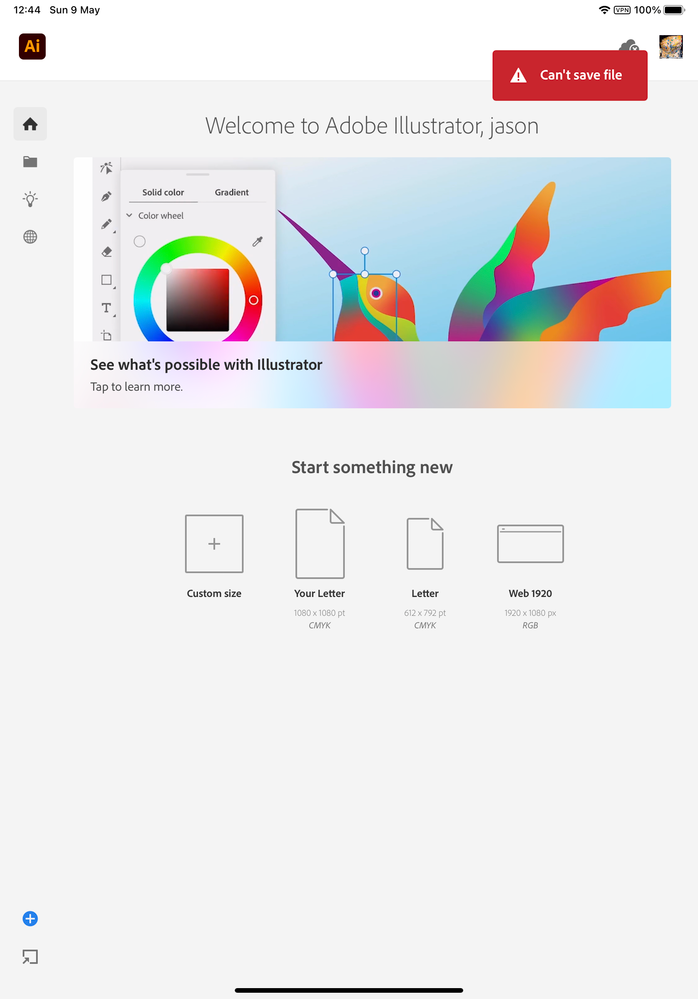
I am having the same issue, 2024 and still not fixed. In my case everytime I leave the file I get a red alert saying "can't save file." This happens for every file which makes the app unusable


Copy link to clipboard
Copied
Is there sufficient space left in your account?
Copy link to clipboard
Copied
Hello @Bruno3775605716n3,
We understand that encountering technical issues can be frustrating. Would you mind checking if you have sufficient space available in your Cloud Storage (https://adobe.ly/4dxNl0h) as Monika suggested to check if it helps? If not, kindly share your Adobe ID via DM so I can check it on my end.
Looking forward to hearing from you.
Thanks,
Anubhav
Copy link to clipboard
Copied
I'm also having this issue. Getting really frustrating. The file was originally created on the MacOS version of Illustrator, saved online and I can open/edit it on the iPad, but none of the changes save.

Copy link to clipboard
Copied
This just happened to me, too.

Copy link to clipboard
Copied
I'm having the same issue! I did a ton of work, but it saved a previous version when I opened it today. I can't seem to recover all the work I did! 😞

Copy link to clipboard
Copied
I experience this intermittently. This has been going on since the app was released. Multiple users both in this forum and the app store have experienced this. Is the cloud sync just not working properly?

Copy link to clipboard
Copied
The only solution I've figured out is to back out every few mins or so to let the doc auto save. It's annoying, but not as annoying as losing hours of work TWICE now 😓

Copy link to clipboard
Copied
this is very frustrating, I just lost my work twice!
please solve this issue, otherwise this app makes no sense at all.

-
- 1
- 2

Get ready! An upgraded Adobe Community experience is coming in January.
Learn more
 AdChoices