
Exit
  • Global community
    • Language:
      • Deutsch
      • English
      • Español
      • Français
      • Português
  • 日本語コミュニティ
  • 한국 커뮤니티
1

Toggling between Preview and Normal screen modes in InCopy (not InDesign)?

New Here ,
Jun 26, 2023 Jun 26, 2023

I'm an editor using InCopy 17.3 for Mac, and I need a keyboard shortcut for toggling between the "Preview" and "Normal" screen modes in Layout view.


I know it can be done in InDesign (either by typing "w" or with a tool) but I am not finding a way to do it in InCopy. I also can't find a way to create a keyboard macro that could do it. I have found a macro function in InCopy for text expansion, but not for menu navigation.


Do you have any ideas or advice for me? I use the View menu to toggle to Preview all day long and would love a quicker method. 


Thank you for any advice you may have for me about InCopy!
328
Translate
Report
Community guidelines
Be kind and respectful, give credit to the original source of content, and search for duplicates before posting. Learn more
community guidelines

correct answers 1 Correct answer

Community Expert , Jun 26, 2023 Jun 26, 2023

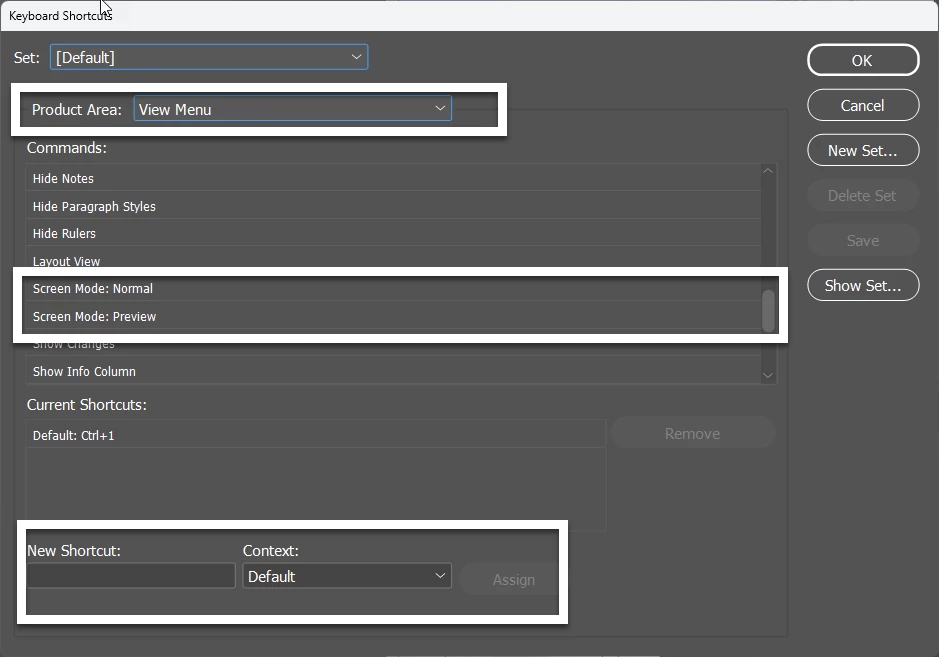
You can absolutely create a KBSC:

2023-06-26_15-28-13.png


Translate
Community Expert ,
Jun 26, 2023 Jun 26, 2023

You can absolutely create a KBSC:

2023-06-26_15-28-13.png


Translate
Report
Community guidelines
Be kind and respectful, give credit to the original source of content, and search for duplicates before posting. Learn more
community guidelines
New Here ,
Jun 26, 2023 Jun 26, 2023
LATEST

OMG, revolutionary, thank you!!!

Translate
Report
Community guidelines
Be kind and respectful, give credit to the original source of content, and search for duplicates before posting. Learn more
community guidelines